

 Tweet
Tweet
could be memory chips going bad.
-
Ray
"If you lead your life the right way, the karma will take care of itself. The dreams will come to you." - Randy Paush, Carnegie Mellon University -
Get the program whocrashed.
about 2/3 down the page...
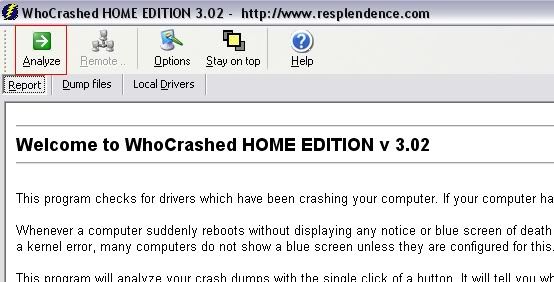
Run the program by opening it up and clicking analyze
After it analyzes your system, it will give you a minidump...and will show you the last several crashes and what caused them.
you will be able to copy and paste them to here if you want someone to see what's causing your problem.Colt: the original point and click interface.Comment
-
so here is what the eventvwr said:
Event Type: Error
Event Source: DCOM
Event Category: None
Event ID: 10016
Date: 1/16/2012
Time: 7 40 PM
40 PM
User: NT AUTHORITY\LOCAL SERVICE
Computer: SKYNET-T-101
Description:
The machine-default permission settings do not grant Local Activation permission for the COM Server application with CLSID
{BC866CF2-5486-41F7-B46B-9AA49CF3EBB1}
to the user NT AUTHORITY\LOCAL SERVICE SID (S-1-5-19). This security permission can be modified using the Component Services administrative tool.
For more information, see Help and Support Center at http://go.microsoft.com/fwlink/events.asp.Originally posted by MelvinoelGreat**Comment
-
so, here is what whocrashed told me:
I downloaded and installed processor drivers. still no dice.On Tue 1/17/2012 3 35 AM GMT your computer crashed
crash dump file: C:\WINDOWS\Minidump\Mini011612-03.dmp
This was probably caused by the following module: amdk8.sys (AmdK8+0x3552)
Bugcheck code: 0x1000000A (0x0, 0xFF, 0x0, 0xFFFFFFFF806E5EA0)
Error: CUSTOM_ERROR
file path: C:\WINDOWS\system32\drivers\amdk8.sys
product: AMD Processor Driver
company: Advanced Micro Devices
description: AMD Processor Driver
A third party driver was identified as the probable root cause of this system error. It is suggested you look for an update for the following driver: amdk8.sys (AMD Processor Driver, Advanced Micro Devices).
Google query: amdk8.sys Advanced Micro Devices CUSTOM_ERROROriginally posted by MelvinoelGreat**Comment
-
where my nerds @?Originally posted by MelvinoelGreat**Comment
-
I used to get that exact same screen. It was an easy fix.
I bought a new computer.
Sorry.. I'm no help :/Comment
-
it could be a verity of system drivers at fault but the error is occuring in that driver.
i would download all of the most recent drivers from your motherboard manufacturer. reinstall inparicular the chipset driver and other board device drivers.
if that still doesnt work, the next best step would be an OS reinstall. i only say this because the time you could possibly invest trying to resolve this issue on the current OS deployment might be far more time then you would spend doing a backup and reinstall.
"It is to secure our rights that we resort to government at all." -Thomas JeffersonComment
-
^
agreed
if after the OS re-install it still happens then you have a hardware issue
most likely either memory or motherboard.Last edited by Montu; 01-20-2012, 12:28 PM.K.F.K|Μολὼν λαβέComment
-
Copy your error, type it into google, you will see others who had the same issue before you."If Jesus had a gun he would be alive today"-Homer SimpsonComment
-
Let me guess, Nvidia video card? This is a common issue related to your drivers. You need to completely remove the drivers (clean install option when installing the latest from Nvidia) before you update them. Just do a Google search for that error (IRQL_NOT_LESS_OR_EQUAL) and you will get a ton of hits. In any case this is a driver issue, not hardware.Oppressors can tyrannize only when they achieve a standing army, an enslaved press, and a disarmed populace. -- James Madison
The Constitution shall never be construed to authorize Congress to prevent the people of the United States, who are peaceable citizens, from keeping their own arms. -- Samuel Adams, Debates and Proceedings in the Convention of the Commonwealth of Massachusetts, 86-87 (Pearce and Hale, eds., Boston, 1850)Comment
-
Sigh.... this is what I figured it would come down to. I've downloaded every driver i can possibly conceive and gotten nowhere.
Now the question is: should I break down and get windows 7, or just reload XP. I'm thinking my 2 gigs of ram will be a bit slim for 7, but I always intended to get moar ram, just never got around to it. I think my MB will support 8 gigs.Originally posted by MelvinoelGreat**Comment
-
check jdays sugestion as well before you throw in the towel.
RAM is pretty cheap these days, i would look into 4-6gb and windows 7.
"It is to secure our rights that we resort to government at all." -Thomas JeffersonComment
-
Try removing all the memory and add it back in one stick at a time until you get the bsod. If you get the bsod on the first stick put it aside and try again with the others. I used to get issues like this when memory chips were going bad, usually 1 stick will go bad and you just have to find it and replace.Comment
-
I finally broke down and went to reload the operating system and started getting BSOD's every time I tried to install the OS. I finally threw my hands up and called my buddy the computer consultant. He opened it up and cleaned the crap out of it's innards. I didn't realize how filthy it was. He ended up having to pull the heat sink and clean it under a faucet. Runs perfect now. I know this was suggested early on, but apparently my version of clean was not up to par. Though, not having ever looked at it closely in the light, I had no idea my processor was caked in dust adobe. Oh well, lesson learned. I'm just glad it was shutting down instead of murdering my hardware. Originally posted by MelvinoelGreat**
Comment





There are currently 10392 users online. 153 members and 10239 guests.
Most users ever online was 239,041 at 10:39 PM on 02-14-2026.


Comment