Unconfigured Ad Widget

Collapse

lets talk 3D Printers

Collapse
X
 
  • Time
  • Show
Clear All
new posts
  • Jeepers
    Veteran Member
    • Sep 2009
    • 3415

    lets talk 3D Printers

    so taking the dive into 3D Printer, looking at a ALUNAR Reprap Prusa i3 Kit and looking for folks that are already printing advice on this kit as to if its worth the $ as a starter kit?

    do not really want to hunt down all the parts to piece my own kit together so at sub 300 the price looks right to me , any add ons/upgrades i should look at right off the bat ?

    any software advice on slicers and or editing tools ?
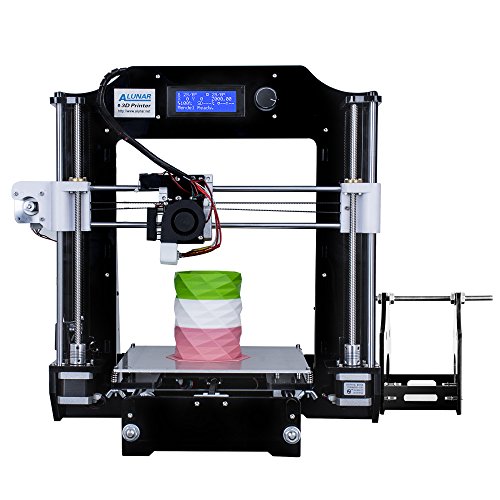


    Brand: ALUNAR
    Model: M508
    Structure: Acrylic frame type
    Print nozzle: 1
    Printing technology:FDM
    Print size: 200x200x180 mm(7.87x7.87x7.09 inch)
    Supports off-line print: SD Card
    Display: LCD Display
    Z axis rotational speed (maximum): 200mm/min
    XY axis positioning accuracy: 0.012mm
    Z axis positioning accuracy:0.004mm
    Print speed: 40-120mm/s
    Standard extrusion nozzle: 0.3mm
    Best Extrusion head operating temperature (maximum): about 240
    Best Hot bed temperature (maximum): about 100
    Hot Bed Material: MK III Aluminum plate
    Printing materials: PLA,ABS
    Recommended print material: PLA
    Printing materials diameter: 1.75mm
    Support file format: STL, G-code
    Operating system: XP, Win7, Mac OS, Linux
    Recommended Print Software: Cura / Repetier-Host
    Power supply:Input: AC 110V/220V 50/60Hz
    Output: DC 12V
    Originally posted by Ronald Reagan
    Before I refuse to take your questions, I have an opening statement.
  • #2
    brassburnz
    Veteran Member
    • Nov 2006
    • 3553

    I have a MakerBot Replicator II, a Replicator Mini, a clone of a MakerBot dual-extruder, and a Cube3. Cube3 is crap. Stay away. The other three are pretty good when they are working. All are down right not for various reasons. Just don't have time to mess with them right now.

    Looking at the pictures of the Reprap, the heating element, extruder, and fan system are similar to the full size MakerBot. I can't really get a good look at the stepper-motor that feeds the filament. Everything is open so getting at everything for maintenance looks easy enough.

    I have a heated build plate on the makerbot clone. I like that feature and wish all of my printers had that. The Cube3 uses glue on the build plate which is sort of interesting. Setting up the build plate is very important. Whatever you're building needs to start with a solid connection to the build plate.

    3D printers are really slow. You'll need a place to let it run for hours unattended, even though the instructions will say not to. I've never run mine overnight although I know people that do. There is always the potential for a fire or fumes.

    A remote camera and a smoke detector/CO detector would be a good idea if you were to run it overnight. The MakerBot Mini has wifi camera built in, but I never connected it to the wifi.

    Your filament needs to be protected from humidity. I didn't know this at first and I think it may have been the reason for some problems early on. Now I just keep them in their original plastic bags with the desiccant packs.

    One of our high schools has an industrial 3D printer. 30K plus. The build plates are consumable and cost 12 bucks a pop. You can run them more than once depending upon the placement of the build pieces to save money. I have access to time on that machine if I ask nicely. They also have about 5 Makerbot Replicator II's, but with the industrial machine, they hardly get used any more.

    I have a friend that makes some really crazy stuff with his DIY machine, but he works from home and has time to monitor his builds.

    The object in you sample picture would take about 6 hours on my Makerbot Replicator II. Maybe longer. I'm assuming it is hollow with a matrix support.

    I don't have any experience with slicers or scanners.
    NRA Life Member
    CRPA Life Member

    Comment

    • #3
      Jeepers
      Veteran Member
      • Sep 2009
      • 3415

      thanks for the tips ... so you just print ready made models and dont do any editing ?
      Originally posted by Ronald Reagan
      Before I refuse to take your questions, I have an opening statement.

      Comment

      • #4
        sonofeugene
        Veteran Member
        • Oct 2013
        • 4356

        The cheap ones are toys.

        'Most important question is what do you want to do with it? I design things on CAD (Solidworks) and use the services of professional 3D printing services. One of the companies I work for has a printer pretty much like the one you're considering. It's almost never used and when it is used, the parts it makes are pretty much useless except to look at. And even then, the resolution is low and the parts are usually warped in some way.

        Good machines are not cheap. That's why most companies, unless they're well established, send their work out to be printed. You get much, much higher quality and a far, far greater selection of materials, colors, and processes to choose from.
        Let us not pray to be sheltered from dangers but to be fearless when facing them. - Rabindranath Tagore

        A mind all logic is like a knife all blade. It makes the hand bleed that uses it. - Rabindranath Tagore

        Talent hits a target no one else can hit. Genius hits a target no one else can see. - Arthur Schopenhaur

        Comment

        • #5
          Jeepers
          Veteran Member
          • Sep 2009
          • 3415

          Originally posted by sonofeugene
          The cheap ones are toys.

          'Most important question is what do you want to do with it? I design things on CAD (Solidworks) and use the services of professional 3D printing services. One of the companies I work for has a printer pretty much like the one you're considering. It's almost never used and when it is used, the parts it makes are pretty much useless except to look at. And even then, the resolution is low and the parts are usually warped in some way.

          Good machines are not cheap. That's why most companies, unless they're well established, send their work out to be printed. You get much, much higher quality and a far, far greater selection of materials, colors, and processes to choose from.
          this is just a hobby thing, plan on using it to make prototypes and use the prototypes as plugs for simple diy molds or as diy investment castings , not planing on anything coming out of it to be used by a "end user" .. agree on these not producing "parts" but can be used to show proof of concept ...
          Originally posted by Ronald Reagan
          Before I refuse to take your questions, I have an opening statement.

          Comment

          • #6
            hey8you
            Member
            • Jun 2008
            • 190

            Check out www.thingiverse.com for things to print. I used that site to print upgrades for my Robo3D printer. The stock spool holder sucks so I printed a new one. With the addition of skateboard bearings and bolts my spool holder moves smoothly now.

            Comment

            • #7
              brassburnz
              Veteran Member
              • Nov 2006
              • 3553

              Originally posted by Jeepers
              thanks for the tips ... so you just print ready made models and dont do any editing ?
              I design a couple of little things with Autodesk. Nothing too complicated.
              NRA Life Member
              CRPA Life Member

              Comment

              • #8
                sonofeugene
                Veteran Member
                • Oct 2013
                • 4356

                Originally posted by Jeepers
                this is just a hobby thing, plan on using it to make prototypes and use the prototypes as plugs for simple diy molds or as diy investment castings , not planing on anything coming out of it to be used by a "end user" .. agree on these not producing "parts" but can be used to show proof of concept ...
                The parts you make from printed molds will have the same crappy resolution that the printed mold has. Before you buy a printer, have a mold made from a machine with the same resolution and make a part and see what you think.
                Let us not pray to be sheltered from dangers but to be fearless when facing them. - Rabindranath Tagore

                A mind all logic is like a knife all blade. It makes the hand bleed that uses it. - Rabindranath Tagore

                Talent hits a target no one else can hit. Genius hits a target no one else can see. - Arthur Schopenhaur

                Comment

                • #9
                  Gromann
                  Member
                  • Aug 2010
                  • 173

                  I'd also advise you check out the monoprice printers. They're actually very well built and give a fairly nice resolution.

                  Comment

                  • #10
                    GrizFyrFyter
                    Senior Member
                    • Jul 2012
                    • 671

                    Originally posted by Jeepers
                    so taking the dive into 3D Printer, looking at a ALUNAR Reprap Prusa i3 Kit and looking for folks that are already printing advice on this kit as to if its worth the $ as a starter kit?

                    do not really want to hunt down all the parts to piece my own kit together so at sub 300 the price looks right to me , any add ons/upgrades i should look at right off the bat ?

                    any software advice on slicers and or editing tools ?


                    Last edited by GrizFyrFyter; 03-27-2017, 8:17 AM.

                    Comment

                    • #11
                      GrizFyrFyter
                      Senior Member
                      • Jul 2012
                      • 671

                      Last thing to add, a Raspberry Pi with the OctoPrint software package is worth the time and $. Has built in webcam software, I just use a $20 webcam for remote monitoring and time-lapse videos.

                      Comment

                      • #12
                        billofrights
                        CGN/CGSSA Contributor
                        CGN Contributor
                        • Oct 2012
                        • 2343

                        For that price point, I'd recommend the Monoprice Maker Select. It's a little more, closer to $350, but their support is fantastic and it prints very well right out of the box. I've had one since November and it's been solid. I've also ordered a Prusa i3 MK2, still have a few weeks on the backorder.

                        Monoprice is also coming out with a clone of the Wanhao D7 this quarter, for $399. That's crazy for a resin printer that will do 50 micron resolution.

                        One thing you haven't mentioned yet, OP, what do you want to use it for? That might help to know.

                        Comment

                        • #13
                          GrizFyrFyter
                          Senior Member
                          • Jul 2012
                          • 671

                          Originally posted by billofrights
                          For that price point, I'd recommend the Monoprice Maker Select. It's a little more, closer to $350, but their support is fantastic and it prints very well right out of the box. I've had one since November and it's been solid. I've also ordered a Prusa i3 MK2, still have a few weeks on the backorder.

                          Monoprice is also coming out with a clone of the Wanhao D7 this quarter, for $399. That's crazy for a resin printer that will do 50 micron resolution.

                          One thing you haven't mentioned yet, OP, what do you want to use it for? That might help to know.
                          Hopefully the cost of resin comes down.
                          Last edited by GrizFyrFyter; 04-20-2017, 10:26 AM.

                          Comment

                          • #14
                            billofrights
                            CGN/CGSSA Contributor
                            CGN Contributor
                            • Oct 2012
                            • 2343

                            Originally posted by GrizFyrFyter
                            For the cost of resin, around $100/litre, 50micron resolution is a waste of time. You can build an sla printer out of a projector for $800 and $650 of that is just the projector.
                            I'd love a build guide, I get access to retired projectors all the time...

                            Comment

                            • #15
                              GrizFyrFyter
                              Senior Member
                              • Jul 2012
                              • 671

                              Originally posted by billofrights
                              I'd love a build guide, I get access to retired projectors all the time...


                              That projector is suggested because it works without any modification. There are a bunch that work with mods.

                              The site buildyourownsla.com has a few guides, even for laser sla printers.
                              Last edited by GrizFyrFyter; 03-27-2017, 12:47 PM.

                              Comment

                              Working...
                              UA-8071174-1