Unconfigured Ad Widget

Collapse

Comp keeps shutting off

Collapse
X
 
  • Time
  • Show
Clear All
new posts
  • gobler
    Veteran Member
    • Mar 2010
    • 3349

    Comp keeps shutting off

    So my comp is starting to shut off at random times. I'm thinking it could be the power supply, what say you all?


    Sent from somewhere in time & space...
    200 bullets at a time......
    sigpic

    Subscribe to my YouTube channel ---->http://www.youtube.com/user/2A4USA
  • #2
    the86d
    Calguns Addict
    • Jul 2011
    • 9591

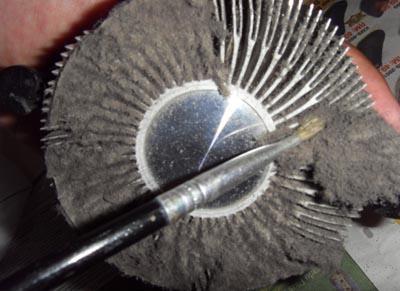
    Just my 1st thought would be Malware, corrupted drivers/OS-files, or a thick blanket of dust on your CPU fan/heatsink?:


    How far is it getting in the boot process when you turn it on, or is it shutting off within a few seconds of power-on?

    Is your CPU fan even spinning? Has it been noisy recently?
    Last edited by the86d; 03-14-2014, 6:02 AM.

    Comment

    • #3
      gobler
      Veteran Member
      • Mar 2010
      • 3349

      Comp keeps shutting off

      The time varies somewhat but usually after an hour or so. I will check the inside for dust and crud.
      No odd sounds and yes the fans are spinning. I run malware and virus protection which I update daily.

      Sent from somewhere in time & space...
      200 bullets at a time......
      sigpic

      Subscribe to my YouTube channel ---->http://www.youtube.com/user/2A4USA

      Comment

      • #4
        ElDub1950
        Calguns Addict
        • Aug 2012
        • 5688

        This is most often the cause. #2 is PS fan just a clogged up with dust. #3 is a failing PS

        Originally posted by the86d
        Just my 1st thought would be Malware, corrupted drivers/OS-files, or a thick blanket of dust on your CPU fan/heatsink?:


        How far is it getting in the boot process when you turn it on, or is it shutting off within a few seconds of power-on?

        Is your CPU fan even spinning? Has it been noisy recently?

        Comment

        • #5
          Timm24
          Junior Member
          • Jun 2013
          • 49

          are you getting the blue screen at all or is it just straight turning off randomly?

          Comment

          • #6
            Jimmy Deuce
            Senior Member
            • Feb 2007
            • 2291

            +1 on checking the fans first. blow out the inside of the PC specially the power supply and cpu fan. Run a test.
            "No fate no fate but the one we make"
            -Sarah Connor
            "No Compromise"
            -Rorschach
            "An elected legislative body can trample a man's rights just as easliy as a King"
            -Benjamin Martin
            "So we stepped off the path"
            -Mr. Parker

            Comment

            • #7
              low67vdubinnocal
              Senior Member
              CGN Contributor
              • Dec 2013
              • 816

              Have a windows 7 Acer Intel cpu laptop does about the same thing without a cooling pad. It's a spare so I don't care but i'm sure it packed with dog fir and dust. Will have to take it apart later and clean the crumbs out.
              VW's Are not for Hippies...
              Play's Cello in a marching band...

              Comment

              • #8
                Darryl Licht
                CGN/CGSSA Contributor
                • Dec 2012
                • 2259

                Chances are it is a fan/heatsink that is fouled. Take PC outside, open it up and spray the insides very well with compressed air!

                Fire PC back up and watch all the fans, are they all spinning? Check Powersupply fan too...
                "Laws that forbid the carrying of arms...disarm only those who are neither inclined nor determined to commit crimes. Such laws make things worse for the assaulted and better for the assailants; they serve rather to encourage than prevent homicides, for an unarmed man may be attacked with greater confidence than an armed one.
                --Thomas Jefferson
                Politics is the art of looking for trouble, finding it everywhere, diagnosing it incorrectly and applying the wrong remedies. --Groucho Marx

                Comment

                • #9
                  Bastard
                  • Jul 2009
                  • 2209

                  desktop I am assuming - it is probably going to be heat related, there are free utilities that monitor, I just can't remember the names right now.

                  I would install & run a prime something, still can't remember the names, I will look it up shortly as I have the programs on one of these damn computers around here.


                  edit; speedfan & prime 95... I think.
                  Last edited by Bastard; 03-15-2014, 11:04 AM.

                  Comment

                  • #10
                    Dubious_Beans
                    Veteran Member
                    • Jul 2010
                    • 3721

                    Acckk.. I just opened up my box and took it outside and gave it the air hose treatment. I got about 2 pounds of cat hair, 5 pounds of general purpose dust, and a monkey fighting a shark all blew out of it. What a mess!
                    Is much quieter now.

                    Thanks for the reminder.

                    Comment

                    • #11
                      meeestirg
                      Member
                      • Aug 2012
                      • 348

                      too much porno! i don't think it's dust that's stuck in the fans...

                      Comment

                      • #12
                        stilly
                        I need a LIFE!!
                        • Jul 2009
                        • 10685

                        Power cutting off is prolly PSU for sure. BUT, take a chance and the next time anything reboots, open it up and feel the heatsinks. You will only get a 2nd degree burn the most. It is nothing, but usually too, you will know that THAT is coming. IE, fan NOT spinning on a GRAPHICS card, oh yeah, you best approach with caution on that one... Damn I had a blister for a week... Stupid MSI...

                        Of course, Graphic Cards locking up usually make you freeze and zot your video screen before it hangs...
                        7 Billion people on the planet. They aint ALL gonna astronauts. Some will get hit by trains...

                        Need GOOD SS pins to clean your brass? Try the new and improved model...


                        And remember- 99.9% of the lawyers ruin it for the other .1%...

                        Comment

                        • #13
                          the86d
                          Calguns Addict
                          • Jul 2011
                          • 9591

                          Originally posted by low67vdubinnocal
                          Have a windows 7 Acer Intel cpu laptop does about the same thing without a cooling pad. It's a spare so I don't care but i'm sure it packed with dog fir and dust. Will have to take it apart later and clean the crumbs out.
                          A cooling pad just really makes a flat surface. If you have a fan pulling from the bottom of the machine, and sit it on your lap and cover the intake-fan vent(s), on the couch-cushion, or on a bed-spread, then it cannot get any airflow FROM underneath.

                          Comment

                          • #14
                            drclark
                            Senior Member
                            • Jan 2006
                            • 1830

                            I had a pc that would randomly reboot. Things I did in order of ease of diagnosis:

                            Boot an alternate os from a cd (e.g. any linux live cd) to isolate hw vs sw issues. (corrupt os, virus malware)

                            If sw is suspected, I usually reformat the HDD and re-install sw, especially if a virus is suspected.

                            If hw is suspected:
                            Check hardware operating temps; are heatsinks dust free and ensure all fans spinning
                            HDD health check
                            Memtest86 memory health check
                            Replace power supply
                            Replace motherboard

                            One pc I had would run fine, but blue screen when I fired up civ4 - turned out to be a failed graphics card fan.

                            I had another episode where a failed network switch was causing a bluescreen on a pc due to some networked printer driver

                            Have had to replace multiple power supplies

                            I've also had two motherboards fail. If you search the web you can sometimes find identical replacements. The older the pc is, the harder that will be.

                            Comment

                            • #15
                              dandan3000
                              Member
                              • Sep 2008
                              • 178

                              Like other have said, either heat or power supply. Your PC will shutdown if the CPU overheats (built in protection)

                              Comment

                              Working...
                              UA-8071174-1