Unconfigured Ad Widget

Collapse

New computer problems...

Collapse
X
 
  • Time
  • Show
Clear All
new posts
  • incredablehefey
    Senior Member
    • Feb 2010
    • 1853

    New computer problems...

    Well i finally spent the money on new computer components and built a new one. I fired it up on friday night and everything seemed to be working well. I went through and started installing drivers for my video card and mobo and had a few problems with the mobo drivers so i said i will worry about them later and shutdown and went to bed. Well i get home from a long day at the fair today to see my case fans running but spinning down to a stop. I thought that was weird so i tried to fire the computer up and now it turns itself on and off without any input from me, sometimes it will stay running for a few minutes other times only seconds. I went and reseated the connectors on the mobo, drives and video card but the same problem exists. I dont know what the next plan of action is aside from sending the psu and mobo back for replacements would be. I will list the components and see if the calguns tec support can help me fix it.

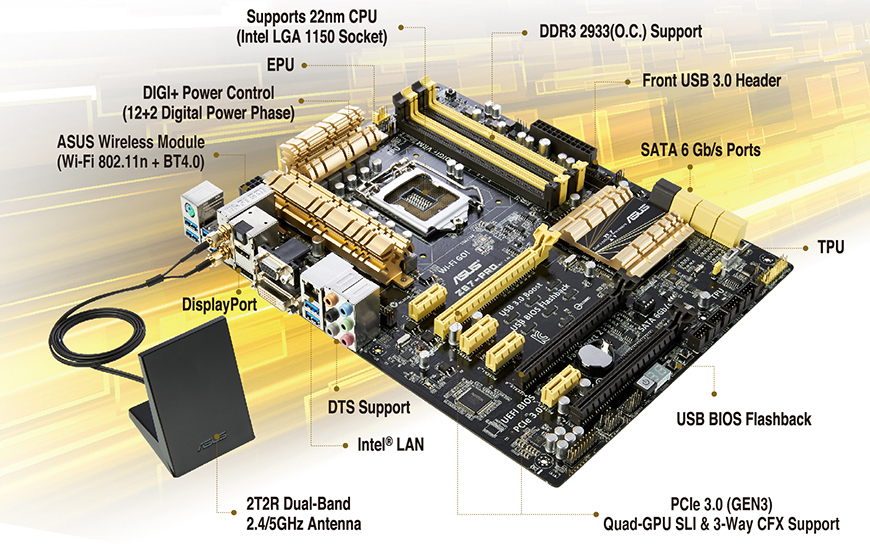
    mobo- Asus z87 pro

    cpu- i7 4770k

    cpu cooler- Thermaltake Water 2.0 Performer

    memory- Patriot Viper 3 16GB- 2 x 8GB, PC3-15000, 1866MHz,

    psu- XFX Pro Series XXX Edition ATX Power Supply - 850W,

    video card- Gigabyte GTX 770 GDDR5-4GB OC WINDFORCE 3X

    os- Windows 8 64 system builder

    hdd- Samsung 840 Series (SSD) 250 GB Sata

    and please no "should have bought a Dell or other pre-made computer" comments

    Last edited by incredablehefey; 07-28-2013, 7:41 PM.
    "The need in public and private life is common sense, decency, courage." - President Roosevelt
  • #2
    bigbearbear
    Calguns Addict
    • Jun 2011
    • 5378

    In before the "go buy a apple computer" crowd.

    Comment

    • #3
      bigbearbear
      Calguns Addict
      • Jun 2011
      • 5378

      Check the power switch and the connector that goes into your motherboard, what you can do is to disconnect it from the motherboard and see if the computer still boots itself up for no apparent reasons. If it does not do that, you can turn the computer on without the switch by touching the pins with a flat head screw driver. See if the computer still turns itself off.

      It might be something as simple as a busted switch on the case.

      Comment

      • #4
        BEE
        Veteran Member
        • Mar 2011
        • 2904

        Perhaps you can try switching all motherboard settings to default and clearing CMOS.

        Comment

        • #5
          Mr. Magoo
          Senior Member
          • Aug 2008
          • 696

          No BSOD on shutdown? If BSOD, run memtest. I see you already checked the PSU seating...

          Do you have the memory timing and voltage set to spec? If not is it underclocked? Even if underclocked if the timings are too tight this can be an issue.

          If bsod, memtest passes, remove video card (I see that mobo has onboard) and see what happens.

          Could still be the PSU but I would check all of that first, if issues still persist run a Linpack and see how it responds. I normally use LinX.

          What does the event log say?
          - M

          Comment

          • #6
            the86d
            Calguns Addict
            • Jul 2011
            • 9587

            See if 12V yellow/black (4 square, or 8 pin rectangle) is lose...
            Reseat that, and the ATX power connector, just a guess.

            Make sure the latch catches.

            Comment

            • #7
              Peter.Steele
              Calguns Addict
              • Oct 2010
              • 7351

              That's the same motherboard and CPU I just got a few weeks ago. Same hard drive. Similar RAM, and I'll keep my Corsair PSU TYVM. Your video card is better, though.

              With the Z87-Pro you can instantly rule out memory issues. There's a button on the motherboard on the upper right corner that when you push it, there will be status lights next to your memory to tell you if it's good or not, and it will automatically figure out what memory timings to use, and set them for you..

              Also, there's another button, on the bottom edge of the board near the center, that will boot you directly into the BIOS.

              Try these, see if anything helps.
              NRA Life Member

              No posts of mine on Calguns are to be construed as legal advice, which can only be given by a lawyer.

              sigpic

              Comment

              • #8
                MotoriousRacing
                Senior Member
                • Oct 2012
                • 1971

                Originally posted by nishanh
                CPU overheat? Ensure that cooler is seated on the CPU correctly.
                Aside from all the good advise above, I was going to suggest this too. Is the CPU cooler plugged in correctly to run the pump and fan?

                Comment

                • #9
                  incredablehefey
                  Senior Member
                  • Feb 2010
                  • 1853

                  well its up and running today.. for whatever reason i cant seem to get the bios to set the memory to 1866... im bummed about that but it seems stable now.
                  "The need in public and private life is common sense, decency, courage." - President Roosevelt

                  Comment

                  • #10
                    dynamomark80
                    Member
                    • Sep 2012
                    • 202

                    glad to hear you didnt kill a new build

                    another thing to try next time to ease the build is to use the on board graphics. just get the build running to load all the new drivers for the mobo and cpu stuff. then add the vid card as well as load the drivers for that bad boy. it cut out a few variables if something is causing issues with the build.
                    I fear paper cuts far more than firearms.

                    Comment

                    • #11
                      dynamomark80
                      Member
                      • Sep 2012
                      • 202

                      dam dude that is a sexy mobo you have
                      I fear paper cuts far more than firearms.

                      Comment

                      • #12
                        MotoriousRacing
                        Senior Member
                        • Oct 2012
                        • 1971

                        Originally posted by incredablehefey
                        well its up and running today.. for whatever reason i cant seem to get the bios to set the memory to 1866... im bummed about that but it seems stable now.
                        It's been awhile since my last build, but....

                        isn't memory 2 channel and therefore you set the speed in the BIOS at 1/2 the rated MHz of the memory? Your setting would be 933 if I am not mistaken.

                        Comment

                        • #13
                          WiKDMoNKY
                          CGN/CGSSA Contributor
                          • Jan 2011
                          • 506

                          Reseat your waterblock on the CPU. It is almost surely a heating issue. Properly clean the block and the CPU and apply a small pea size blob of TIM paste to the center if the CPU and evenly screw the cooler down. Also set you bios to defaults and work back up from there.

                          I have a 4770K running at 4.5Ghz @1.25v on an Asus Sabertooth Z87 with a Corsair H100i and 16GB of GSkill Ripjaw X 21300 DDR3 and a pair of Samsung 840 Pro 128's in RAID 0 running at no more than 130f playing BF3 maxed out.

                          Sent from my Nexus 7 using Tapatalk 4
                          Last edited by WiKDMoNKY; 08-24-2013, 8:11 PM.
                          NRA, SAF, GOA GET INVOLVED NOW OR DON'T COMPLAIN LATER!

                          "They who can give up essential liberty to obtain a little temporary safety, deserve neither liberty nor safety." Benjamin Franklin 1818

                          "A free people ought not only to be armed and disciplined, but they should have sufficient arms and ammunition to maintain a status of independence from any who might attempt to abuse them, which would include their own government." George Washington 1790

                          Comment

                          • #14
                            BigStiCK
                            Veteran Member
                            • Aug 2010
                            • 3788

                            I've had the same imac for 7 years and have yet to have a problem. Macbook pro for 5, no probs. Ipad & Iphone that my 3 & 5 year old boys play with (and drop) frequently. All still working great.

                            Our windblows based pc's at work crash multiple times a day, like clockwork. I was a network admin for 5 years in the Air Guard. I will NEVER own or work on another windblows based pc or network EVER again.

                            Sorry for your troubles, but they're built in, dude.
                            Freedom consists not in doing what we like, but in having the right to do what we ought.

                            ~Pope John Paul II

                            Comment

                            • #15
                              ocabj
                              Calguns Addict
                              • Oct 2005
                              • 7924

                              Originally posted by BigStiCK
                              Our windblows based pc's at work crash multiple times a day, like clockwork. I was a network admin for 5 years in the Air Guard. I will NEVER own or work on another windblows based pc or network EVER again.
                              I use Mac OS X, too, but I can still maintain Active Directory.

                              Blame the IT department, not Microsoft, for the shortcomings of your infrastructure at work.

                              IT: It's not just about Mac, Windows, or Linux and Unix.

                              Distinguished Rifleman #1924
                              NRA Certified Instructor (Rifle and Metallic Cartridge Reloading) and RSO
                              NRL22 Match Director at WEGC

                              https://www.ocabj.net

                              Comment

                              Working...
                              UA-8071174-1