Unconfigured Ad Widget

Collapse

Windows8 issues???

Collapse
X
 
  • Time
  • Show
Clear All
new posts
  • #31
    woods
    Member
    • Mar 2011
    • 477

    Classic shell is the best windows start button for 8. You might be able to reinstall 8 and keep the same license.

    Windows7 is better than 8.

    Debian7 is a great Linux option. I run linux every day. Some windows games won't run in Debian so I keep win7 around.

    Mydigitallife.info usually has good windows info on the forums.

    Comment

    • #32
      the86d
      Calguns Addict
      • Jul 2011
      • 9591

      One the 1st Windows 8 box (OEM all-in-one) I looked at, she did windows updates, and her wireless mouse and keyboard stopped working... A restore fixed it, but that is some Bull-Sha-vik!

      Comment

      • #33
        ShooterDK
        CGN/CGSSA Contributor - Lifetime
        CGN Contributor - Lifetime
        • Feb 2007
        • 11975

        Originally posted by arrix
        You guys ignored the obvious option which is to restore the OS. basically a factory reset for your computer. did your laptop come with a restore partition? Pm me if you need help with it.
        I purchased this used. I do not have disks to do restore.

        Originally posted by NytWolf
        They immediately blame the OS, so knowing that, restoration is out of the question.
        I don't honestly know the root cause of my problems. But I have used 7 and have never had the problems like I am encountering with 8.

        Originally posted by Exile Machine
        +1 I made the decision to go Windows 8 and have regretted it ever since.
        -Mark
        You and I are both "haters". haha1

        There are copies of 7 on ebay and I will grab one.

        Originally posted by woods
        Classic shell is the best windows start button for 8. You might be able to reinstall 8 and keep the same license.

        Windows7 is better than 8.

        I am not super tech savvy with PC's but I know enough to give up on 8 and put 7 on this machine

        Debian7 is a great Linux option. I run linux every day. Some windows games won't run in Debian so I keep win7 around.

        Mydigitallife.info usually has good windows info on the forums.
        I loaded Ubuntu on this machine but don't know how to get it started???
        Dave

        Comment

        • #34
          the86d
          Calguns Addict
          • Jul 2011
          • 9591

          Originally posted by ShooterDK
          I loaded Ubuntu on this machine but don't know how to get it started???
          Installed already, or booted to the Live CD/DVD so far?
          Last edited by the86d; 08-07-2013, 2:57 PM.

          Comment

          • #35
            Peter.Steele
            Calguns Addict
            • Oct 2010
            • 7351

            Dave, careful buying Windows 7 on eBay. There's a lot of people selling counterfeit disks out there. You'll get it, and install and it's good, but you can't activate it.

            Buy an OEM disk from a retailer. It'll cost you a little more, but you won't have any hassles with activation.
            NRA Life Member

            No posts of mine on Calguns are to be construed as legal advice, which can only be given by a lawyer.

            sigpic

            Comment

            • #36
              dchang0
              Veteran Member
              • Jul 2008
              • 2772

              Nearly all PCs made in the last five years never shipped with reinstallation CDs or DVDs (unless you paid extra to order one). They use a hidden restore or recovery partition on the hard drive. Even Macs do this now.

              If you google the exact model of the machine along with the words "factory restore," you'll find someone who's written exact steps on how to do a restore to just like it was when it was taken out of the box the first time. It is an easy process, meant for non-technical home computer users to follow. You'll be fine doing it yourself.

              After that, you will run updates for a few hours to bring it up to current--mostly coming back to check on the computer while you're doing something else like watching TV, and it will be usable. I consider this boring procedure a must-do whenever I buy a used system--it is not trustworthy otherwise. You never know what kind of malware could have been left on it by the previous owner, knowingly or unknowingly.

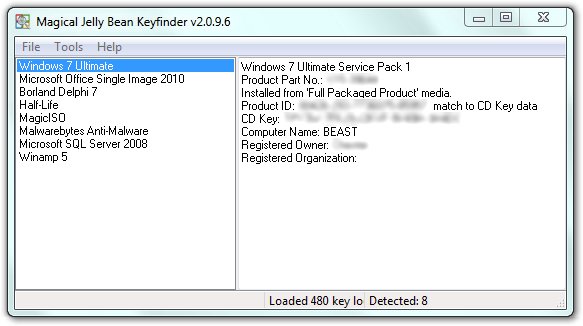
              If the machine was hand-assembled out of commodity parts, then you may find that there is no recovery partition. In that case, I would first take inventory of all the devices in the machine in Device Manager, then obtain all the drivers ahead of time on a USB thumb drive, then get the Windows 8 CD key out of the registry using this free utility:

              The Magical Jelly Bean Keyfinder is a freeware utility that retrieves your Product Key (cd key) used to install windows from your registry.


              (You can get other keys like Microsoft Office, etc, if that software came installed on the machine.)

              Then, you download the Windows 8 installation DVD directly from Microsoft's website and burn it to a DVD, and then you go through the reinstall process, formatting the hard drive completely. You won't have to buy Windows 8 again nor Windows 7 since you have the CD key that was used to install that machine.

              Windows 8 is actually pretty stable and works well; it's just frustrating because all the things you got used to seeing in certain places in Windows 7/Vista are now hidden away in different places. When 8.1 comes out, it will solve most of those problems for most users.


              You got a lot of good advice above. Don't buy Win 7 on ebay unless from a reputable source (one of the big retailers with a brick and mortar store). It's not Windows 8 that's to blame--it's something installed on top of Windows (probably Lavasoft or other unknown crap). You must reinstall this fresh even if you weren't having trouble, because it is possible that malware may exist that you don't see or notice. (I once had a keylogger on a machine that stole my bank password while I was logging into the online banking, then sent it to a crime ring in Russia. They took over my credit card and tried to order $3000 of equipment from Samy's Camera. All this was done without any obvious symptoms.)

              One more thing: I'm a big LINUX fan myself (I run Crunchbang and Debian and Ubuntu Server), but if you're having trouble with Win 8, you're not going to have nearly so good a time with LINUX, especially if there are driver issues when you are installing it. A lot of these LINUXes do run perfectly out of the box, but if something goes wrong, man, it'll be even worse than what you're dealing with now.
              Last edited by dchang0; 08-07-2013, 9:52 PM.

              Comment

              • #37
                Peter.Steele
                Calguns Addict
                • Oct 2010
                • 7351

                Originally posted by dchang0
                Windows 8 is actually pretty stable and works well; it's just frustrating because all the things you got used to seeing in certain places in Windows 7/Vista are now hidden away in different places. When 8.1 comes out, it will solve most of those problems for most users.


                People said the exact same thing about Vista, remember? And ME before that.

                Didn't make it true, though.


                As for 8.1 ... if it features a Start button, maybe I'll consider it. Otherwise, **** 'em. I'll keep Windows 7 until Autodesk stops supporting it.
                NRA Life Member

                No posts of mine on Calguns are to be construed as legal advice, which can only be given by a lawyer.

                sigpic

                Comment

                • #38
                • #39
                  problemchild
                  Banned
                  • Oct 2005
                  • 6959

                  Originally posted by The War Wagon
                  Actually, Win8 is growing on me. If it had a &*^*^%&$##@ "start" button, it'd be a shiiteload more USEFUL, though.
                  It does, its called "classic shell" download it, install it, use it.

                  Comment

                  • #40
                    problemchild
                    Banned
                    • Oct 2005
                    • 6959

                    Originally posted by Exile Machine
                    +1 I made the decision to go Windows 8 and have regretted it ever since.
                    -Mark
                    It works OK if you know how to "tune it". First thing is to load classic shell. Then go into advanced and turn OFF all "look pretty and fancy features".

                    Comment

                    • #41
                      Peter.Steele
                      Calguns Addict
                      • Oct 2010
                      • 7351

                      Originally posted by problemchild
                      It works OK if you know how to "tune it". First thing is to load classic shell. Then go into advanced and turn OFF all "look pretty and fancy features".


                      Okay, so are you a dev for Classic Shell or something? With the way you keep pimping it, either you stand to profit from it somehow OR you're just trying to get other people to buy into the misery that is Windows 8 for some other reason.

                      Classic Shell is NOT part of Windows. It's something separate, AND it's also BETA SOFTWARE.

                      And for the "look pretty and fancy features," why would I go to Windows 8 and turn them off, when Windows 7 works just fine with them on?
                      NRA Life Member

                      No posts of mine on Calguns are to be construed as legal advice, which can only be given by a lawyer.

                      sigpic

                      Comment

                      Working...
                      UA-8071174-1