Unconfigured Ad Widget

Collapse

School me on routers

Collapse
X
 
  • Time
  • Show
Clear All
new posts
  • Meety Peety
    Veteran Member
    • Aug 2008
    • 3216

    School me on routers

    Going to upgrade my modem and router since both are around 5+ years old and not working so well anymore.. but I don't really know a lot about networking.. and not really sure what router to go with. In case it's relevant, decided to go with a Motorola 6121 modem (haven't bough it yet though) and I have confirmed that my ISP will support it.

    As far as routers go, I tend to run hardlines to anything that I want to use reliably. I don't know if it's just my router or the fact that we have a large house but I have never been able to keep a reliable connection via the wireless setup that I have. I have tried aftermarket antennas and replaced the router at some point and was never satisfied, so I just ran some cables through the attic and have been happy ever since. We do still use the wireless, but only really for a laptop and cell phones to not use data when at home. The blue ray, 3 PCs and xbox are all hardlined and reliability is 100% as long as the router is functioning. Now, the connection seems to get weak about every 5 minutes, the signal will not die, but you will get a lag spike lasting about 10 seconds which is very noticeable when streaming movies and playing games. I figure it's time to get rid of the rental modem anyway, so might as well upgrade both components and see if the problem goes away.

    So here's where I get lost.. Do I need a dual band router given that I barely even use the wireless? I'm not really sure if the dual band feature is something that only pertains to wireless or if it affects hardlines as well? I wouldn't mind using wireless for the blueray and xbox etc.. but I've pretty much given up expecting any router to reach this far. Probably 75 feet or so. So really it will just be 1 laptop and a few cell phones that will use the wireless. I don't mind buying a dual band one, I just really don't even know what my needs are as I don't really know too much about routers and networking.

    Next question is about the gigabit Ethernet ports. I am primarily trying to decide between the Asus RT-N53 and the Asus RT-N56U and the main difference *seems* to be the gigabit Ethernet ports. From what I have read, it seems like those ports are only useful to people who do massive file sharing from computer to computer? All we really do is stream movies and play games, no downloading or file sharing really going on. Would I benefit from having these gigabit ports due to the fact that I run everything in hardlines?

    Also, it looks like the RT-N56U comes with some kind of USB network adapter that has something to do with the dual band operation.. which makes me wonder if my computers/xbox/blueray will all require one of these? They are like 30 bucks a piece and I have no idea what they even do. Can anyone help? Thanks in advance..
    "Everybody is a genius. But if you judge a fish by its ability to climb a tree, it will live its whole life believing that it is stupid." - Albert Einstein
  • #2
    Brianguy
    Veteran Member
    • Sep 2009
    • 3836

    Might as well get gigabit in case you want to transfer files some time in the future. i dont see anything about an adapter coming with the n56u in that link you posted. you don't need that for your devices if they already have wireless adapters. dual band doesn't effect wired connections

    here's something a little cheaper with gigabit ports


    I've never owned a TP-LINK router but I have one of their switches and powerline kit, they have been working fine for me. I have an rt-ac66u and i get full bars and speed all over the house picking a good wireless channel essential. Use this tool to find a channel https://tools.meraki.com/stumbler

    are you sure it's the router crapping out? could be your modem or the signal going to it. it's probably worth it to buy your own anyway, you'll save money in the long run. if you still have problems after getting a new modem and router, you should ***** up a storm to your isp until they send out a tech
    Last edited by Brianguy; 07-14-2013, 4:11 AM.

    Comment

    • #3
      mavericksun
      Member
      • May 2010
      • 349

      The problem is do you have the equipment to match the new tech?

      Wireless -
      dual band technology - means 2.4 and 5G. There are simultaneous dual band and switchable which can only use one frequency at a time.
      802.11B/G is only 2.4. 802.11N can be on 2.4 and 5. The advantage is not a lot of people have the 5G band on their routers so the usage on those frequencies might be less. Most people do not change the settings of their routers so the G routers tend to be set on channel 6 or 11 which are the default channels and the interference of many wifi on the same channels degrade transmission rates. If you have an android, install Wifi Analyzer and you can see which channels the wifi are set to around you. Depending on your device, you can see 2.4 and maybe 5.
      N150,N300,...N900. Basically they mean how many antennas your card can deal with at the same time to get data. N150 means one 2.4. N300 means one 2.4 and one 5. N450 means two 2.4 and one 5. so forth to N900 which is three 2.4 and three 5. The Max theoretical output for an antenna is 150. MIMO is another name for it. Multiple In and Multiple Out.

      Wired - gigabit ports are only useful under a few set conditions.1- both devices has to have gigabit ports. 2-Unless you have something like Google Fiber, Fios, or other really fast broadband connection, gigabit is not going to be useful in any type of streaming from netflix, Hulu, etc because your broadband is just not that fast. If you were stream from your computer to your Tv or something like that then it would be useful. Gigabit is backwards compatible so it does future proof it. You would need at least cat5e cables to use gigabit speeds. cat 6 is more ideal but the cost is a lot more.

      Comment

      • #4
        Meety Peety
        Veteran Member
        • Aug 2008
        • 3216

        Thanks for the input guys. So to be clear, lets say that I get the more expensive router which all reviews seem to suggest that it should easily reach out to 75 feet with the signal.. Is there some way I can test my equipment to see which devices are compatible with the 5gh band? I figure the laptop and 3d bluray player are brand new and most certainly will have the latest technology.. but I'm unsure about the xbox (4g slim). I will keep the PCs hardlined but one of the cat6's through the attic has a broken connector and it might be nice to just run wifi instead of replacing the cable or reheading it, which I have put off because I don't have the tool required to do this.
        "Everybody is a genius. But if you judge a fish by its ability to climb a tree, it will live its whole life believing that it is stupid." - Albert Einstein

        Comment

        • #5
          Jason95357
          Senior Member
          • Feb 2013
          • 1130

          Originally posted by Meety Peety
          Thanks for the input guys. So to be clear, lets say that I get the more expensive router which all reviews seem to suggest that it should easily reach out to 75 feet with the signal.. Is there some way I can test my equipment to see which devices are compatible with the 5gh band? I figure the laptop and 3d bluray player are brand new and most certainly will have the latest technology.. but I'm unsure about the xbox (4g slim). I will keep the PCs hardlined but one of the cat6's through the attic has a broken connector and it might be nice to just run wifi instead of replacing the cable or reheading it, which I have put off because I don't have the tool required to do this.
          Just look up the manual/technical specs for each to see what wireless technologies they support.

          I would go with dual band just to free up contention. Less folks have dual-band for now, so that means your devices that support 5g will have less interference/competition. This also frees up more bandwidth for your 2.4g devices.

          The SB6121 is a great modem. I've had mine for over a year, no problems with it, very fast (I've 25mbit/s service). I think Comcast charges $7/mo for "rental" fees, so you'll break-even in less than a year.

          I recommend the D-Link DIR-825 for a dual-band router. I've had it for over a year as well, and had it recommended to me by others have been professionally evaluating SOHO equipment for years. This is a great router, especially if you have Comcast. The reason I specifically name Comcast, is that they have deployed IPv6 networking and addressing for home users (business is forth-coming). The SB6121 and DIR-825 both support IPv6. This means you'll have connectivity to the latest Internet protocol and better connectivity options.

          Benefits of IPv6 and more IPv6 benefits.
          LTCs: CA, OR, AZ, UT, FL, NV
          GOA & NRA Member

          Comment

          • #6
            bigbearbear
            Calguns Addict
            • Jun 2011
            • 5378

            You can consider using powerline adapters too, I work from home and do large file transfers (daily backup of servers) with those and they're reliable and fast.

            I have older Netgear version rated for 200Mbps, they have a newer version here:

            Comment

            • #7
              mavericksun
              Member
              • May 2010
              • 349

              Powerline adapters depend on the power circuits in your house. If they are not connected to each other then you are out of luck. xbox have 802.11N but I believe it's only 2.4 out of the box. You have to get the adapter for 5. Most new devices will have N but it's a question of is it dual band since N operates on both bands.

              IPV6 does not necessarily translate to better connectivity. IPV6 is still not widely deployed. While Comcast may have IPV6, the data it's getting from the rest of the internet is still on IPV4. It will give you the ability to do IPV6 at home network but your advantages might just stop there.

              Comment

              • #8
                Jason95357
                Senior Member
                • Feb 2013
                • 1130

                Originally posted by mavericksun
                ...

                IPV6 does not necessarily translate to better connectivity. IPV6 is still not widely deployed. While Comcast may have IPV6, the data it's getting from the rest of the internet is still on IPV4. It will give you the ability to do IPV6 at home network but your advantages might just stop there.
                This might have been true over a year ago, but not so much now. IPv6 support is there for many major website operators: Google, Yahoo, Bing, Netflix, Facebook, Wikipedia, AOL, Whitehouse.gov, Cisco Webex, just to name a few.

                Yes, many mid to small-time websites have not deployed IPv6. For instance, my employer (~500 employees), while we have some IPv6 networking, still hasn't acquired direct IPv6 connectivity from our two ISPs (two national telcos), but we've two circuits on the way which will have it. We do have redundant IPv6 tunnels, and we do publish DNS nameservers with IPv6 addresses (our own and our two ISPs) and do send customer bill email notices via that tunnel to Gmail and Comcast (IPv6-enabled mail providers). Once we have native (direct) IPv6 from our ISPs, then we'll enable IPv6 for our public websites.
                LTCs: CA, OR, AZ, UT, FL, NV
                GOA & NRA Member

                Comment

                • #9
                  mavericksun
                  Member
                  • May 2010
                  • 349

                  Originally posted by Jason95357
                  This might have been true over a year ago, but not so much now. IPv6 support is there for many major website operators: Google, Yahoo, Bing, Netflix, Facebook, Wikipedia, AOL, Whitehouse.gov, Cisco Webex, just to name a few.

                  Yes, many mid to small-time websites have not deployed IPv6. For instance, my employer (~500 employees), while we have some IPv6 networking, still hasn't acquired direct IPv6 connectivity from our two ISPs (two national telcos), but we've two circuits on the way which will have it. We do have redundant IPv6 tunnels, and we do publish DNS nameservers with IPv6 addresses (our own and our two ISPs) and do send customer bill email notices via that tunnel to Gmail and Comcast (IPv6-enabled mail providers). Once we have native (direct) IPv6 from our ISPs, then we'll enable IPv6 for our public websites.
                  IPV6 is growing but it's still not there yet. Even by the site's own measurements, IPV6 traffic of Alexa's Top 1000 website is only below 12%.


                  Many large companies have not fully deployed IPV6 either. Amazon, Ebay, paypal, etc. Many of these guys are not going to spend the money to replace equipment unless it's necessary. So that is going to be when equipment fails, IPV6 is mandated, or IPV4 address space is completely used up.

                  Comment

                  • #10
                    Jason95357
                    Senior Member
                    • Feb 2013
                    • 1130

                    Originally posted by mavericksun
                    IPV6 is growing but it's still not there yet. Even by the site's own measurements, IPV6 traffic of Alexa's Top 1000 website is only below 12%.


                    Many large companies have not fully deployed IPV6 either. Amazon, Ebay, paypal, etc. Many of these guys are not going to spend the money to replace equipment unless it's necessary. So that is going to be when equipment fails, IPV6 is mandated, or IPV4 address space is completely used up.
                    I don't disagree that many haven't moved forward, but my major point was to debunk that there was no one using IPv6. Many major players are (Google, for one). My cell phone provider (T-Mobile), my ISP (Comcast), and soon my work all have IPv6. You should too (or at least buy equipment that is ready to do so when your ISP enables IPv6)!

                    The US Federal government has mandated IPv6. All of their vendors have had to fully support IPv6 for some time. Are they behind on their deployment? Yes, but the point is there is a mandate and it is occurring.

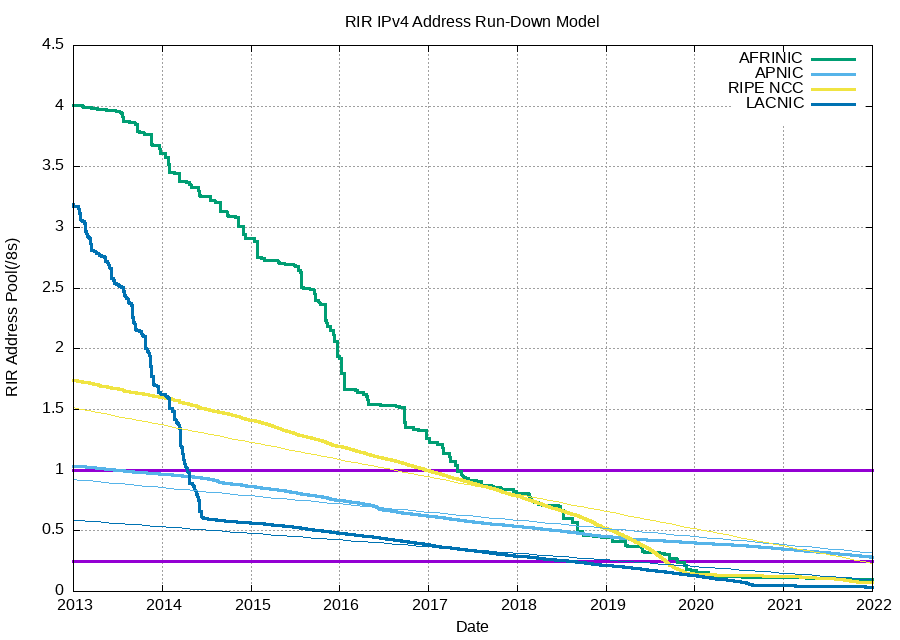
                    FYI, IPv4 address space is all used up from the global allocator (IANA) as of Feb, 2011. Now only the RIRs (ARIN, RIPE, APNIC, AFRINIC, LATNIC) have addresses left.


                    APNIC (Asia, including Australia and Japan) ran out of easy to obtain addresses as of April, 2011, and has moved to IPv4 end-game stage where they will only assign one final small address range to ISPs for use in transitionary methods.

                    RIPE (Europe) ran out of easy to obtain IPv4 addresses Sept, 2012 and has also entered the end-game stage.

                    ARIN (US, Canada, and some others) will run out next, projected in the first half of 2014, followed by LACNIC (Latin America & Carribbean) by the end of 2014. Due to it's slow Internet growth, AFRINIC will continue to have freely available IPv4 space for some time (2020-2022).

                    I've been saying for a while, it's time to get off the fence and move to IPv6 now. I agree, most place won't do it until next upgrades, but much of their gear bought within the last two years will do it now, they just have to configure it.

                    More IPv4 stats.
                    LTCs: CA, OR, AZ, UT, FL, NV
                    GOA & NRA Member

                    Comment

                    • #11
                      Meety Peety
                      Veteran Member
                      • Aug 2008
                      • 3216

                      Ok guys thanks for the input. So I'll definitely go with dual band, but now I'm just unsure whether to go with a router that has gigabit ports or not? The price different between routers with and without is close to double. I don't see myself utilizing it, and I don't really have any plans to in the future.. but I'm still unsure if I will be somehow losing internet speed or anything? Like I said, I don't really transfer files between computers (when I do it's tiny stuff anyway), I don't download movies or stream from my computer.. so I'm not sure if I will even benefit from having gigabit ports? Also, I do stream movies from Netflix via my bluray player (Which has wifi but I dont see any mention of 2.4 or 5ghz on the website), is this considered something I would want gigabit ports for or are we more-so talking about like transferring a 50gig zip file from one computer to the other or something?

                      Thanks again for the help
                      "Everybody is a genius. But if you judge a fish by its ability to climb a tree, it will live its whole life believing that it is stupid." - Albert Einstein

                      Comment

                      • #12
                        Jason95357
                        Senior Member
                        • Feb 2013
                        • 1130

                        Originally posted by Meety Peety
                        Ok guys thanks for the input. So I'll definitely go with dual band, but now I'm just unsure whether to go with a router that has gigabit ports or not? The price different between routers with and without is close to double. I don't see myself utilizing it, and I don't really have any plans to in the future.. but I'm still unsure if I will be somehow losing internet speed or anything? Like I said, I don't really transfer files between computers (when I do it's tiny stuff anyway), I don't download movies or stream from my computer.. so I'm not sure if I will even benefit from having gigabit ports? Also, I do stream movies from Netflix via my bluray player (Which has wifi but I dont see any mention of 2.4 or 5ghz on the website), is this considered something I would want gigabit ports for or are we more-so talking about like transferring a 50gig zip file from one computer to the other or something?

                        Thanks again for the help
                        100mbit WAN will be fine. I've not looked, but I'm guessing anything recent will have that. You really only need a 1gbit WAN if you have 100mbit+ Internet.
                        LTCs: CA, OR, AZ, UT, FL, NV
                        GOA & NRA Member

                        Comment

                        • #13
                          Brianguy
                          Veteran Member
                          • Sep 2009
                          • 3836

                          Originally posted by Meety Peety
                          Ok guys thanks for the input. So I'll definitely go with dual band, but now I'm just unsure whether to go with a router that has gigabit ports or not? The price different between routers with and without is close to double. I don't see myself utilizing it, and I don't really have any plans to in the future.. but I'm still unsure if I will be somehow losing internet speed or anything? Like I said, I don't really transfer files between computers (when I do it's tiny stuff anyway), I don't download movies or stream from my computer.. so I'm not sure if I will even benefit from having gigabit ports? Also, I do stream movies from Netflix via my bluray player (Which has wifi but I dont see any mention of 2.4 or 5ghz on the website), is this considered something I would want gigabit ports for or are we more-so talking about like transferring a 50gig zip file from one computer to the other or something?

                          Thanks again for the help
                          Pretty much anything you buy will be plenty fast unless you have some crazy internet like fios

                          Comment

                          • #14
                            mavericksun
                            Member
                            • May 2010
                            • 349

                            Originally posted by Jason95357
                            I don't disagree that many haven't moved forward, but my major point was to debunk that there was no one using IPv6. Many major players are (Google, for one). My cell phone provider (T-Mobile), my ISP (Comcast), and soon my work all have IPv6. You should too (or at least buy equipment that is ready to do so when your ISP enables IPv6)!
                            The work to convert is going along, I can tell you it's never going to be 100%. Old tech runs around the world all over the place. Conversions will be in place in some deep dark corner of an entity's network. If you look into the infrastructure of any long running organization, they got some frankenstein legacy system running on old hardware and software. It's going to be like that for the IPV6 transition too. Government mandates for itself is kinda of a running joke. They'll set up dates and talk about penalties for missing it but they will excuse themselves for it soon. IPV6 for most consumer will really come into play in about another year or so when some of the consumer service companies really get into it. They have been trying to stave off the IPV4 address space running out by cracking down on some false domain registration to reclaim some addresses. The conversion is happening, it's just going to take a while.

                            Comment

                            • #15
                              mavericksun
                              Member
                              • May 2010
                              • 349

                              Originally posted by Meety Peety
                              Ok guys thanks for the input. So I'll definitely go with dual band, but now I'm just unsure whether to go with a router that has gigabit ports or not? The price different between routers with and without is close to double. I don't see myself utilizing it, and I don't really have any plans to in the future.. but I'm still unsure if I will be somehow losing internet speed or anything? Like I said, I don't really transfer files between computers (when I do it's tiny stuff anyway), I don't download movies or stream from my computer.. so I'm not sure if I will even benefit from having gigabit ports? Also, I do stream movies from Netflix via my bluray player (Which has wifi but I dont see any mention of 2.4 or 5ghz on the website), is this considered something I would want gigabit ports for or are we more-so talking about like transferring a 50gig zip file from one computer to the other or something?

                              Thanks again for the help
                              For most of your uses, you will not need it. All it's really going to do is make your small file transfer faster. Netflix is coming in from your broadband, so unless you got FIOS, Google Fiber, or some other really fast ISP, it's not going to make a difference to you. Have you considered getting a NAS(Network Attached Storage) for your home? If you do then gigabit will be useful. Prices fluctuate all the time with tech items. If you check some of the tech deal sites, you should be able to get it for cheaper price. I got a netgear R4500 router from Costco for about $129 last year. I've seen it at frys on sale for about $109 a few months ago and it's a N900 router with gigabit ports. I connect my NAS to my laptop via the router with CAT6 cables. It makes it faster to transfer files. The NAS is used as a central storage so I don't have to worry about failures of HD in my laptop. Depending on the type of NAS, you can use RAID to make sure your data never gets lost.

                              Comment

                              Working...
                              UA-8071174-1