Unconfigured Ad Widget

Collapse

How do you change WPA to WPA2 wireless encryption?

Collapse
X
 
  • Time
  • Show
Clear All
new posts
  • xrMike
    Calguns Addict
    • Feb 2006
    • 7841

    How do you change WPA to WPA2 wireless encryption?

    I just checked all of the wireless networks that my laptop is picking up in the neighborhood, and all of them except mine say "WPA2" encryption. Mine is the only one that says "WPA".

    We were one of the first ones to get ATT U-verse service around here, so I assume WPA2 is a newer and better type of encryption than WPA.

    How do I switch our wireless network to WPA2?

    Can I do that from the router admin page?

    Also, I can't remember how to even GET to the admin page, although I've done it before. I remember you just enter a particular IP address into your browser address bar, but I forget the IP address... Anybody know what it is for ATT Uverse routers?

    Do you just change a setting on the admin page or is it more involved than that?

    Thanks for any tips/advice.
  • #2
    stilly
    I need a LIFE!!
    • Jul 2009
    • 10685

    seriously?

    Okay, look for your access point and login to it, it is USUALLY something like 10.0.0.1 or 10.0.0.2 OR in some cases 192.168.0.1 or close to it, then just change it over from wpa to wpa2- but as long as it is NOT WEP is should be okay for a while.

    You can also get a program called "the Dude" that should scan your network and show you what the ip address is of your router. It is sometimes very close the your GATEWAY if not your gateway.

    To find your gateway you can click START, then RUN, then type CMD (and hit enter/return)

    you will get a black box and then you type: "ipconfig" you should see some numbers and you will see YOUR ip address (which should start as 192.168... or 10.0.0... and that will dictate which ip address your gateway will be around. Generally playing around with those numbers in your browser address bar will get you where you wanna go.

    If your wireless is part of your router then it should be able to be changed through your admin page or setup page.

    Personally though, I would leave it alone unless you REALLY had some issues.

    BTW, I am no expert so please, if I am wrong someone step up and school me.
    Last edited by stilly; 01-30-2013, 9:40 PM.
    7 Billion people on the planet. They aint ALL gonna astronauts. Some will get hit by trains...

    Need GOOD SS pins to clean your brass? Try the new and improved model...


    And remember- 99.9% of the lawyers ruin it for the other .1%...

    Comment

    • #3
      xrMike
      Calguns Addict
      • Feb 2006
      • 7841

      Originally posted by stilly
      seriously?
      Um, yeah, why would I have posted the question otherwise?

      I do appreciate the advice. None of your IP addresses worked, but the "ipconfig" command gives my "Default Gateway" IP address, which takes me to the ATT U-verse Admin page. There are multiple tabs within tabs there, so I'll have to explore and find the page with the encryption settings, if that's where they are.

      Not experiencing any problems. Just want to change over to the most modern/secure method if I can. Thanks.

      Comment

      • #4
        nothinghere2c
        Senior Member
        • Mar 2012
        • 2259

        WPA2 is slightly more secure than WPA. Its usually just a quick option change in your router interface which should be your "default gateway" IP as you found.

        if your router doesn't support it, or you cant figure it out, don't worry too much.

        as long as you aren't using WEP

        Comment

        • #5
          ExtremeX
          Calguns Addict
          • Sep 2010
          • 7160

          If you can’t use WPA2 when you can achieve better security from using custom SSID and strong encryption keys.

          You will get a lot more mileage from that vs simply switching to WPA2 and using a password key such as “Internet” or something else easy to remember or brute force.
          ExtremeX

          Comment

          • #6
            ocabj
            Calguns Addict
            • Oct 2005
            • 7924

            WPA was broken in 2009 using a method of short packet spoofing. It targeted a weakness in TKIP which is the underlying algorithm for WPA.

            This is why no one uses (or should be using) WPA.

            Distinguished Rifleman #1924
            NRA Certified Instructor (Rifle and Metallic Cartridge Reloading) and RSO
            NRL22 Match Director at WEGC

            https://www.ocabj.net

            Comment

            • #7
              hey8you
              Member
              • Jun 2008
              • 190

              Originally posted by xrMike
              I just checked all of the wireless networks that my laptop is picking up in the neighborhood, and all of them except mine say "WPA2" encryption. Mine is the only one that says "WPA".

              We were one of the first ones to get ATT U-verse service around here, so I assume WPA2 is a newer and better type of encryption than WPA.

              How do I switch our wireless network to WPA2?

              Can I do that from the router admin page?

              Also, I can't remember how to even GET to the admin page, although I've done it before. I remember you just enter a particular IP address into your browser address bar, but I forget the IP address... Anybody know what it is for ATT Uverse routers?

              Do you just change a setting on the admin page or is it more involved than that?

              Thanks for any tips/advice.
              My parents have Uverse. Try 192.168.1.254 to get on the router.

              The wireless settings icon is right next to the Broadband icon or go to the bottom of the page where it says "Top Networking Features". Wi-Fi should be the first selection.

              Comment

              • #8
                maurice05
                Senior Member
                • Mar 2007
                • 796

                192.168.1.254 its correct dvds your gonna need the admin password on the side of the Rg to make changes
                Al Sharpton and Jesse Jackson don't speak for all black people!

                Comment

                • #9
                  Darryl Licht
                  CGN/CGSSA Contributor
                  • Dec 2012
                  • 2259

                  Originally posted by xrMike
                  I just checked all of the wireless networks that my laptop is picking up in the neighborhood, and all of them except mine say "WPA2" encryption. Mine is the only one that says "WPA".

                  We were one of the first ones to get ATT U-verse service around here, so I assume WPA2 is a newer and better type of encryption than WPA.

                  How do I switch our wireless network to WPA2?

                  Can I do that from the router admin page?

                  Also, I can't remember how to even GET to the admin page, although I've done it before. I remember you just enter a particular IP address into your browser address bar, but I forget the IP address... Anybody know what it is for ATT Uverse routers?

                  Do you just change a setting on the admin page or is it more involved than that?

                  Thanks for any tips/advice.
                  Depending on how old your Uverse router is you may be limited to only WEP and WPA. If that is the case call AT&T and get a newer more up to date unit from them!

                  Did you ever gain entry to the admin page...
                  "Laws that forbid the carrying of arms...disarm only those who are neither inclined nor determined to commit crimes. Such laws make things worse for the assaulted and better for the assailants; they serve rather to encourage than prevent homicides, for an unarmed man may be attacked with greater confidence than an armed one.
                  --Thomas Jefferson
                  Politics is the art of looking for trouble, finding it everywhere, diagnosing it incorrectly and applying the wrong remedies. --Groucho Marx

                  Comment

                  • #10
                    stilly
                    I need a LIFE!!
                    • Jul 2009
                    • 10685

                    Originally posted by xrMike
                    Um, yeah, why would I have posted the question otherwise?

                    I do appreciate the advice. None of your IP addresses worked, but the "ipconfig" command gives my "Default Gateway" IP address, which takes me to the ATT U-verse Admin page. There are multiple tabs within tabs there, so I'll have to explore and find the page with the encryption settings, if that's where they are.

                    Not experiencing any problems. Just want to change over to the most modern/secure method if I can. Thanks.
                    It is like, if you made it to that point where you could assign wpa, then why not just one more click and wpa2?

                    I thought that WEP was busted. You mean that someone figured out wpa too? Sweet. I have the setup for wep but I neva thought wpa was taken down. LoL.

                    I have to agree with Merc too though in that no matter WHAT you choose, if you has a password named "password" or something simple no amount of encryption/security will prevent it from being compromised (to a POINT of course).
                    7 Billion people on the planet. They aint ALL gonna astronauts. Some will get hit by trains...

                    Need GOOD SS pins to clean your brass? Try the new and improved model...


                    And remember- 99.9% of the lawyers ruin it for the other .1%...

                    Comment

                    • #11
                      odysseus
                      I need a LIFE!!
                      • Dec 2005
                      • 10407

                      Originally posted by ocabj
                      WPA was broken in 2009 using a method of short packet spoofing. It targeted a weakness in TKIP which is the underlying algorithm for WPA.

                      This is why no one uses (or should be using) WPA.
                      Yes, someone shrewd enough and wanting in sniffing WPA running TKIP has an entry point, which is why WPA2 was fast tracked in implementing CCMP-AES crypto.

                      Also for the OP along side a very hardened PSK (password) if you are presumably using this, if your device supports WPS PINs you need to disable that, even if the device is supporting WPA2.
                      "Just leave me alone, I know what to do." - Kimi Raikkonen

                      The moment the idea is admitted into society, that property is not as sacred as the laws of God, and that there is not a force of law and public justice to protect it, anarchy and tyranny commence.' and that `Property is surely a right of mankind as real as liberty.'
                      - John Adams

                      http://www.usdebtclock.org/

                      Comment

                      • #12
                        JDay
                        I need a LIFE!!
                        • Nov 2008
                        • 19393

                        Originally posted by odysseus
                        if your device supports WPS PINs you need to disable that, even if the device is supporting WPA2.
                        On many APs/Routers disabling WPS does not secure you against the WPS pin attack. What you need to do is flash a 3rd party firmware such as dd-wrt that does not have WPS support built-in.
                        Oppressors can tyrannize only when they achieve a standing army, an enslaved press, and a disarmed populace. -- James Madison

                        The Constitution shall never be construed to authorize Congress to prevent the people of the United States, who are peaceable citizens, from keeping their own arms. -- Samuel Adams, Debates and Proceedings in the Convention of the Commonwealth of Massachusetts, 86-87 (Pearce and Hale, eds., Boston, 1850)

                        Comment

                        • #13
                          Darryl Licht
                          CGN/CGSSA Contributor
                          • Dec 2012
                          • 2259

                          Originally posted by JDay
                          On many APs/Routers disabling WPS does not secure you against the WPS pin attack. What you need to do is flash a 3rd party firmware such as dd-wrt that does not have WPS support built-in.
                          Unfortunately, an ISP supplied router such as in this case with AT&T Uverse CANNOT run ddwrt! Only certain makes and models of routers can run ddwrt, tomatoe, openwrt, etc.

                          Also, FYI --- average WEP can be hacked in about 5 minutes, average WPA takes about an hour, and WPA2 can be hacked but you need PLENTY of time, a fast PC, and determination! Most hackers will look for easier "prey".

                          Best protection is to use a long and complicated passkey (password) using a mix of upper and lower case letters, numerals, and special characters!
                          "Laws that forbid the carrying of arms...disarm only those who are neither inclined nor determined to commit crimes. Such laws make things worse for the assaulted and better for the assailants; they serve rather to encourage than prevent homicides, for an unarmed man may be attacked with greater confidence than an armed one.
                          --Thomas Jefferson
                          Politics is the art of looking for trouble, finding it everywhere, diagnosing it incorrectly and applying the wrong remedies. --Groucho Marx

                          Comment

                          • #14
                            xrMike
                            Calguns Addict
                            • Feb 2006
                            • 7841

                            Wow, haven't checked this thread in a week or so, thanks for the info guys, I don't understand ANY of the last several posts but...

                            Originally posted by Darryl Licht
                            Did you ever gain entry to the admin page...
                            Yes, it's 192.168.1.256, just like several of you said, thanks again.

                            Originally posted by stilly
                            I have to agree with Merc too though in that no matter WHAT you choose, if you has a password named "password" or something simple no amount of encryption/security will prevent it from being compromised (to a POINT of course).
                            Currently it's a 10-digit random numeric. The same one the ATT guy gave us when he did the original installation.

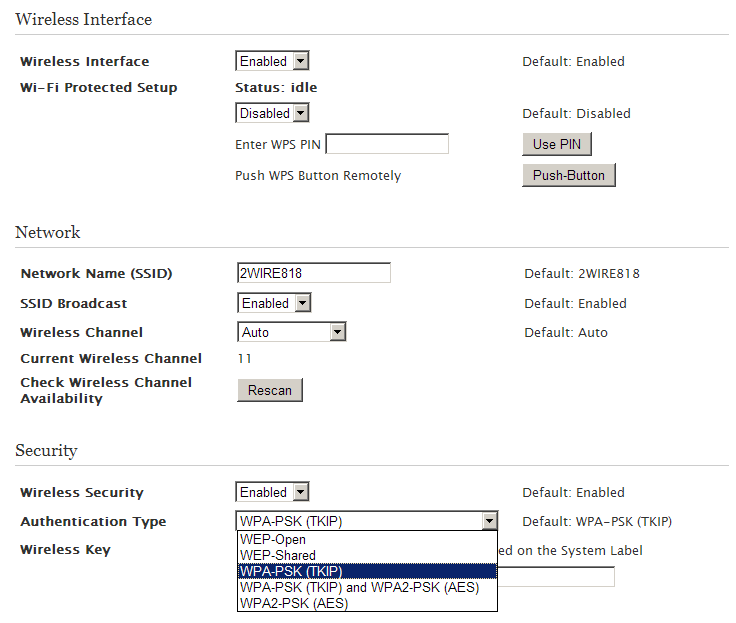
                            So I just did some digging through the MANY admin pages and tabs within pages, and here's what the relevant tab looks like:


                            So all I have to do is select "WPA2-PSK (AES)" in the drop-down list and click the Save button?

                            Is that all I have to do to switch it over to WPA2?

                            There is a statement at the top of the page:

                            Warning Modifying the settings on this page can impact the ability of devices to access your wireless network.

                            My fear is clicking the Save button and losing all connectivity and then not being able to get back into the Admin page to fix or change it back...

                            I've got ~10 different devices configured to automatically connect to the router, and it will be a PIA to re-enter the password for all of them again. Will that be necessary?

                            Thanks.

                            Comment

                            • #15
                              ocabj
                              Calguns Addict
                              • Oct 2005
                              • 7924

                              When you specify WPA2-PSK it's going to want another shared secret. If you want, just use the same one you had configured for your previous authentication type.

                              Distinguished Rifleman #1924
                              NRA Certified Instructor (Rifle and Metallic Cartridge Reloading) and RSO
                              NRL22 Match Director at WEGC

                              https://www.ocabj.net

                              Comment

                              Working...
                              UA-8071174-1