Unconfigured Ad Widget

Collapse

PC geniuses come in here

Collapse
X
 
  • Time
  • Show
Clear All
new posts
  • Brandon04GT
    In Memoriam
    • Feb 2011
    • 3016

    PC geniuses come in here

    So my one and only computer (Dell M1210) is nearing it's last leg of life and to my surprise I found out my warranty is still valid for two more weeks. Dell is going to be sending someone to replace a bunch of parts in this ****ING PIECE OF **** COMPUTER (sorry I had to vent) including the hard drive.

    I am fully expecting/wanting that my computer be reformatted since I have so many issues with it. Everything I want to save is already backed up.

    I've had repair work done before and I know what happens is that they keep the old parts and send it back to Dell after replacing them on my computer.

    My question is, how do I go about erasing all the stuff on my HD before they come over to replace it? I simply don't like the idea that someone may be able to view the contents on my old HD if they were so inclined, despite not really having anything to hide.

    I see that when I go to My Computer I can right-click on "Local Disk (C" and click reformat. But I'm assuming for obvious reasons I cannot/should not do it now otherwise I'll have no computer to use until they come to replace it within a couple days.


    Thanks for the help,
    Brandon
  • #2
    taloft
    Well used Member
    CGN Contributor
    • Sep 2002
    • 2696

    Go to the Hard Drive manufacturers Web site and download the Zero Fill utility on to a CD. The night before they are to come over, just Zero Fill the drive.
    .


    "Wise men speak because they have something to say; Fools because they have to say something."--Plato

    Comment

    • #3
      nick
      CGN/CGSSA Contributor
      CGN Contributor
      • Aug 2008
      • 19151

      Check out Hardwipe.
      DiaHero Foundation - helping people manage diabetes. Sending diabetes supplies to Ukraine now, any help is appreciated.

      DDR AK furniture and Norinco M14 parts kit: https://www.calguns.net/calgunforum/....php?t=1756292
      sigpic

      Comment

      • #4
        Brandon04GT
        In Memoriam
        • Feb 2011
        • 3016

        Originally posted by taloft
        Go to the Hard Drive manufacturers Web site and download the Zero Fill utility on to a CD. The night before they are to come over, just Zero Fill the drive.
        My CD drive is broken too....that's another thing they will be replacing.

        Originally posted by nick
        Check out Hardwipe.
        Thanks I'll look into this.

        Comment

        • #5
          taloft
          Well used Member
          CGN Contributor
          • Sep 2002
          • 2696

          Lol, that figures. You can run them from memory. I just like having utilities on CD. Once started, there is no going back. Hardwipe is basically the same thing with overwrite capabilities. It is much more robust and versatile. It will definitely do what you need. Zero fill apps suffice and are quick because they don't use an overwrite algorithm. All they do is erase any partitions and fill all sectors with zeros.

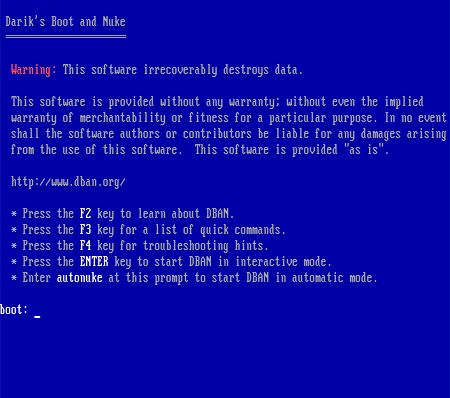
          I've also used DBAN with great success but, I used it from a bootable floppy disk.
          .


          "Wise men speak because they have something to say; Fools because they have to say something."--Plato

          Comment

          • #6
            the86d
            Calguns Addict
            • Jul 2011
            • 9587

            If it is a non-SSD (regular spinning Hard Drive) you CAN boot to almost any distro of Linux and (depending on version, on CD, USB etc.) do a "fdisk -l" from the command line to find out what drives are able to be zeroed, and just do a "dd if=/dev/zero of=/dev/" then what fdisk listed. If fdisk listed your drive as "sda" then you could do a "dd if=/dev/zero of=/dev/sda bs=1M" and it takes about 40 minutes per 80GB on a 133MHz *IDE bus, or less less with newer tech like SATAII...

            I believe that I have done this in Slax a few times, and Slax can be booted from USB with just a .exe being run to make the stick bootable initially from inside Windows.

            Multi-pass wipes are pointless as data has never been recovered from a (regular standard spinning) drive that has been zero-filled, or had all data overwritten, ever. No matter what DOD-wipe looneys say, it has NEVER been successfully implemented (aside from the possibility of sectors marked bad by SMART having data pulled from them). I have seen people post about how SSDs are different, but I know little about SSDs.

            BE ADVISED: Once you format a drive, or Zero-Fill one, you will not be able to get into Windows, or ever have access to any of your data again (unless you do some forensics after a format, but most of the time this is pointless too).
            Last edited by the86d; 06-20-2012, 9:36 AM. Reason: edited "sectors", not "clusters"

            Comment

            • #7
              Nick1236
              Veteran Member
              • Mar 2010
              • 3843

              This is much easier....

              Download Dban and burn the .iso image to a dvd using any iso burning software.

              here is a free one: http://download.cnet.com/Active-ISO-...-10602452.html

              put the disk in and start your computer up, hold F5 or F10 (whatever button gets you into your bios menu) and select boot from disk.

              Bam, your hard drive will comepletey wiped and unrecoverable. Dban uses the DoD method of erasing data (3 pass) or you can use the Gutmann method (35 passes).


              EDIT: I jsut read that your CD drive is broken.. I believe you can also run DBan while loged on using the .exe file they provide as well. either way will get the job done.
              Last edited by Nick1236; 06-20-2012, 8:27 AM.
              sigpic

              Originally posted by dirtykoala
              dont have a gun, let crack head break your window and super man drop kick you
              Originally posted by compulsivegunbuyer
              I grab my zipper and ask if he wants to make a little extra cash

              Comment

              • #8
                whatpain
                Senior Member
                • Feb 2011
                • 664

                you dont need to do all this. just reformat before he comes over. you dont need to hardwipe or do anything crazy. trust me hes not going to pry into any personal files . hes just a dude doing a job and probably could really care less whats on your pc. if hes replacing your hdd hes gonna need to reinstall the os anyway so hes probably not even going to look at the old hdd if you have all your info backed up already

                Comment

                • #9
                  the86d
                  Calguns Addict
                  • Jul 2011
                  • 9587

                  Originally posted by Nick1236
                  This is much easier...
                  Bam, your hard drive will comepletey wiped and unrecoverable. Dban uses the DoD method of erasing data (3 pass) or you can use the Gutmann method (35 passes).
                  Like I said...
                  Originally posted by the86d
                  Multi-pass wipes are pointless as data has never been recovered from a (regular standard spinning) drive that has been zero-filled, or had all data overwritten, ever. No matter what DOD-wipe looneys say, it has NEVER been successfully implemented (aside from the possibility of sectors marked bad by SMART having data pulled from them).
                  Sectors of 512 bytes.

                  Originally posted by whatpain
                  you dont need to do all this. just reformat before he comes over. you dont need to hardwipe or do anything crazy. trust me hes not going to pry into any personal files . hes just a dude doing a job and probably could really care less whats on your pc. if hes replacing your hdd hes gonna need to reinstall the os anyway so hes probably not even going to look at the old hdd if you have all your info backed up already
                  You are probably right, but some of us have things that are for our eyes only... say girlfriend pics, or daughter pics and would not want some freak looking at those... with malice, or rooster-in-hand.

                  (One concern would be if someone has a secondary drive installed, they might wipe the wrong one if they do not know which is which [especially if they are on different controllers, or someone changed SATA cable positions].)

                  Comment

                  • #10
                    whatpain
                    Senior Member
                    • Feb 2011
                    • 664

                    Originally posted by the86d
                    Like I said...
                    Sectors of 512 bytes.


                    You are probably right, but some of us have things that are for our eyes only... say girlfriend pics, or daughter pics and would not want some freak looking at those... with malice, or rooster-in-hand.

                    (One concern would be if someone has a secondary drive installed, they might wipe the wrong one if they do not know which is which [especially if they are on different controllers, or someone changed SATA cable positions].)

                    my point still stands. your going way too deep into this. to say any pc technician will just randomly go through your pictures without permission is spreading fud. if there are multiple drives dell wont handle that anyway. his warranty is factory warranty and dell is only responsible for dell factory parts and most dells dont come with multiple hard drives. also the op said he was getting his hard drive replaced not drives. also sata cable positions dont really matter because he is getting both his hard drive and optical drive replaced so his sata cables will be reset to the standard locations. all the op really needs to do if he is really worried about the guy snooping is to reformat the drive. that will erase any data sufficiently enough for any casual prying eyes. and trust me when i tell you any pc technician is more worried about losing his job then looking through your hard drive for any random pics or whatever

                    Comment

                    • #11
                      the86d
                      Calguns Addict
                      • Jul 2011
                      • 9587

                      Originally posted by whatpain
                      ...your going way too deep into this. to say any pc technician will just randomly go through your pictures without permission is spreading fud.
                      I never said they would, it is possible, and this WAS the OP's concern.

                      OP: WHATPAIN is right, in that format SHOULD be sufficient in theory (for an outsourced Dell tech), even if he takes the drive home after he swaps it out.

                      There are things you could do to completely prevent it, is it worth it? Is the data worth chancing? Do you really care if they spend MANY hours pulling data? It is up to you...

                      Comment

                      • #12
                        Brandon04GT
                        In Memoriam
                        • Feb 2011
                        • 3016

                        Lol ok I'm kinda confused now....I am not technologically inclined so half of the discussions here sound foreign to me. I'm not worried about the outsourced Dell tech actually taking it home to check it out....but I know he will have to send it back to Dell and for whatever reason I simply just would rather clear out all the stuff in my HDD.

                        I am pretty comfortable with a simple reformat I guess. But like I said, I'm guessing the easy way to do this is go to into "My Computer" and right clickc on my C: drive and select reformat? I'm still assuming for obvious reasons this won't work because i'd be reformatting the only HDD in my computer which contains the OS itself? Or am I wrong?

                        Or should I just download Hardwipe and run the program? is it as simple as running a program and thats it?

                        The guy should be coming tomorrow in the early afternoon. It would be nice to do this tomorrow morning before he comes over.

                        BTW I'm not worried about my computer not being usable after doing this. Reason being is that the plan is for the tech to replace a bunch of parts and to reload windows again and have my computer basically as good as new.

                        Thanks,
                        Brandon
                        Last edited by Brandon04GT; 06-20-2012, 3:54 PM.

                        Comment

                        • #13
                          Montu
                          Senior Member
                          • May 2011
                          • 1589

                          ^ do it the night before since it may take a while

                          windows wont re format the drive it's on

                          You have 2 options:

                          Just do a regular format/ delete partition - the drive will appear to be blank but files can be recovered if some one really wants. - you can do this by using a windows install disk or other utility you can download online and run off of a usb drive

                          zero fill etc.. will make it (nearly depending on what software u use) impossible to recover any data even if they tried. - you can download one of the mentioned programs and boot from usb to run the tool.
                          Last edited by Montu; 06-20-2012, 3:59 PM.
                          K.F.K|Μολὼν λαβέ

                          Comment

                          • #14
                            Brandon04GT
                            In Memoriam
                            • Feb 2011
                            • 3016

                            I see. So the first option will basically be as good as me dragging stuff into My Recycle Bin and adopting the mindset of out of sight, out of mind, when in fact the info is still basically readily recoverable.

                            What's the easiest way to do this zero-fill magic?

                            Just to be clear, I only have one HDD in this computer and the CD drive is broken.


                            Thanks,
                            Brandon

                            Comment

                            • #15
                              Montu
                              Senior Member
                              • May 2011
                              • 1589

                              Originally posted by Brandon04GT
                              I see. So the first option will basically be as good as me dragging stuff into My Recycle Bin and adopting the mindset of out of sight, out of mind, when in fact the info is still basically readily recoverable.

                              What's the easiest way to do this zero-fill magic?

                              Just to be clear, I only have one HDD in this computer and the CD drive is broken.


                              Thanks,
                              Brandon
                              try dban
                              Free Open-Source Data Wiping Software for Personal Use


                              I hope you have a USB thumb drive available here are some instructions on how to install it to a usb drive that you boot from

                              How to create a DBAN Bootable USB drive using YUMI USB boot creator tool. Run Darik's Boot and Nuke data destruction tool from a flash drive.
                              K.F.K|Μολὼν λαβέ

                              Comment

                              Working...
                              UA-8071174-1