Unconfigured Ad Widget

Collapse

School me on computer monitors

Collapse
X
 
  • Time
  • Show
Clear All
new posts
  • #31
    Iknownot
    Senior Member
    • Jul 2007
    • 2174

    I like 27 inch or so 1440p monitors. I think that’s a nice sweet spot for resolution vs size at a price point of about $200-250 depending on the model.

    4k is still pricey for what you get but buy once cry once I guess if you are going to use it a long time.

    Comment

    • #32
      ibanezfoo
      I need a LIFE!!
      • Apr 2007
      • 12290

      Originally posted by Featureless
      I would think 49" is WAY too big for the desktop. More of an across the room size for Powerpoint, etc.

      I'm shopping 32", going from 24" to 32".
      The problem with them is that they are wide, but not very tall. So the 49" is really only about as tall as a 30". Take a look at the 32" wide because it might be only as tall as your old 24".
      vindicta inducit ad salutem?

      Comment

      • #33
        ldsnet
        Senior Member
        • Oct 2008
        • 1422

        Found a 32" curved monitor on sale at Costco for only a few hundred dollars.
        Works great for my wife's machine being used in a similar application. I use a pair of MSI 27 gaming monitors (2 docking stations, one dock for my laptop, one dock for my work laptop).

        Comment

        • #34
          arrix
          Veteran Member
          • May 2012
          • 4478

          Originally posted by Featureless
          Yes, that's what I need to do occasionally now. But, the entire page doesn't show on the screen. So, I'm thinking a bigger screen will have bigger fonts without using the magnifier?
          Look at it this way, you can buy a 4K monitor or TV to get more desktop space but you can still increase your font and icon sizes. Or you could also just lower the overall screen resolution to 2K for the same effect but you would also have less desktop space.
          There is no week nor day nor hour, when tyranny may not enter upon this country, if the people lose their supreme confidence in themselves -- and lose their roughness and spirit of defiance -- Tyranny may always enter -- there is no charm, no bar against it -- the only bar against it is a large resolute breed of men.

          -Walt Whitman

          Comment

          • #35
            bwiese
            I need a LIFE!!
            • Oct 2005
            • 27621

            I run a 40" 4K Vizio HDTV. Just got a 2nd one for #2.

            Works great. Font scaling etc. can be adjusted so you don't get tiny fonts.

            When using a TV as a monitor you need to disable certain video 'improvements"
            for best display/low lag. These are in menu - sometimes called 'gaming mode'.

            What I'd really like is a TV/monitor with scalable "PIP" (picture in picture)
            support for 2nd source. Older projection TVs having this were quite common.

            Bill Wiese
            San Jose, CA

            CGF Board Member / NRA Benefactor Life Member / CRPA life member
            sigpic
            No postings of mine here, unless otherwise specifically noted, are
            to be construed as formal or informal positions of the Calguns.Net
            ownership, The Calguns Foundation, Inc. ("CGF"), the NRA, or my
            employer. No posts of mine on Calguns are to be construed as
            legal advice, which can only be given by a lawyer.

            Comment

            • #36
              high_revs
              Calguns Addict
              • Feb 2006
              • 7823

              Originally posted by arrix
              Looks like your chipset can only do 4K @ 60Hz with a DisplayPort interface. For HDMI, it can only do 4K@24Hz.

              https://ark.intel.com/content/www/us...mory-16gb.html

              kewl that arrix shared this as i was about to. i had a thinkpad 480s and it can only output up to 59hz or 60hz. i bought a new 36" dell since i made an oopsie and destroyed mine (keyboard slipped from hand; edge hit monitor). it was BF2022 and i bought another one. i thought it was the cables and what not and bought cables too only to find out the minimum hz needed was above what my thinkpad could send. granted this is for home and i use dual monitors at home and preferred the 36" closer to me than using the older 32" while the 36" is connected to my personal desktop. i was replacing a curved 36" with another 36" curved that also tilts down a little.

              suffice to say, i missed out on the sale since the 32" that supports lower hz was almost the same price as the 36"!


              i use 2x27" at work (eizo) and that works well at 2k something x 1440p at normal scaling.


              also i'ts not about just resolution since aging eyes won't like the 4k. rather you can get more real estate to view. you can still use max resolution and set your scaling a little larger, like 150% or even a little more. i have to use 125% on my newer 32" at 3840x2160 vs. 100% . while i can read, no need to struggle for me. 150% was a little too much.
              Last edited by high_revs; 07-08-2023, 4:31 PM.

              Comment

              • #37
                joefrank64k
                @ the Dark End of the Bar
                CGN Contributor - Lifetime
                • Mar 2009
                • 10124

                We use these at work:

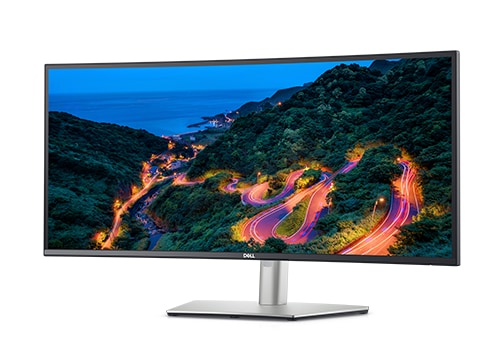
                Shop the Dell UltraSharp 34 Inch Curved USB-C Hub Monitor (U3423WE), featuring superior contrast & color on a curved WQHD monitor, or view all computer monitors at Dell.com.


                The Dell Ultrasharp line. Superb monitors.

                I was unsure if I’d like the curved screen. Takes a bit of adjustment, then you wonder how you got along without it.
                You will never, in your life, have a chance like this again.
                If I were you, I would not pass this up. I would not let this go by...this is rare.
                Come on...what harm??

                joefrank64k 251/251 100% iTrader?

                Comment

                • #38
                  Marauder2003
                  Waiting for Abs
                  CGN Contributor - Lifetime
                  • Aug 2010
                  • 3111

                  When I moved to NV I ended up with 2 65" Sony TVs. Decided to use one as a PC monitor. I run it at native resolution, 3840x2160 and at 125% scaling.

                  My eyes are 45" from the screen.

                  Best thing since sliced bread.
                  #NotMyPresident
                  #ArrestFauci
                  sigpic

                  Comment

                  • #39
                    ibanezfoo
                    I need a LIFE!!
                    • Apr 2007
                    • 12290

                    Originally posted by bwiese
                    I run a 40" 4K Vizio HDTV. Just got a 2nd one for #2.

                    Works great. Font scaling etc. can be adjusted so you don't get tiny fonts.

                    When using a TV as a monitor you need to disable certain video 'improvements"
                    for best display/low lag. These are in menu - sometimes called 'gaming mode'.

                    What I'd really like is a TV/monitor with scalable "PIP" (picture in picture)
                    support for 2nd source. Older projection TVs having this were quite common.
                    Good point about running it in gaming mode. Some have an actual PC mode as well. This eliminates lag.

                    Dell makes monitors with multiple inputs with PNP and various other split screen options. Hardware based not just the things that their monitor software does. It will also carry the sound from whichever input you want to be active. Almost like a built in KVM. They were showing them to us during our annual field trip to Dell. Not sure of the model numbers.
                    vindicta inducit ad salutem?

                    Comment

                    Working...
                    UA-8071174-1