Unconfigured Ad Widget

Collapse

State Of The Art In “Spinning Rust”

Collapse
X
 
  • Time
  • Show
Clear All
new posts
  • #16
    MrFancyPants
    Senior Member
    • Jun 2017
    • 1160

    Originally posted by Gun Kraft
    My mistake. I thought a 5 disk RAID5 had two disks of redundancy. I was wrong.
    RAID 5 utilizes n-1 parity striped across all disks. Very dangerous, especially for large arrays, since if a disk fails and needs to be replaced, a single URE during the array rebuild process means you lose your whole array, and the chance of a URE during a rebuild is around 40% I think, if not higher. If you have multiple disks purchased from the same manufacturing batch in the array, you've increased the chance of a lost array even more.

    RAID 6 steps it up to sustaining up to 2 simultaneous disk failures (n-2), but the same dangers of RAID 5 apply.

    In short, striped parity should be restricted to not-so-critical data and smaller arrays. Mirrored sets are more costly as far as hardware and disk space, but far more resilient and easily expandable.


    Comment

    • #17
      Robotron2k84
      Senior Member
      • Sep 2017
      • 2013

      As stated URE in SSD is incredibly rare, at 1:1000 compared to platter disks, essentially a non-event in the R/W lifetime of the device. The FTL and checksumming verify that the data is correct, and even if that page is unrecoverable, the old pages have a percentage of chance, or good chance if CoW is used extensively, of being able to reconstruct the data. Newer platter disk controllers utilize the same schemas, so URE is much lower (not quite as low as SSD) on platter disks of today, vs ten years ago.

      E.g. the stated URE on the 12TB Exos is 1:10^15, or one URE per quadrillion bytes, or 1024 TB. The operational lifetime of 5 years, warrantied, include 550-750 TB written, so the URE exceeds 1.5-2x the practical life of the device if you stay within the operational boundaries and replace your drives on a 5-year schedule (as you should).

      Comment

      • #18
        MrFancyPants
        Senior Member
        • Jun 2017
        • 1160

        Originally posted by Robotron2k84
        E.g. the stated URE on the 12TB Exos is 1:10^15, or one URE per quadrillion bytes, or 1024 TB. The operational lifetime of 5 years, warrantied, include 550-750 TB written, so the URE exceeds 1.5-2x the practical life of the device if you stay within the operational boundaries and replace your drives on a 5-year schedule (as you should).
        Yeah, during the normal operation of the disks in the array. However I'm referring to a rebuild process when the volume of reads is exponentially higher, when the entire parity stripe is being read multiple times over times however many disks are in the array. It's a compounding number of factors which dramatically increases the likelihood of a lost array due to a URE. I have personally never had to rebuild a RAID 5 or RAID 6 array, and the odds are still in your favor, however you are rolling the dice with your data with a striped parity array. It's a proven mathematical fact.

        If you ever encounter a situation where you do need to replace a disk in a striped parity array, and the process is successful, you should consider your disks riding on borrowed time at that point and plan for a replacement of all disks ASAP. Another possible unforeseen expense.

        Again to each their own. Disk space is cheap enough these days, mirrored sets are a very viable option.

        Comment

        • #19
          Robotron2k84
          Senior Member
          • Sep 2017
          • 2013

          Originally posted by MrFancyPants
          Yeah, during the normal operation of the disks in the array. However I'm referring to a rebuild process when the volume of reads is exponentially higher, when the entire parity stripe is being read multiple times over times however many disks are in the array. It's a compounding number of factors which dramatically increases the likelihood of a lost array due to a URE. I have personally never had to rebuild a RAID 5 or RAID 6 array, and the odds are still in your favor, however you are rolling the dice with your data with a striped parity array. It's a proven mathematical fact.

          If you ever encounter a situation where you do need to replace a disk in a striped parity array, and the process is successful, you should consider your disks riding on borrowed time at that point and plan for a replacement of all disks ASAP. Another possible unforeseen expense.

          Again to each their own. Disk space is cheap enough these days, mirrored sets are a very viable option.
          I’ll let you know if there are any UREs on my array. The drives will lifetime-lock R/O before any UREs would occur, and necessitate drive swap, anyway.

          That was one of the considerations in choosing R5 with SSD, so *should* be a non-issue, knock on wood.

          Comment

          • #20
            MrFancyPants
            Senior Member
            • Jun 2017
            • 1160

            I hope you don't experience any, and perhaps with the safeguards engineered into the SSD technology it will compensate for much of the danger of running platters. Unfortunately for my needs SSD drives are too costly for the amount of storage space I'll need, so I'll be running an array of platters in a mirrored sets configuration. I'll be giving up half the total drive space, but it's data I do NOT want to have to try to replace, ever.

            Comment

            • #21
              Robotron2k84
              Senior Member
              • Sep 2017
              • 2013

              And I hope your platters keep on spinning and no hiccups, as well.

              Shamelessly stolen from a specific forum post:

              The question often comes up as to why RAID 5 is so dramatically warned against and considered deprecated for use with traditional Winchester hard drives (aka spinning rust) and yet is often recommended for use with more modern SSDs (solid state drives.) Like with anything, it is actually a combination of many factors that come together to make one use case so bad and the other so generally good. Here is the run down:

              • UREs are the primary risk factor for traditional hard drives in RAID 5 arrays, but UREs are not a risk (so far) on SSDs. So this one fact alone completely changes the "risk game" between Winchester drives and SSDs

              • Time to Resilver is hugely reduced with traditional arrays often taking days or even weeks to resilver. The move to SSDs often cuts that to a small fraction of the original time. That resilver time is not just a performance impact to the environment, in some cases actually making the array useless until it has completely, but also means that the array is completely at risk of secondary drive failure during that window. Reducing that window greatly reduces that risk.

              • Resilver Impact is much reduced as SSDs handle non-sequential data access so well meaning that even during a typical resilver an all SSD RAID 5 array may continue to function extremely well while still performing a high speed resilver operation meaning that the risk of performance impact to the environment is much smaller.

              • Parity Resilver secondary drive failure risk does not exist. This is a rather sizeable risk to Winchester drives. The parity resilver operation often induces other drives to fail during the resilver operation due to the large strain placed on them for the operation. This does not impact SSDs making the resilver operation far safer.

              • Performance is very different between Winchester drives and SSDs. The move from Winchester drives to SSD is a many orders of magnitude jump in performance. The write performance difference between RAID 5 and its key competitor, RAID 10, is small by comparison. So while the latency impact of a parity calculation is great in relation to the IOPS of the SSDs, the overall speed increase is generally so immense that the performance loss to the parity system is often of no consequence except in the most demanding environments and in those environments it is common to move to different models of data protection other than traditionally managed RAID arrays.

              • Cost is very different with SSDs having a high capacity cost but a low performance cost, the opposite of Winchester drives. This means that using RAID 5 often results in a large cost savings while maintaining high performance and high reliability that does not exist with Winchester drives.

              Comment

              • #22
                Robotron2k84
                Senior Member
                • Sep 2017
                • 2013

                Just an update, I made a few changes to the array, and one was an (intentional) destructive re-overprovisioning from 10 to 7%, but I did use the change to measure the rebuild speed and time of the SSDs for R5.

                With throughput throttled to 600MB/s the array rebuild and, scrub took 2.5 hrs. At 2000MB/s, it took about 45 minutes.

                Ejecting and reinserting a single SSD took the array 25 minutes to sync and 1.25 hours to scrub. At 2000MB/s it took about the same as the rebuild.

                That’s for the full 24T. Compare that to days to weeks for spinning rust. It’s easily 10-20x faster and does confirm the window for failure during a rebuild is reduced to manageable levels. Backing up and restoring the data for the destructive change took about 6 hours each.

                I also tested performing a series of scrubs, at lower speeds, 10 in total. Through all the scrubs and rebuilds, the msecli utility reported no percentage of drive lifetime loss for those operations, so impact appears to be minimal for performing monthly R5 scrubs.

                Interestingly, I also just found out about the Highpoint (not gun-related) NVMe M.2 PCIe RAID cards. This will be my next raid setup, and moving away from a 2.5” chassis: a single 8x NVMe PCI card, in a (hopefully) mini-ATX chassis, with quad 10GBe SFP card and 8x 8TB NVMe drives, 28GB/s throughput. Hotswapping does take a backseat, however. You can’t have everything. Those two cards alone, would saturate a PCIe 4.0 bus, so on the lookout for PCIe 5.0. That idea of the dual Power10 PPC 32-core board might just re-emerge.

                Spec’d, it’s about $10K in today’s dollars (minus the system boards and CPU/RAM), but if the SSDs get cheap, it will be sub $5K in a year or two.

                Comment

                • #23
                  MrFancyPants
                  Senior Member
                  • Jun 2017
                  • 1160

                  Didn't Highpoint provide a lot of onboard RAID chipsets for mobo manufacturers? I know the name but I don't recall exactly what their niche is. One of their products I remember is Rocket RAID, don't remember if that's onboard or an addon card.

                  If you're really interested in NVMe hot-swappable RAID, have you seen these?


                  It would make for a nice mini PC system. They are working on several concept enclosures, though that particular one only supports up to PCIe Gen 3 NVMe. I expect them to have a Gen 4 model in short order.

                  Price per terabyte is still the prohibiting factor for me. Also I only need a RAID type volume for long term and infrequent storage, so SSD doesn't make sense, at least for now. I can build out a 1:1 mirrored 80 TB volume with "spinning rust" as you say for $4k at today's prices.
                  Last edited by MrFancyPants; 01-19-2022, 8:21 PM.

                  Comment

                  • #24
                    Robotron2k84
                    Senior Member
                    • Sep 2017
                    • 2013

                    Comment

                    • #25
                      Marauder2003
                      Waiting for Abs
                      CGN Contributor - Lifetime
                      • Aug 2010
                      • 2956

                      Confused. How does the Icydock connect to the mono?


                      Originally posted by MrFancyPants
                      Didn't Highpoint provide a lot of onboard RAID chipsets for mobo manufacturers? I know the name but I don't recall exactly what their niche is. One of their products I remember is Rocket RAID, don't remember if that's onboard or an addon card.

                      If you're really interested in NVMe hot-swappable RAID, have you seen these?


                      It would make for a nice mini PC system. They are working on several concept enclosures, though that particular one only supports up to PCIe Gen 3 NVMe. I expect them to have a Gen 4 model in short order.

                      Price per terabyte is still the prohibiting factor for me. Also I only need a RAID type volume for long term and infrequent storage, so SSD doesn't make sense, at least for now. I can build out a 1:1 mirrored 80 TB volume with "spinning rust" as you say for $4k at today's prices.
                      #NotMyPresident
                      #ArrestFauci
                      sigpic

                      Comment

                      • #26
                        Robotron2k84
                        Senior Member
                        • Sep 2017
                        • 2013

                        Originally posted by Marauder2003
                        Confused. How does the Icydock connect to the mono?
                        Mobo?

                        The dock just has a bunch of SATA/SAS connectors on the back of the in-case part of the chassis that connect to ports on your system board or expansion controller.

                        The dock has no intelligence on its own, and is just a way to contain and connect the drives. Which, sadly, means that you are operating one or two (or more) NVMe sticks per port, that normally communicate at 1-2 GB/s (each), at 600 MB/s SATA III speeds (combined). So, not ideal; far from it, in fact. The only benefit, seemingly, would be compactness, and not improved device speed.

                        What IcyDock should do is, unfortunately, create a proprietary PCIe card and connector for the host to dock interface, running multiple USB4 channels over a single cable. M.2 / U.2 (NVMe+USB 3.0 GB/s) have supplanted the proposed SataExpress standard (3.0 GB/s), which was to be the next iteration of internal SATA. There isn’t likely to be another SATA rev. beyond III, due to design issues and NVMe / USB4 (4.0 GB/s) standards obsoleting the SATA physical spec., in general.

                        But, ask yourself why hot-swapping evolved in the first place: to replace failed mechanical devices without downtime, and then ask if NVMe drives suffer the same maladies? SSD is more akin to DRAM, and you don’t see hot-swapped DRAM outside of clustered supercomputers that can’t afford downtime at all. So, in the consumer to SMB space, it’s correct to ask why is hot-swapping NVMe necessary if their lifetime failure rates are the same as their lifetime read / write rates, with nominal durability. That makes them pretty-much sealed devices except EOL replacement that can be scheduled years in advance.

                        Comment

                        • #27
                          MrFancyPants
                          Senior Member
                          • Jun 2017
                          • 1160

                          Originally posted by Marauder2003
                          Confused. How does the Icydock connect to the mono?
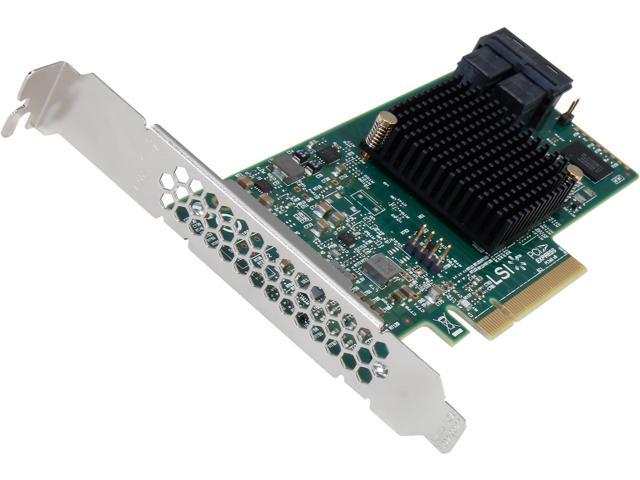
                          The dock contains SFF-8643 (miniSAS) connectors, so in order to take full advantage of the m.2 drive speeds, you would need a PCIe 3.0 SAS host adapter (bonus benefit: hardware RAID) connected to a PCIe 3.0 slot on your mobo, something like this:

                          Buy LSI 9300-8i PCI-Express 3.0 SATA / SAS 8-Port SAS3 12Gb/s HBA - Single--Avago Technologies with fast shipping and top-rated customer service. Once you know, you Newegg!


                          You can also get miniSAS breakout cables with standard SATA connectors at one end and connect to SATA ports on your mobo, but I don't know if they would have to be SAS capable. I also have no idea how device allocation would work at the system level with a single miniSAS dedicated to one m.2 drive and 4 SATA connectors at the other end. The dock documentation I've seen is not complete.

                          Valid point. I would venture to guess the main appeal of the dock is not for hot swap capability, but rather any easy and expandable way to cram your system full of m.2 format SSDs.
                          Last edited by MrFancyPants; 01-26-2022, 4:43 PM.

                          Comment

                          • #28
                            Robotron2k84
                            Senior Member
                            • Sep 2017
                            • 2013

                            But looking at their proposal, it’s like 5 sticks per sled, and all sharing one bus, so no faster than SATA III.

                            If you have 32 TB per sled and SATA III speeds per stick, and RAID on top, you probably should have just saved the money and gone platter to begin with.

                            Except for the cool-factor, I imagine that’s why the dock is still not a purchasable product.

                            Comment

                            • #29
                              MrFancyPants
                              Senior Member
                              • Jun 2017
                              • 1160

                              Yeah I'm not defending the feasibility. Personally for me it's excessive, given the extra cost involved with maximizing its potential. If they are on a shared bus (I'm really not clear on that), and if it's not wide enough to carry max throughput for all drives combined, a tray full of 2.5" SSDs would likely perform similar, or better, and cost much less.

                              Comment

                              • #30
                                Robotron2k84
                                Senior Member
                                • Sep 2017
                                • 2013

                                To me, all the speed on the drive-side still can’t be used without a butt-load of 10Gbe or faster (IFB/FC) networking, anyway. And even with multiple 10Gb ports, the switching gear for that is also still a bit spendy.

                                Something like the IcyDock running at full speed would need a quad 100Gbe fiber card to make it useful.

                                Comment

                                Working...
                                UA-8071174-1