Unconfigured Ad Widget

Collapse

State Of The Art In “Spinning Rust”

Collapse
X
 
  • Time
  • Show
Clear All
new posts
  • Robotron2k84
    Senior Member
    • Sep 2017
    • 2013

    State Of The Art In “Spinning Rust”

    As I embark on the new year, I have upgraded my personal storage array with all Micron/Crucial SSD drives for a conservative 24T of Raid-5, and acquired a half dozen new standard 3.5" platters to do the bank vault rotation for off-site.

    Seagate Exos 12T SATA disks. They make larger sizes, up to 18T I think, but the 12-14T are the fastest ones, from what I've been told. They are all CMR drives, and quite bulky, as you would expect.

    In a JMicron USB<-->SATA hot-swap enclosure, they are good for linear speeds of 175-300 MB/s and random reads at 12-18 MB/s. The BlackMagic test below was done with the 5GB sample size.

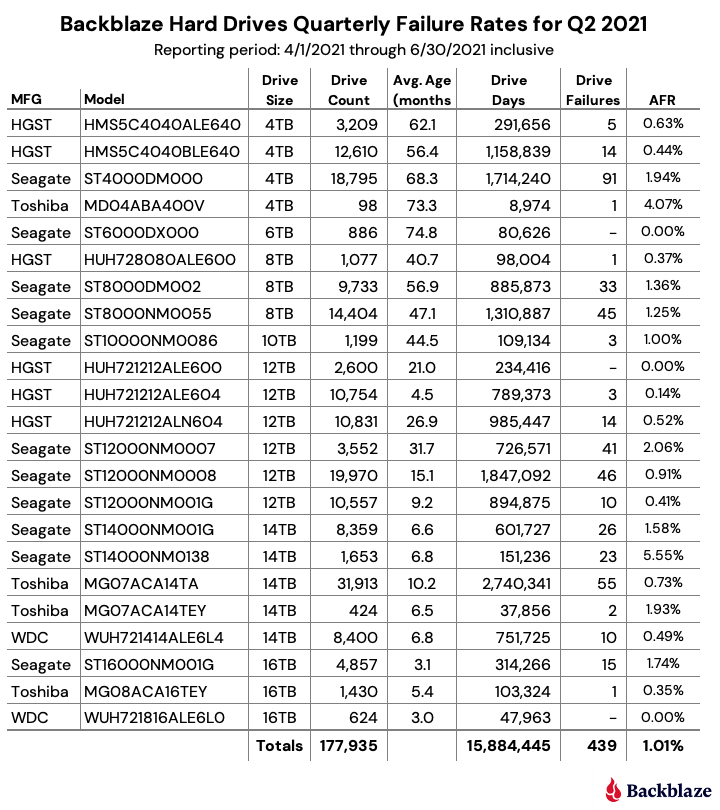
    That's not a whole heck of a lot slower than a busy SSD. Backblaze "2021 Q2 Drive Report" were listed as 0.41% failure rate (pretty decent, but not outstanding).

    I was rather pleasantly surprised. These are 4K native, so don't have any 512B storage in my pool, any more.



    Last edited by Robotron2k84; 02-10-2022, 11:41 AM.
  • #2
    hermosabeach
    I need a LIFE!!
    • Feb 2009
    • 19807

    What do you do with your set up?
    Rule 1- ALL GUNS ARE ALWAYS LOADED

    Rule 2 -NEVER LET THE MUZZLE COVER ANYTHING YOU ARE NOT PREPARED TO DESTROY (including your hands and legs)

    Rule 3 -KEEP YOUR FINGER OFF THE TRIGGER UNTIL YOUR SIGHTS ARE ON THE TARGET

    Rule 4 -BE SURE OF YOUR TARGET AND WHAT IS BEYOND IT
    (thanks to Jeff Cooper)

    Comment

    • #3
      Robotron2k84
      Senior Member
      • Sep 2017
      • 2013

      Anything and everything. The array hosts all my music, movies, videos for editing, VM backing stores, backup for my business, and about 100 other things, plus staging areas for development work. 24T is still on the small side for what I would actually like, but 8T SSDs are still not all that up to speed and Samsung QVOs are pretty much the only options without spending a TON more.

      All of the array data fits on two 3.5" disks (one so far), so no need for tape, yet.

      Probably overkill for a lot of folks, but I bet there are people here with bigger pools.

      Just thought it was a good chance to see what the current state is for 3.5" disks, since I'm not in that market very much, any more.

      Cheers

      Comment

      • #4
        Turbinator
        Administrator
        CGN Contributor - Lifetime
        • Oct 2005
        • 11960

        I think there's a 20TB model coming out soon, if not out already.

        I'm trying to envision why the 12TB to 14TB models are faster - I believe in the older days that was true to an extent, where it was faster to seek data with fewer heads and platters, but I think there are some technology advancements in the drive that nullify that to an extent, so anything in the 16TB, 18TB, and 20TB range should be equally good performers.

        What's nice is that you're seeing such good read / write performance in what appears to be an array of 2 disks, set up as RAID 5. I wouldn't have expected that configuration to get close to SSD performance, but that's a nice find, as you say.

        I'm wondering if you'd see even better performance if you striped across more disks - not sure.

        Turby

        Comment

        • #5
          Robotron2k84
          Senior Member
          • Sep 2017
          • 2013

          A bit of clarification. The SSDs are the Raid elements, and the platter disks are my backup volumes. They are not in a Raid configuration and are just USB attached to the array for archiving and offsite storage.

          The R/W speeds I posted are for a bare, single disk, not amalgamated into a span or mirror.

          You are absolutely right, though, in a stripe, the Exos should fly.

          As for why the smaller drives are faster, I believe it has to do with cache performance vs. write speed. The larger drives may have superior linear capabilities, but emptying and filling the 256MB cache has its drawbacks and a pipelined FIFO may be more efficient. I would expect Seagate to increase the cache size in the larger models.

          Remember, too, that these aren’t simply IDE disks running SATA protocols, they have controllers inside them that rival the logic of everyday SSDs, which means that the drives are doing a lot more to manage the storage than simply reading and writing. These are LBA drives, and can also do CoW and LBA remapping on the fly, which may be the reason for their edge in performance.

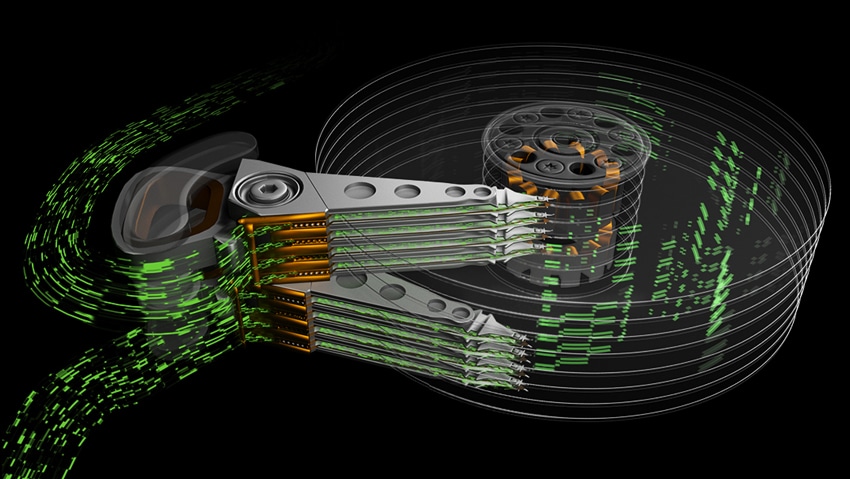
          Lastly, there are a few different models of the Exos line, and they do make SAS versions, with the biggest benefit being that the controller is dual-ported for SAN redundancy. And the other oddity is the Exos 2X14 which has two independent head gantries one for the top platters and one for the bottom, being able to not only read and write simultaneously, but seek independently, and a top speed of 500MB/s. Not sure that comes in a SATA format, however.


          Happy new year!

          Comment

          • #6
            MrFancyPants
            Senior Member
            • Jun 2017
            • 1160

            I wish I was comfortable with only a 24 TB array, it would be so much easier. That's just scraping the surface of what I need as I have many more TB of data to archive, and currently it's spread out all over the place, though I do have at least 3 copies of all the important data. I have a 16-bay SuperMicro storage server chassis with 2 8-port custom flashed SATA controllers and will be running a redundant ZFS pool of mirrors, probably in the neighborhood of 48-64 TB. I need to finish paying off the $3,500 desktop I recently built before investing in drives, and hoping the prices will come down by then. Probably wishful thinking....

            Curious, why RAID 5? There are very few reasons to use striped parity anymore, especially for larger arrays. IMO the chance of data loss and wear and tear on the hardware is too high. I have a small 5-bay QNAP NAS running in RAID 5 which is only for hosting media, but it's only 10 TB total (8TB usable) so who cares if it tanks. That's the only place I'd consider RAID 5 to maximize the storage space as the data isn't critical.
            Last edited by MrFancyPants; 01-02-2022, 11:12 AM.

            Comment

            • #7
              Gun Kraft
              Vendor/Retailer
              • Jul 2014
              • 807

              I use a Synology 918+ and recently upgraded my RAID 10 from 4x 12TB Exos drives to 4x 16TB Exos drives. I would have gone with 18TB (which currently is the largest Exos available) but the 918 doesn't support them. Then just for fun bought a Synology DX517 and created a second volume on it as a SHR2 (Synology Hybrid RAID) using the "old" 12TB drives.

              I have 5 Exos 12TB and one failed. It was easy to return to Seagate for a free replacement.

              Reasons I went with RAID 10 vs 5: faster read/write speeds, ability to continue using the RAID when done drive goes down and quicker rebuild times.

              Reasons I went with SHA vs. RAID 10: easier to upgrade volume size over time with mismatched drives.

              Drawback to RAID 10 vs. RAID 5: less available storage, only guaranteed to protect against 1 drive failure at a time where RAID 5 can survive if 2 drives simultaneously go down.

              Drawback to SHA vs. RAID 10: read/write performance isn't as good.
              SF Bay Area firearm training
              www.gunkraft.com

              Comment

              • #8
                Turbinator
                Administrator
                CGN Contributor - Lifetime
                • Oct 2005
                • 11960

                Originally posted by Gun Kraft
                where RAID 5 can survive if 2 drives simultaneously go down.
                I don't recall that being the case. You thinking of RAID 6?

                "Only 1 disk failure is allowed in RAID5. If 2 disk fails data cannot be retrieved"


                Turby

                Comment

                • #9
                  Robotron2k84
                  Senior Member
                  • Sep 2017
                  • 2013

                  Originally posted by MrFancyPants
                  I wish I was comfortable with only a 24 TB array, it would be so much easier. That's just scraping the surface of what I need as I have many more TB of data to archive, and currently it's spread out all over the place, though I do have at least 3 copies of all the important data. I have a 16-bay SuperMicro storage server chassis with 2 8-port custom flashed SATA controllers and will be running a redundant ZFS pool of mirrors, probably in the neighborhood of 48-64 TB. I need to finish paying off the $3,500 desktop I recently built before investing in drives, and hoping the prices will come down by then. Probably wishful thinking....

                  Curious, why RAID 5? There are very few reasons to use striped parity anymore, especially for larger arrays. IMO the chance of data loss and wear and tear on the hardware is too high. I have a small 5-bay QNAP NAS running in RAID 5 which is only for hosting media, but it's only 10 TB total (8TB usable) so who cares if it tanks. That's the only place I'd consider RAID 5 to maximize the storage space as the data isn't critical.
                  Raid 5 is still the best balance of capacity and redundancy, without necessitating a mirror set or me having to purchase a bigger chassis or spend more on higher capacity SSDs.

                  IOPs to me are the key metric, so the space is fine, but I need higher I/O than what ZFS provides, hence the SSDs in the first place. ZFS does multiple I/O operations for each write, and while great for redundancy, and ZFS is pretty neat overall, it's not what fits for my backing stores and video editing on the array that I have.

                  I'm not practically concerned with the extra wear, the array is set up with hot-spares and I have a few extra SSDs should I encounter failure. They're cheap enough to have a few extra on hand.

                  I'm more concerned with figuring out the next chassis to get which I can get 10Gbe on. Looking at the TrueNas boxes, but they're ugly and small. Who knows, maybe I'll build out a 2U 24 drive enclosure.

                  Comment

                  • #10
                    Robotron2k84
                    Senior Member
                    • Sep 2017
                    • 2013

                    Originally posted by Gun Kraft
                    I use a Synology 918+ and recently upgraded my RAID 10 from 4x 12TB Exos drives to 4x 16TB Exos drives. I would have gone with 18TB (which currently is the largest Exos available) but the 918 doesn't support them. Then just for fun bought a Synology DX517 and created a second volume on it as a SHR2 (Synology Hybrid RAID) using the "old" 12TB drives.

                    I have 5 Exos 12TB and one failed. It was easy to return to Seagate for a free replacement.

                    Reasons I went with RAID 10 vs 5: faster read/write speeds, ability to continue using the RAID when done drive goes down and quicker rebuild times.

                    Reasons I went with SHA vs. RAID 10: easier to upgrade volume size over time with mismatched drives.

                    Drawback to RAID 10 vs. RAID 5: less available storage, only guaranteed to protect against 1 drive failure at a time where RAID 5 can survive if 2 drives simultaneously go down.

                    Drawback to SHA vs. RAID 10: read/write performance isn't as good.
                    That is one thing that is pretty depressing: that Synology is curtailing and actively not testing new drives in favor of their own brand of storage. The fact that the leading enterprise disks aren't supported is proof positive that they want to own the whole vertical, and it isn't a consumer product company, anymore.

                    I've been hard of them in the past for their really sucktastic hardware, but such a move seals the deal that I'll never buy one of their products in the future.

                    Comment

                    • #11
                      Turbinator
                      Administrator
                      CGN Contributor - Lifetime
                      • Oct 2005
                      • 11960

                      Originally posted by Robotron2k84
                      That is one thing that is pretty depressing: that Synology is curtailing and actively not testing new drives in favor of their own brand of storage. The fact that the leading enterprise disks aren't supported is proof positive that they want to own the whole vertical, and it isn't a consumer product company, anymore.
                      I'm checking out the Synology website and it appears the 918+ is sold without disk drives, so if they plan on supporting that storage enclosure ongoing, it would be in their best interests to continue to test and qualify new disk drives with their products. That way they can continue to breathe new life into their existing storage enclosure platforms as new drives are released.

                      From a high level perspective, I can tell you there isn't going to be much difference between the 16TB SATA Exos X16 and the 18TB SATA version - but if Synology are using any kind of firmware lockout features, then yeah, they're going to prevent users from plugging in 18TB SATA drives and using them unqualified.

                      Otherwise, absent robust qualification and any lockouts on Synology's part, the 18TB SATA should work.

                      Turby

                      Comment

                      • #12
                        Robotron2k84
                        Senior Member
                        • Sep 2017
                        • 2013

                        Originally posted by Turbinator
                        I'm checking out the Synology website and it appears the 918+ is sold without disk drives, so if they plan on supporting that storage enclosure ongoing, it would be in their best interests to continue to test and qualify new disk drives with their products. That way they can continue to breathe new life into their existing storage enclosure platforms as new drives are released.

                        From a high level perspective, I can tell you there isn't going to be much difference between the 16TB SATA Exos X16 and the 18TB SATA version - but if Synology are using any kind of firmware lockout features, then yeah, they're going to prevent users from plugging in 18TB SATA drives and using them unqualified.

                        Otherwise, absent robust qualification and any lockouts on Synology's part, the 18TB SATA should work.

                        Turby
                        For a few years, they have provided a compatibility list with specific drives and firmware that they will support and that enables the features on the devices. If your drive and firmware are not listed, those features will be missing.

                        They are actively not validating new firmware and drives to push people to buy their own drives that are rebadged Toshiba, Silicon Power, SanDisk and WD, from what I remember.

                        Here’s an article on it from last year. They talk about the Ent. arrays, but Synology is starting to lock the consumer ones by way of obsolescence (just like the CA roster):

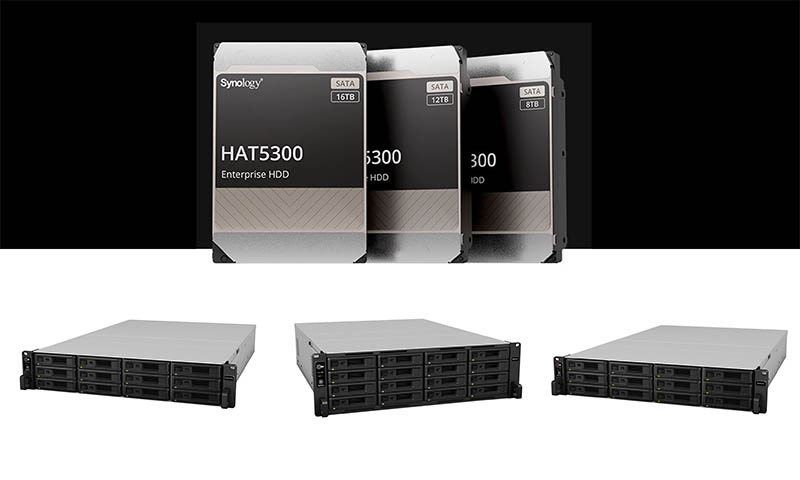
                        Synology launched a new line of enterprise NAS units along with its HAT5300 hard drives. It is now locking these NAS units to specific drives


                        Anyway, dick move by them, and they won't be getting any $$$ from me and I don't recommend their hardware, simply on the basis that they have no independent caching controller and do all their assembly in software on a poor J-series Celeron, while running BusyBox and all the other cruft that a storage engine doesn't need, like LAMP stacks and JVM and a Hypervisor.

                        Pointless on a SMB-sized unit. Their enterprise offerings are rebadged SuperMicros, so YMMV.

                        Comment

                        • #13
                          MrFancyPants
                          Senior Member
                          • Jun 2017
                          • 1160

                          Synology screwed the pooch by locking down their hardware. Gonna cost them a lot of customers, myself included. I won't buy hardware if I'm restricted on what I can do with it, unless it's for a very specialized purpose and I can't get around it. Fortunately storage arrays are a dime a dozen and there are plenty of manufacturers to choose from.

                          Comment

                          • #14
                            Gun Kraft
                            Vendor/Retailer
                            • Jul 2014
                            • 807

                            Originally posted by Turbinator
                            I don't recall that being the case. You thinking of RAID 6?

                            "Only 1 disk failure is allowed in RAID5. If 2 disk fails data cannot be retrieved"
                            My mistake. I thought a 5 disk RAID5 had two disks of redundancy. I was wrong.
                            SF Bay Area firearm training
                            www.gunkraft.com

                            Comment

                            • #15
                              Robotron2k84
                              Senior Member
                              • Sep 2017
                              • 2013

                              Maybe thinking of Raid-15: a striped parity volume of individual mirror devices, which came into vogue when people freaked out about the 12T / URE theoretical wall. Luckily that doesn’t practically apply to SSD, and the barrier was overcome with better controllers that were able to manage LBAs better.

                              R50 is the inverse, a stripe of R5 volumes. R51 is R5 mirrored to another R5 volume.

                              Comment

                              Working...
                              UA-8071174-1