Unconfigured Ad Widget

Collapse

Am I overloading my router?

Collapse
X
 
  • Time
  • Show
Clear All
new posts
  • Gregchico
    Vendor/Retailer
    • Dec 2006
    • 2377

    Am I overloading my router?

  • #2
    d33pt
    Senior Member
    • Jan 2012
    • 1628

    I'd get a separate wired access point and make a new SSID for it, and just put all the "smart" devices on that. Use your AC5300 router for your real devices. That should free up a lot of bandwidth on your router. That's fairly cheap and easy to do if coverage is not an issue. 40 devices is a lot on one router.

    Comment

    • #3
      ExtremeX
      Calguns Addict
      • Sep 2010
      • 7160

      If you want the UniFi system to work correctly you need a controller. You may not need remote management, but you still need it to setup/manage the UniFi environment. All changes are made on the controller and pushed out to UniFi hardware.

      The controller software is a free download from Ubiquity, but you still need to host it somewhere (PC, MAC, Virtual Machine (cloud or local). The "CloudKey" is just a small Linux computer with the UniFi management controller software running on it.
      ExtremeX

      Comment

      • #4
        Ivan275
        Member
        • May 2013
        • 241

        Change your wifi password, all devices will disconnect. Now connect with just one device and see what speeds you get next to the router without any overload. Change the password back to what it was originally.

        Now consider is it worth the cost of another router to get whatever speed increase you got.

        Comment

        • #5
          The War Wagon
          I need a LIFE!!
          • Apr 2011
          • 10294

          Do you live IN the Best Buy computer showroom, or...???
          sigpic

          Comment

          • #6
            Gregchico
            Vendor/Retailer
            • Dec 2006
            • 2377

            Originally posted by d33pt
            I'd get a separate wired access point and make a new SSID for it, and just put all the "smart" devices on that. Use your AC5300 router for your real devices. That should free up a lot of bandwidth on your router. That's fairly cheap and easy to do if coverage is not an issue. 40 devices is a lot on one router.
            Is that as simple as adding a Ubiquiti access point to the switch?

            Originally posted by ExtremeX
            If you want the UniFi system to work correctly you need a controller. You may not need remote management, but you still need it to setup/manage the UniFi environment. All changes are made on the controller and pushed out to UniFi hardware.

            The controller software is a free download from Ubiquity, but you still need to host it somewhere (PC, MAC, Virtual Machine (cloud or local). The "CloudKey" is just a small Linux computer with the UniFi management controller software running on it.
            Thanks for the info. I was having trouble understanding all the functions of the individual components.

            Originally posted by Ivan275
            Change your wifi password, all devices will disconnect. Now connect with just one device and see what speeds you get next to the router without any overload. Change the password back to what it was originally.

            Now consider is it worth the cost of another router to get whatever speed increase you got.
            I will try this tonight when everybody goes to bed. A while ago when I first set this up, we had 50 down and I was getting all 50, granted I have added 15-ish more devices since then.
            As far as cost goes, your point is taken and understood.

            Comment

            • #7
              the86d
              Calguns Addict
              • Jul 2011
              • 9587

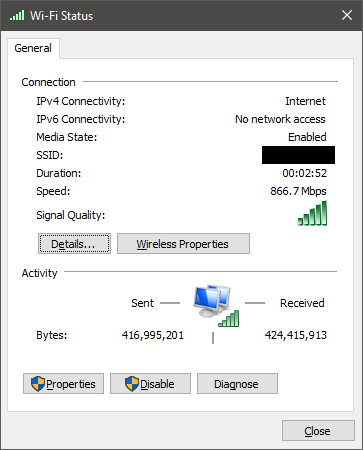
              You never get full bandwidth on wireless speeds, in my experience:

              Wired 500/500Mbps, but I usually do just a bit closer to 500/500.
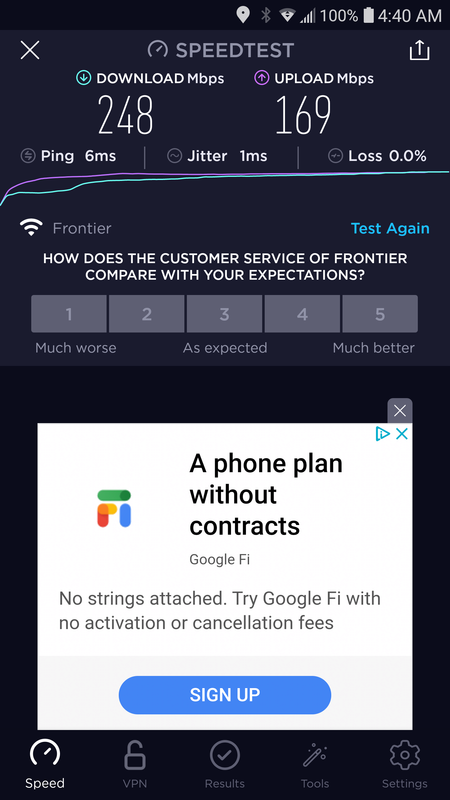

              802.11N speeds on my phone on a 500/500 pipe.
              Link shows 585Mbps on the phone...

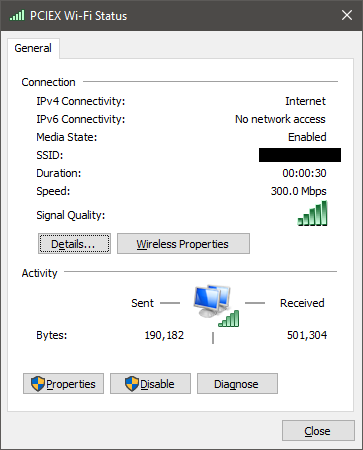
              Wireless on my rackmount i7 PC from like 15" away I normally get about 200/200 max, although antennas are behind the PC as the crow flies from the router, and behind 1.5 walls (.5 is computer room door).

              What is you link speed?
              Last edited by the86d; 07-14-2020, 5:57 AM.

              Comment

              • #8
                the86d
                Calguns Addict
                • Jul 2011
                • 9587

                Only ~200/200Mbps on my AC USB 3.0 NIC from 15" away from my AC Asus router:


                What is your link speed showing?
                Last edited by the86d; 07-14-2020, 5:58 AM.

                Comment

                • #9
                  SoCal1
                  Member
                  • Feb 2011
                  • 328

                  Comment

                  • #10
                    LTC-J
                    Senior Member
                    • Aug 2012
                    • 1055

                    I was going to recommend get another router. They aren't THAT expensive.

                    Also, does any of it require active internet connection?

                    I would avoid UniFi... their customer service leaves a LOT to be desired. In my experience, if your equipment is out of warranty, they won't do a dam thing.

                    Comment

                    • #11
                      the86d
                      Calguns Addict
                      • Jul 2011
                      • 9587

                      Any metal around the router antennas?

                      Comment

                      • #12
                        Gregchico
                        Vendor/Retailer
                        • Dec 2006
                        • 2377

                        Originally posted by Ivan275
                        Change your wifi password, all devices will disconnect. Now connect with just one device and see what speeds you get next to the router without any overload. Change the password back to what it was originally.
                        I had to test over 5-ish minutes or my ISP slows me down. I peaked around 75 down. Not much of an improvement. Your second point is still very valid...

                        Originally posted by the86d
                        What is you link speed?
                        From my Note 10+, approximately 15ft, no obstacles, line of sight.
                        2.4ghz is 144mbps, 5ghz (#1)is 780mbps, 5ghz (#2) is 1.0GBps


                        Originally posted by SoCal1
                        Get an app on a phone like “Wi-Fi Sweetspots” which will give you an indication of the speed between your device and Wi-Fi router. This will be more useful in measuring the Wi-Fi speed and not the internet speed.
                        I tried the app, it said 550-ish mbps from the same spots where my phone said 1.0gbps on the #2 5ghz band....

                        Originally posted by the86d
                        Any metal around the router antennas?
                        It is about 2-3ft above a built in microwave oven unit (I aware of the possibilities of interference when it is on although I have not noticed any issues), on some 4 inch stilts allowing ventilation and get it as high as I can. I do have a few cloud hard drives and a 8 port switch in a metal housing and other electronic devices with in 1ft, but nothing else.
                        Last edited by Gregchico; 07-14-2020, 7:52 PM.

                        Comment

                        • #13
                          Robotron2k84
                          Senior Member
                          • Sep 2017
                          • 2013

                          On top of a microwave? Seriously?

                          Microwaves have built-in shielding that will eat your signal. Move it.

                          Comment

                          • #14
                            Gregchico
                            Vendor/Retailer
                            • Dec 2006
                            • 2377

                            Originally posted by Robotron2k84
                            On top of a microwave? Seriously?

                            Microwaves have built-in shielding that will eat your signal. Move it.
                            In my defence, I did move it approximately 6 extra feet away (the longest cable I could find at the time, bringing the "total diagonal distance" to about 10 feet) when I first started noticing that I was not getting "all my bandwidth". I did not notice any difference in performance.
                            And as I stated, I'm aware that ovens when on can interfere with WiFi, but I have not noticed anything. I also primarily use the 5ghz channels, especially for my speed testing as they are less congested.

                            Comment

                            • #15
                              Robotron2k84
                              Senior Member
                              • Sep 2017
                              • 2013

                              Comment

                              Working...
                              UA-8071174-1