

 Tweet
Tweet
For the security aspect, ALWAYS use a VPN on public wifi. You would be wise to invest in a dedicated VPN service. Do some shopping around and choose one that aligns with your values.
-
-
The laptop doesn't have wi-fi, like I said in the OP. I also want to bring my home phone, ethernet only. It would be easier to use just one gadget. Less space in my bags, fewer a/c adapters and cords strung around my hotel room, etc, etc.Comment
-
I use an iPhone, iPad, and sometimes an Apple laptop when traveling. One collateral benefit is that I can use a single VPN account for all my devices (and all my family's devices). The one I use is Encrypt.me, and it doesn't require an external device like a router or hot spot so long as I have access to hotel (or other) WiFi. It doesn't even require an Apple device-- it works on several platforms. It is basically set-it-and-forget-it; once the app is installed on your phone, tablet, whatever, any time you use an untrusted WiFi network, it automatically puts you on a VPN so you can do just about whatever you want (except watch Netflix).
The only time I would use a WiFi hotspot would be if I was traveling outside the country, where my cellular provider has sloooooow data roaming.iTrader under old CalGunsComment
-

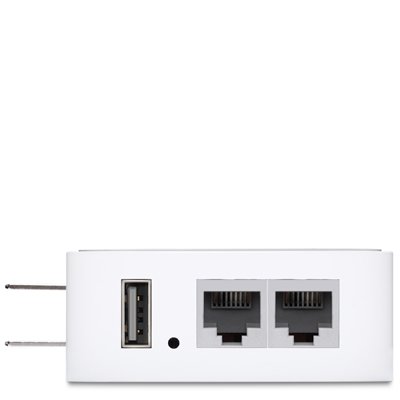
this acts as a client to connect to the hotel wifi, and the computer connects via ethernet, with a second port for your phone. you may not be able to get your phone working correctly if the hotel internet has a login page, though (problem with the early roku/chromecast too)...depends on the phone setup itself, and if it has a way to bypass that login page.
i've also bridged connections with one of these to get a chromecast working, using a laptop to bypass the login page; something similar to the device above was my access point, and i connected to the hotel wifi with the build in wifi in the laptop. pain in the butt, but it worked; depending on your phone, this concept may be, in effect, what you'd need to get the phone working (as it gets around the login page).Last edited by local_nobody; 02-14-2019, 12:31 AM.Comment


There are currently 15464 users online. 101 members and 15363 guests.
Most users ever online was 239,041 at 10:39 PM on 02-14-2026.


Comment