Unconfigured Ad Widget

Collapse

Windows 10 problem - help!

Collapse
X
 
  • Time
  • Show
Clear All
new posts
  • Bushwack44
    CGN/CGSSA Contributor
    CGN Contributor
    • Oct 2013
    • 2042

    Windows 10 problem - help!

    Upgraded to Win 10 from Win 7 Pro a couple weeks ago and it's been a quasi-nightmare. The main problem I am having is when I restart the PC, it will take 2 hours (no exaggeration with time) to restart. I've re-loaded Win 10 thinking there was a corruption problem on the first install. But the same thing is happening on my 2nd install.

    I get light blue screen saying it is re-starting (stays on for about 15 seconds) then a second prompt says "Getting Windows Ready" Then it takes 2 hours to "Getting Windows Ready" before it reboots (sometimes reboot time is quick and other times it can take 15 minutes).

    If I was to do a standard shut down procedure, that works well. But its the darn option to restart that takes 2+ hours. It happens after opening only Chrome. It happens if only opening Word, Outlook or Photoshop. It happens when using CCCLeaner. It happens with NOD32 and/or Malwarebytes disabled It also happens when the computer is turned on first thing in the morning (everything loads fine). Once everything loads, if I was to do nothing else but re-start, it will take 2 hours to do so. Sometimes there's hard drive activity, other times not (I am 100% certain the hard drive is not the problem).

    I've searched the net for this problem but can't find any info on this happening to someone else. Any suggestions on how to troubleshoot? I'm not Windows savvy but I can work within msconfig, regedit or DOS (if given instruction). Many thanks for any advice given.
    .
    Facts are to liberals as kryptonite is to Superman.
    ...

    Feed a man a fish, he eats for a day (Democrat).
    Teach a man to fish, he eats for a lifetime (Republican).
  • #2
    Stanze
    Veteran Member
    • Oct 2005
    • 3301

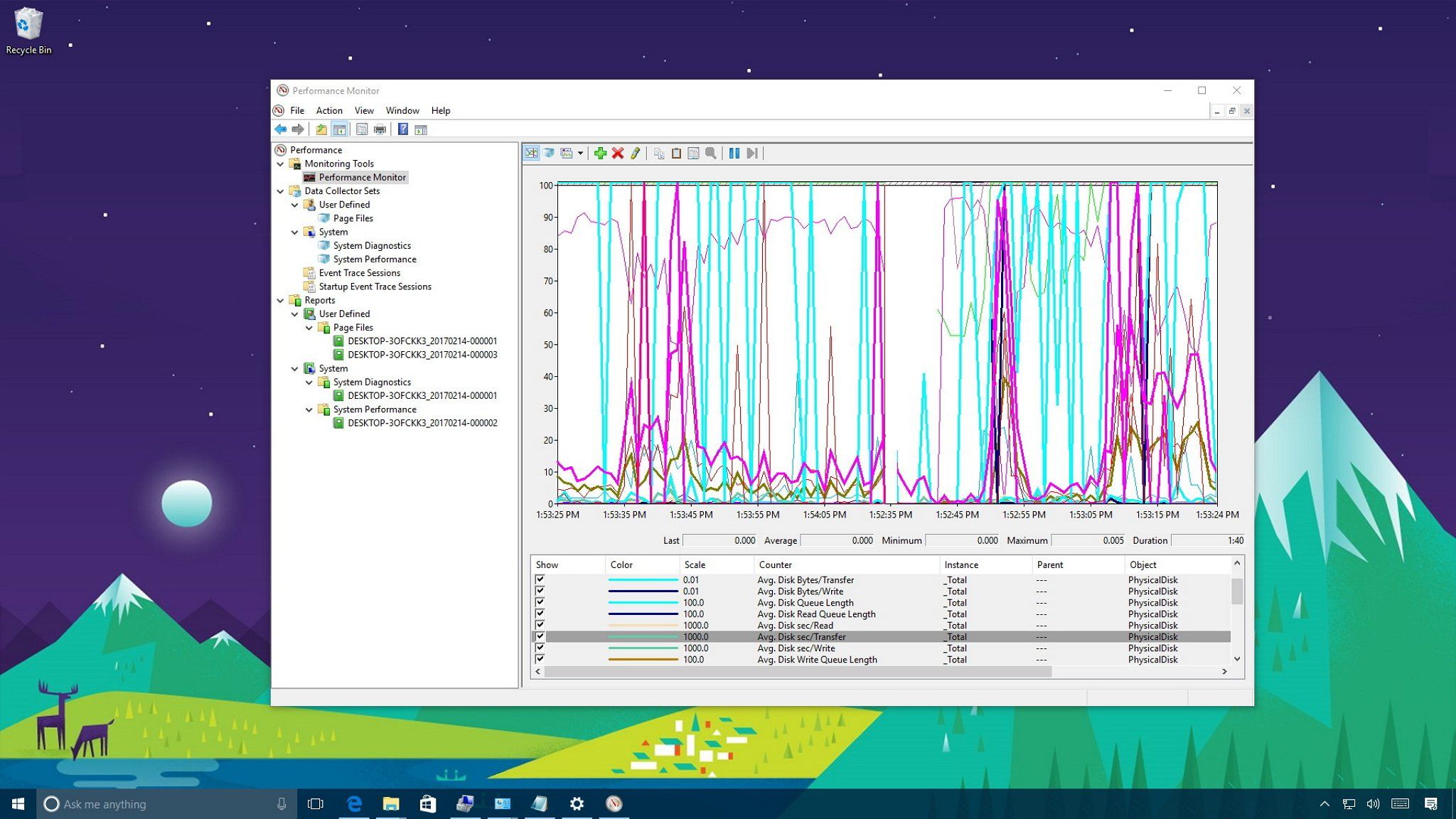
    You computer is suddenly slower than you remember. Here's how to use the Performance Monitor on Windows 10 to get to the bottom of the issue.


    Performance Monitor, you seek Perfmon.

    This advice came from an experienced former Windows developer in a recent Microsoft debugging class I took.

    You can set it to record a log on the next reboot. He recommended that you only have it record the log for the first 3 three minutes since there can be around 50 million events recorded in the first few minutes after boot up. Filters are your friend once you get the logs.

    This is the first thing he does when he flies out to corporate clients having problems with their servers.

    He said that is the most powerful tool in the Win 10 OS.

    I haven't personally tried it myself yet, but that is the answer to getting the info you need.

    Good luck!

    P.S. Since it takes 2 hours to restart, I'd just install another drive , do a fresh install and move the data to the new install.
    Constitutionally, officials cannot license or register a fundamental right.

    "It is the first responsibility of every citizen to question authority." - Benjamin Franklin


    "Lifetime warranty and excellent customer service don't mean a thing when your gun fails during a zombie attack." -Stanze

    Comment

    • #3
      SkyHawk
      I need a LIFE!!
      • Sep 2012
      • 23525

      Did you do an in-place upgrade from Win7 to Win10, or did you do a clean install of Win 10? Was this done on a brand new PC or your old Win 7 PC?

      When you 'reloaded' Win10, what did that entail exactly?

      I would go to device manager and see if you have any items that need attention, or showing up as 'unknown device'. My guess is you have a problem with a major subsystem driver.

      If you did an in-place upgrade from Win 7 to Win 10, that can easily go sideways. Be lucky you can boot at all - many who have tried, can't.

      If you are trying to run Win 10 on old Win 7 hardware, you need to go get latest BIOS, Win 10 driver pack for everything including chipset, usb, video, network, mouse, audio - the whole enchilada.
      Last edited by SkyHawk; 12-16-2017, 10:40 PM.
      Click here for my iTrader Feedback thread: https://www.calguns.net/forum/market...r-feedback-100

      Comment

      • #4
        Section 101
        Member
        • Feb 2013
        • 244

        What hard drive are you using?

        Comment

        • #5
          Dragunov
          Senior Member
          • Dec 2008
          • 1953

          You can try "fastboot", to see if that works better. It SHOULD be "default".

          Here's how to do it:


          You also have the option to "roll back" to Windows 7 (MY advice). If you've had WinX for longer than 30 days, you'll need to get a legit copy of Win7, hunt all your drivers, re format your HDD, and do a clean install. It's not just that simple either, especially if you're dealing with a UEFI BIOS, AND don't have all the software tools at hand.

          So make the decision quickly, you're running out of time!

          Here is how to do a roll back to Win7, if you're still within the 30 day rollback period:


          How much RAM do you have? I SERIOUSLY recommend at LEAST 6gb/RAM. 8GB would be better. In my opinion, anything higher than Win7 Home Premium, needs more than 4gb/RAM, to run properly, and quickly. Even at that, Win7HP fairs better with 6, or 8gb/RAM.

          What CPU do you have? I have WinX running on a ThinkPad T400, Core2 Duo, w/8GB of RAM (Vintage, 2010), and it runs pretty well. Your computer would have to be pretty old not to run WinX, as long as you have the RAM and HDD space to do it. Most people own laptops, or desktops that are 4yrs old and newer. CPU speed, shouldn't be an issue.

          How much hard drive do you have? If you're cutting it close, that would be the problem. There could be SOOO much more involved (Spyware, virus, bloatware, chipset incompatibility, software incompatibility, old hard drive that's on its last leg, or overloaded, etc.).

          We need more info.
          Originally posted by SkyHawk
          Did you do an in-place upgrade from Win7 to Win10, or did you do a clean install of Win 10? Was this done on a brand new PC or your old Win 7 PC?

          When you 'reloaded' Win10, what did that entail exactly?

          I would go to device manager and see if you have any items that need attention, or showing up as 'unknown device'. My guess is you have a problem with a major subsystem driver.

          If you did an in-place upgrade from Win 7 to Win 10, that can easily go sideways. Be lucky you can boot at all - many who have tried, can't.

          If you are trying to run Win 10 on old Win 7 hardware, you need to go get latest BIOS, Win 10 driver pack for everything including chipset, usb, video, network, mouse, audio - the whole enchilada.
          Very true! If he upgraded, and he has a smaller capacity HDD, That "Windows.old" file is pretty big, and sucks up a lot of space.
          For the most part, good advice! However, I have some pretty old machines running WinX that are on BIOS dated 2012, and they work fine. If someone hasn't ever flashed a BIOS, I don't recommend it unless they have someone who has experience doing it, holding their hand through the process. One mistake, and they're buying a new computer.

          I do, second the WinX driver pack, if it's needed.
          Last edited by Dragunov; 12-17-2017, 7:35 AM.

          Comment

          • #6
            the86d
            Calguns Addict
            • Jul 2011
            • 9587

            Originally posted by Dragunov
            ...How much RAM do you have? I SERIOUSLY recommend at LEAST 6gb/RAM. 8GB would be better. In my opinion, anything higher than Win7 Home Premium, needs more than 4gb/RAM, to run properly, and quickly. Even at that, Win7HP fairs better with 6, or 8gb/RAM...
            2nd the RAM, and swap because of it might be the issue.
            On this Win7 rig I am in front of right now, I am really running 2 browsers, an AV, DNS updater and that is about it, @ 3.36GB RAM utilization.

            I know when the free-upgrade kicked over, I tried it on a few machines, and they were all a shin-show. I also have it on one work wig, and it is slower in response times than everything I have ever used. I am skipping 10 on all my rigs...

            SSD?

            Is reverting to the old version of Win still a possibility, or was that just for the free-upgrade?:
            ITPro Today, Network Computing and IoT World Today have combined with TechTarget.com. The page you are looking for may no longer exist.

            I know you had a month to revert from the free-upgrade...
            Last edited by the86d; 12-17-2017, 7:21 AM.

            Comment

            • #7
              Bushwack44
              CGN/CGSSA Contributor
              CGN Contributor
              • Oct 2013
              • 2042

              Originally posted by Dragunov
              You can try "fastboot", to see if that works better. It SHOULD be "default".

              Here's how to do it:


              You also have the option to "roll back" to Windows 7 (MY advice). If you've had WinX for longer than 30 days, you'll need to get a legit copy of Win7, hunt all your drivers, re format your HDD, and do a clean install. It's not just that simple either. Especially, if you're dealing with UEFI BIOS, So make the decision quickly, as you're running out of time.

              Here is how to do it if you're still within the 30 day rollback period:


              How much RAM do you have? I SERIOUSLY recommend at LEAST 6gb/RAM. 8GB would be better. In my opinion, anything higher than Win7 Home Premium, needs more than 4gb/RAM, to run properly, and quickly. Even at that, Win7HP fairs better with 6, or 8gb/RAM.

              What CPU do you have? I have WinX running on a ThinkPad T400, Core2 Duo, w/8GB of RAM, and it runs pretty well. Your computer would have to be pretty old not to run WinX, as long as you have the RAM and HDD space to do it. Most people own laptops, or desktops that are 4yrs old and newer. CPU speed, shouldn't be an issue.

              How much hard drive do you have? If you're cutting it close, that would be the problem.

              We need more info.
              Very true! If he upgraded, and he has a smaller capacity HDD, That "Windows.old" file is pretty big, and sucks up a lot of space.
              For the most part, good advice! However, I have some pretty old machines running WinX that are on BIOS dated 2012, and they work fine. If someone hasn't ever flashed a BIOS, I don't recommend it unless they have someone who has experience doing it, holding their hand through the process. One mistake, and they're buying a new computer.

              I do, second the WinX driver pack, if it's needed.
              I have 16 GB RAM (plenty!). It's an i7 3.2 processor and 2TB WD hard drive (with about 40% of the drive full). PC came with Win 7 and I did upgrade to Win 10 via on-line (can't do a clean install as I don't have disks). I did check the BIOS on my PC and its up to date. I did the same Win7 --> Win 10 upgrade on my HP Envy laptop a few months ago and it has been trouble free.

              I reluctantly upgraded my desktop to Win 10 but I am a realist. Corporate world has embraced Win 10 (not as much as MS would like but far enough where I can't ignore it any longer). So gotta deal with Win 10 and can't look back.

              My gut tells me its a software problem - not a hard drive or RAM issue. I'll try the advice given thus far and report back.

              BTW, all external devices (scanner, external hard drives, printers, etc) except for Ethernet hub and modem (for internet access) have been disconnected until I get this problem resolved.

              Asdvice very much appreciated! ...and keep it coming if something else comes to mind.
              Last edited by Bushwack44; 12-17-2017, 7:38 AM.
              .
              Facts are to liberals as kryptonite is to Superman.
              ...

              Feed a man a fish, he eats for a day (Democrat).
              Teach a man to fish, he eats for a lifetime (Republican).

              Comment

              • #8
                Dragunov
                Senior Member
                • Dec 2008
                • 1953

                Originally posted by Bushwack44
                I have 16 GB RAM (plenty!). It's an i7 3.2 processor and 2TB WD hard drive (with about 40% of the drive full). PC came with Win 7 and I did upgrade to Win 10 via on-line (can't do a clean install as I don't have disks). I did check the BIOS on my PC and its up to date. I did the same Win7 --> Win 10 upgrade on my HP Envy laptop a few months ago and it has been trouble free.

                I reluctantly upgraded my desktop to Win 10 but I am a realist. Corporate world has embraced Win 10 (not as much as MS would like but far enough where I can't ignore it any longer). So gotta deal with Win 10 and can't look back.

                My gut tells me its a software problem - not a hard drive or RAM issue. I'll try the advice given thus far and report back.

                BTW, all external devices (scanner, external hard drives, printers, etc) except for Ethernet hub and modem (for internet access) have been disconnected until I get this problem resolved.

                Asdvice very much appreciated! ...and keep it coming if something else comes to mind.
                That's awesome! You shouldn't be having a problem. Let's start with your AV, and any spyware protection you might have:

                You really don't need it. If you have a third party AV, or spyware protection, remove it. The Windows Defender in WinX is more than adequate for protection, and is updated regularly. If you have McAfee, or Norton, DUMP them. If you really MUST use an after market AV, use AVAST! free (make SURE you get the WinX version). It's lighter, much faster, and more efficient than Norton, or McAfee. If you do this, shut OFF Windows Defender.

                Is it in the middle of updates, and keeps getting interrupted? This can cause massive slowdown on boot up. Turn on computer, find "check for updates" in System and Security. When updates start, walk away for 3 or 4 hours, don't touch until updates are finished. I actually despise WinX for that reason. You CAN disable the automatic updates completely, but it's not that easy.
                When it reboots, it may update some more. If you're constipated, and finally let loose, you could be back and forth to the loo several times before finished. Same concept here.

                Bloatware... Any that came with your Win7 computer, is still there, and probably in startup, if you never cleaned it out.... Especially, HP. They load their machines with a ton of it. REMOVE it.

                what's in your startup..... Anything there you DON'T need to be starting? There are also a number of services that can be shut off. There is no logical reason for a computer of that class, to be running that crappy. Shut as much down in here, as humanly possible. Keep in mind, EVERYTHING you have running in that taskbar, is also loading up during boot. EVERYTHING showing on your desktop, is sapping video memory, and probably boot time.

                Cortana.... If you don't need it, shut it off.

                You might want to do a serious disk cleanup, then defrag (NEVER defrag a Solid State Drive!) afterward.

                You could also have a defective hard drive. You'll need to test it.

                I'll add to this if I can think of anything else.
                Last edited by Dragunov; 12-17-2017, 8:11 AM.

                Comment

                • #9
                  Epaphroditus
                  Veteran Member
                  • Sep 2013
                  • 4888

                  Having been through this several times I strongly suggest roll back to win7 then setup a Linux partition. Wean off Windows - stop the madness.
                  CA firearms laws timeline BLM land maps

                  Comment

                  • #10
                    Bushwack44
                    CGN/CGSSA Contributor
                    CGN Contributor
                    • Oct 2013
                    • 2042

                    Originally posted by Dragunov
                    You can try "fastboot", to see if that works better. It SHOULD be "default".

                    Here's how to do it:
                    Followed instructions per the video, it helped slightly. My restart time (before it would boot back up) was 85 minutes, but once the PC booted back up, it took an additional 25 minutes.

                    Originally posted by Dragunov
                    That's awesome! You shouldn't be having a problem. Let's start with your AV, and any spyware protection you might have:

                    You really don't need it. If you have a third party AV, or spyware protection, remove it. The Windows Defender in WinX is more than adequate for protection, and is updated regularly. If you have McAfee, or Norton, DUMP them. If you really MUST use an after market AV, use AVAST! free (make SURE you get the WinX version). It's lighter, much faster, and more efficient than Norton, or McAfee. If you do this, shut OFF Windows Defender.

                    Is it in the middle of updates, and keeps getting interrupted? This can cause massive slowdown on boot up. Turn on computer, find "check for updates" in System and Security. When updates start, walk away for 3 or 4 hours, don't touch until updates are finished. I actually despise WinX for that reason. You CAN disable the automatic updates completely, but it's not that easy.
                    When it reboots, it may update some more. If you're constipated, and finally let loose, you could be back and forth to the loo several times before finished. Same concept here.

                    Bloatware... Any that came with your Win7 computer, is still there, and probably in startup, if you never cleaned it out.... Especially, HP. They load their machines with a ton of it. REMOVE it.

                    what's in your startup..... Anything there you DON'T need to be starting? There are also a number of services that can be shut off. There is no logical reason for a computer of that class, to be running that crappy. Shut as much down in here, as humanly possible. Keep in mind, EVERYTHING you have running in that taskbar, is also loading up during boot. EVERYTHING showing on your desktop, is sapping video memory, and probably boot time.

                    Cortana.... If you don't need it, shut it off.

                    You might want to do a serious disk cleanup, then defrag (NEVER defrag a Solid State Drive!) afterward.

                    You could also have a defective hard drive. You'll need to test it.

                    I'll add to this if I can think of anything else.
                    For troubleshooting purposes, I've disabled NOD32 (anti virus) and Malwarebytes (used both for many years - at home and in a network environment. I believe highly in these two products but I've turned them off for now. BYW, both are Win 10 versions).

                    Disk isn't the problem. I've run via DOS the command sfc /scannow twice and have also run the similar process within Win 10. Also have run chkdsk (in DOS) twice. Everything is good.

                    I've gone into msconfig and other than MS items only, EVERYTHING is disabled (including files from Adobe, Intuit, Google, etc).

                    I turned off Cortana (but that shoudn't be a problem if its from MS).

                    No bloatware on the PC. Not even a game (I'm not a gamer).

                    Now here's something interesting: You asked about if Win 10 is updated. I'm at v1709 installed today (could have been at 1AM or within the past couple hours when I did a re-start). I do know when I looked yesterday, it was v1703. But when I looked at the update history log just now, it shows nothing. Just the latest update (v1709). Maybe that's telling (that its updating at every restart)?

                    UPDATE: I decided to uninstall (not disable) NOD32 (Eset anti-virus) and Malwarebytes. I went back to Windows update and it shows that its trying to (re) install v1709 (it was fully installed BEFORE uninstalling those two programs). I also got this MS error number: 0x800705b4. Looked it up and it has to do with Windows Defender. Went ahead and activated it via service.msc and will now attempt a re-start (which I'm guessing will take another 2-3 hours). Hoping for the best!


                    (0x800705b4)
                    Last edited by Bushwack44; 12-17-2017, 10:19 AM.
                    .
                    Facts are to liberals as kryptonite is to Superman.
                    ...

                    Feed a man a fish, he eats for a day (Democrat).
                    Teach a man to fish, he eats for a lifetime (Republican).

                    Comment

                    • #11
                      67Cuda
                      Senior Member
                      • Oct 2013
                      • 1716

                      If your Windows 10 is validated, wipe the drive and reinstall.
                      You don't need installation discs, download the Windows 10 ipo. on to a USB and reinstall.

                      Last edited by 67Cuda; 12-17-2017, 9:59 AM.
                      Originally posted by ivanimal
                      People that call other member stupid get time off.
                      So much for being honest.

                      Comment

                      • #12
                        jdfthetech
                        Member
                        • Dec 2017
                        • 189

                        Usually when you have this sort of issue, there are a few possible causes.

                        1) windows 10 is running all the updates over the past couple years,( this can take literally a day or so to clean up with reboots etc). This happens if you do an upgrade which is most likely why you are seeing this problem. Best course of action is to let it update everything when it boots a few times. This can take around 10-20 hours, and yes, I've seen this a bunch.

                        2) You have old drivers loading that are conflicting with system calls for newly installed drivers. This can be fixed by uninstalling all video / sound / device drivers, rebooting and then letting windows install it's own base drivers first. After the drivers install, go out and download device drivers for all your hardware again. I've seen this one a few times but it's not so common (mostly seen it with nvidia cards and also old network card drivers like the USB linksys ones).

                        3) your old install is being scanned on boot each time for viruses and there is an actual old win 7 virus blocking syscalls, you can try a fresh install to see if this is the case


                        Generally the best course of action is a fresh install on an SSD (or another partition) and then you can port over the stuff you need to keep. If you do port your data over, it's possible you may have permission issues with some files. If you have permissions issues, you may have to takeown the files on the old install then grant all users permissions to them:


                        edit:

                        Just thought of this, but this could be another problem . . .

                        You could have a ton of old update files in your temp director from Win 10 updating. These files are not cleaned up properly when you are updating. You can clean out the temp directory and it may help speed up the updating process (the temp files are scanned each update which eats up a lot of time).

                        This site has some good info on the process:

                        There are many ways out there to free up a significant amount of free space on a PC running Windows 10 without modifying settings that might affect
                        Last edited by jdfthetech; 12-17-2017, 10:23 AM.
                        while (bullets > 0 && target == 1){fire == 1;}

                        Comment

                        • #13
                          Dragunov
                          Senior Member
                          • Dec 2008
                          • 1953

                          Originally posted by Bushwack44
                          Followed instructions per the video, it helped slightly. My restart time (before it would boot back up) was 85 minutes, but once the PC booted back up, it took an additional 25 minutes.


                          For troubleshooting purposes, I've disabled NOD32 (anti virus) and Malwarebytes (used both for many years - at home and in a network environment. I believe highly in these two products but I've turned them off for now. BYW, both are Win 10 versions).

                          Disk isn't the problem. I've run via DOS the command sfc /scannow twice and have also run the similar process within Win 10. Also have run chkdsk (in DOS) twice. Everything is good.

                          I've gone into msconfig and other than MS items only, EVERYTHING is disabled (including files from Adobe, Intuit, Google, etc).

                          I turned off Cortana (but that shoudn't be a problem if its from MS).

                          No bloatware on the PC. Not even a game (I'm not a gamer).

                          Now here's something interesting: You asked about if Win 10 is updated. I'm at v1709 installed today (could have been at 1AM or within the past couple hours when I did a re-start). I do know when I looked yesterday, it was v1703. But when I looked at the update history log just now, it shows nothing. Just the latest update (v1709). Maybe that's telling (that its updating at every restart)?

                          UPDATE: I decided to uninstall (not disable) NOD32 (Eset anti-virus) and Malwarebytes. I went back to Windows update and it shows that its trying to (re) install v1709 (it was fully installed BEFORE uninstalling those two programs). I also got this MS error number: 0x800705b4. Looked it up and it has to do with Windows Defender. Went ahead and activated it via service.msc and will now attempt a re-start (which I'm guessing will take another 2-3 hours). Hoping for the best!


                          (0x800705b4)
                          From what I'm getting from you, is that you're probably in an update loop. You may want to download a WinX .ISO on another computer, wipe, and reload. Make sure you have your wireless drivers backed up. Everything else can be downloaded from the manufacturers website.

                          Otherwise, keep rebooting, and continue updates. Eventually, it'll catch up. Personally, I'd download my drivers from the manufacturers website on another computer, Download the WinX .ISO on another computer, use WIN to FLASH, or another tool to make a bootable .ISO flash drive, and just wipe, and reload. Just make SURE you have your wireless drivers downloaded, before wiping.

                          Comment

                          • #14
                            Dragunov
                            Senior Member
                            • Dec 2008
                            • 1953

                            Originally posted by jdfthetech
                            Usually when you have this sort of issue, there are a few possible causes.

                            1) windows 10 is running all the updates over the past couple years,( this can take literally a day or so to clean up with reboots etc). This happens if you do an upgrade which is most likely why you are seeing this problem. Best course of action is to let it update everything when it boots a few times. This can take around 10-20 hours, and yes, I've seen this a bunch.

                            2) You have old drivers loading that are conflicting with system calls for newly installed drivers. This can be fixed by uninstalling all video / sound / device drivers, rebooting and then letting windows install it's own base drivers first. After the drivers install, go out and download device drivers for all your hardware again. I've seen this one a few times but it's not so common (mostly seen it with nvidia cards and also old network card drivers like the USB linksys ones).

                            3) your old install is being scanned on boot each time for viruses and there is an actual old win 7 virus blocking syscalls, you can try a fresh install to see if this is the case


                            Generally the best course of action is a fresh install on an SSD (or another partition) and then you can port over the stuff you need to keep. If you do port your data over, it's possible you may have permission issues with some files. If you have permissions issues, you may have to takeown the files on the old install then grant all users permissions to them:


                            edit:

                            Just thought of this, but this could be another problem . . .

                            You could have a ton of old update files in your temp director from Win 10 updating. These files are not cleaned up properly when you are updating. You can clean out the temp directory and it may help speed up the updating process (the temp files are scanned each update which eats up a lot of time).

                            This site has some good info on the process:

                            http://www.intowindows.com/delete-te...in-windows-10/
                            These are good points.

                            Comment

                            • #15
                              Bushwack44
                              CGN/CGSSA Contributor
                              CGN Contributor
                              • Oct 2013
                              • 2042

                              Thanks everyone for the great tips! I've done some with little change occurring. For the remaining 7 hours that I am awake, I will let the PC remain idle for 3 hrs, reboot, idle another 3 hrs (sleep mode disabled) then reboot again and let the PC update while I sleep. Maybe restarting tickles MS to update Win 10.

                              At the moment, I am in Task Manager, no apps are open and Windows Module installer Worker is using up 12-15% of the CPU. I think that's part of the upgrading process.
                              .
                              Facts are to liberals as kryptonite is to Superman.
                              ...

                              Feed a man a fish, he eats for a day (Democrat).
                              Teach a man to fish, he eats for a lifetime (Republican).

                              Comment

                              Working...
                              UA-8071174-1