Unconfigured Ad Widget

Collapse

Which password manager do you use?

Collapse
X
 
  • Time
  • Show
Clear All
new posts
  • area51
    Senior Member
    • Jan 2012
    • 715

    Which password manager do you use?

    I've been using 1Password for a while now and I'm very happy with it because it stores all contents on my local drive and I can sync it with dropbox automatically if I choose.

    I've also used lastpass and I i'm very happy with its performance.
    The only drawback that I could see with last pass is the fact that it stores all passwords on the cloud which makes me uneasy.

    Cost wise lastpass is free for the desktop version but if you want to use his mobile platform you have to pay an additional $12 a year.

    1 password is moving toward a $3.00 monthly fee which will cover all platforms. That would put one password at $36 yearly which is 3 times the cost of lastpass.[emoji34]

    Do you guys prefer to have your password stored locally or in the cloud? Furthermore what are the chances of the cloud passwords been hacked and exposed? Currently I am using a complex 30 character password with 2fa with lastpass..
    Looking 4" Python 686/ Redhawks, Les Baer.... East Bay NorCal
  • #2
    swiss_
    Senior Member
    • Oct 2015
    • 596

    Have you heard of the "Fappening"...? I wouldn't store anything important on the "cloud." Create, and manage, your own passwords.

    Comment

    • #3
      stilly
      I need a LIFE!!
      • Jul 2009
      • 10685

      Originally posted by area51
      I've been using 1Password for a while now and I'm very happy with it because it stores all contents on my local drive and I can sync it with dropbox automatically if I choose.

      I've also used lastpass and I i'm very happy with its performance.
      The only drawback that I could see with last pass is the fact that it stores all passwords on the cloud which makes me uneasy.

      Cost wise lastpass is free for the desktop version but if you want to use his mobile platform you have to pay an additional $12 a year.

      1 password is moving toward a $3.00 monthly fee which will cover all platforms. That would put one password at $36 yearly.

      Do you guys prefer to have your password stored locally or in the cloud? Furthermore what are the chances of the cloud passwords been hacked and exposed? Currently I am using a complex 30 character password with 2fa with lastpass..
      Since the cloud is NOT in my protective watch, I do not put things there. I also do NOT put things there because it is NOT my hardware.

      I use Keepass. Open source and it simply works plus you can use your own icons if you please.

      When I worked for the city they were using eWallet or something. They had looked at Keepass, but since it was open source, they had nobody to yell at when it broke, so they went with the ewallet instead and they were very happy with it. It allows you to make walls inside and give access to certain parts and by certain people, but the entire file can be distributed. That is kind of a nice idea if you have a larger organization.

      I personally use Keepass though.
      7 Billion people on the planet. They aint ALL gonna astronauts. Some will get hit by trains...

      Need GOOD SS pins to clean your brass? Try the new and improved model...


      And remember- 99.9% of the lawyers ruin it for the other .1%...

      Comment

      • #4
        NYT
        CGN/CGSSA Contributor
        CGN Contributor
        • Apr 2011
        • 3811

        i use lastpass with everything short of financials. its just too easy to use across platforms.

        remember than they did get hacked awhile back.

        Comment

        • #5
          glockman19
          Banned
          • Jun 2007
          • 10486

          It's called my brain.

          Comment

          • #6
            area51
            Senior Member
            • Jan 2012
            • 715

            Originally posted by stilly
            Since the cloud is NOT in my protective watch, I do not put things there. I also do NOT put things there because it is NOT my hardware.


            I use Keepass. Open source and it simply works plus you can use your own icons if you please.


            When I worked for the city they were using eWallet or something. They had looked at Keepass, but since it was open source, they had nobody to yell at when it broke, so they went with the ewallet instead and they were very happy with it. It allows you to make walls inside and give access to certain parts and by certain people, but the entire file can be distributed. That is kind of a nice idea if you have a larger organization.


            I personally use Keepass though.

            I actually played with Keepass for a while but I don't like the fact that it doesn't auto fill for you. Otherwise I'm all for open source.

            One password stores your passwords at a local level which is fantastic. The only thing I don't like about it right now is the new price structure
            Looking 4" Python 686/ Redhawks, Les Baer.... East Bay NorCal

            Comment

            • #7
              d33pt
              Senior Member
              • Jan 2012
              • 1630

              Originally posted by glockman19
              It's called my brain.
              I guarantee that you re-use passwords and use weak passwords due to the memory of your brain.

              Comment

              • #8
                glockman19
                Banned
                • Jun 2007
                • 10486

                Originally posted by d33pt


                I guarantee that you re-use passwords and use weak passwords due to the memory of your brain.
                No I have a system that uses 8 or more characters using Capital and Lowercase letters, numbers and symbols in EVERY password that is different at every site yet easy to remember.

                Comment

                • #9
                  the86d
                  Calguns Addict
                  • Jul 2011
                  • 9587

                  Password protected .xlsx... as always.

                  Comment

                  • #10
                    NYT
                    CGN/CGSSA Contributor
                    CGN Contributor
                    • Apr 2011
                    • 3811

                    Originally posted by the86d
                    Password protected .xlsx... as always.
                    Learn how to open a password-protected Excel file by removing password protection or using a workbook password cracker with our step-by-step guide.


                    protected xls files are just one step above writing them on a piece of paper and keeping that paper under your keyboard.

                    check out an encrypted local app if you want to secure your passwords but dont want them stored in the cloud.

                    Comment

                    • #11
                      ocabj
                      Calguns Addict
                      • Oct 2005
                      • 7924

                      I have been using LastPass for the past few years, and we use LastPass Enterprise within our department. I think it's a great user friendly solution to password management, but from the Enterprise standpoint, it's not great out of the box. There's a lot of things we haven't had time to write, such as pulling audit logs from LastPass and inserting it into our Elasticsearch cluster.

                      We also haven't written the tools to automatically rotate root passwords on servers and then update it in LastPass (API).

                      Thycotic is probably one of the more well-known Enterprise level password management tools because they've been hardcore pitching their service (and have working ties with other vendors such as Qualys), and it does a lot of the password rotation tasks (that's one of the primary selling points).

                      As far as storing in the cloud, it's a simple matter of adjusting with the times. All the older folks in my organization were hesitant to do adopt cloud-anything for a long time. For the most part, cloud services are no-less secure than rolling it yourself. You're simply moving liability from one place to another.

                      Now going back to LastPass, you can set it up with Two-Factor authentication and they support a lot of mechanisms. I use Duo Security two-factor for both my personal and Enterprise LastPass accounts, with YubiKeys as additional/backup tokens on both accounts.

                      Note: LastPass did get compromised in a limited fashion a year or two back where they were able to get some master passwords (passwords to vaults). One of the opponents to using LastPass in our organization was eager to point this out to us after we adopted it, but our (Security Team) response is that we require 2-factor auth to even have a LastPass account in our Enterprise platform.

                      Originally posted by glockman19
                      No I have a system that uses 8 or more characters using Capital and Lowercase letters, numbers and symbols in EVERY password that is different at every site yet easy to remember.
                      I used to do this prior to adopting LastPass. The problem is that if you were able to compromise the password databases for two services that I used (e.g. two independent web forums, retail sites, etc), you would be able to figure out my password for every other service I had an account with.

                      I honestly think that Federated authentication is probably the best solution out there. Google OAuth is probably most 'popular' (widest userbase). If people simply used Google as their OAuth for all other services (and assuming websites accepted Google OAuth for authentication and attribute assertions), we wouldn't have to worry about various small databases (e.g. some small mom-and-pop webstore) having their user+pass databases compromised. Of course, people will argue that having Federated auth with SSO for all services means you have a single point of failure, but you mitigate this with other things like 2-factor auth. Seriously, who here in a medium to large organization isn't using CAS and/or SAML for their applications?
                      Last edited by ocabj; 12-22-2016, 8:08 AM.

                      Distinguished Rifleman #1924
                      NRA Certified Instructor (Rifle and Metallic Cartridge Reloading) and RSO
                      NRL22 Match Director at WEGC

                      https://www.ocabj.net

                      Comment

                      • #12
                        gogohopper
                        Veteran Member
                        • Mar 2013
                        • 4733

                        text file, but I enter them down incorrectly and have a system to decode them into the proper ID and PW.

                        The thought of storing them in a giant cloud repository, with a target on it's back, makes little sense to me.
                        Originally posted by Webologist
                        I am in a sympathy-free zone as well. A leftist brown shirt reaping what he sowed after profiting from it is sweet justice indeed.

                        Comment

                        • #13
                          terry4130
                          Senior Member
                          • Mar 2010
                          • 635

                          I also use Keepass . Great app and it's also available on mobile devices.

                          Comment

                          • #14
                            billofrights
                            CGN/CGSSA Contributor
                            CGN Contributor
                            • Oct 2012
                            • 2343

                            Originally posted by glockman19
                            No I have a system that uses 8 or more characters using Capital and Lowercase letters, numbers and symbols in EVERY password that is different at every site yet easy to remember.
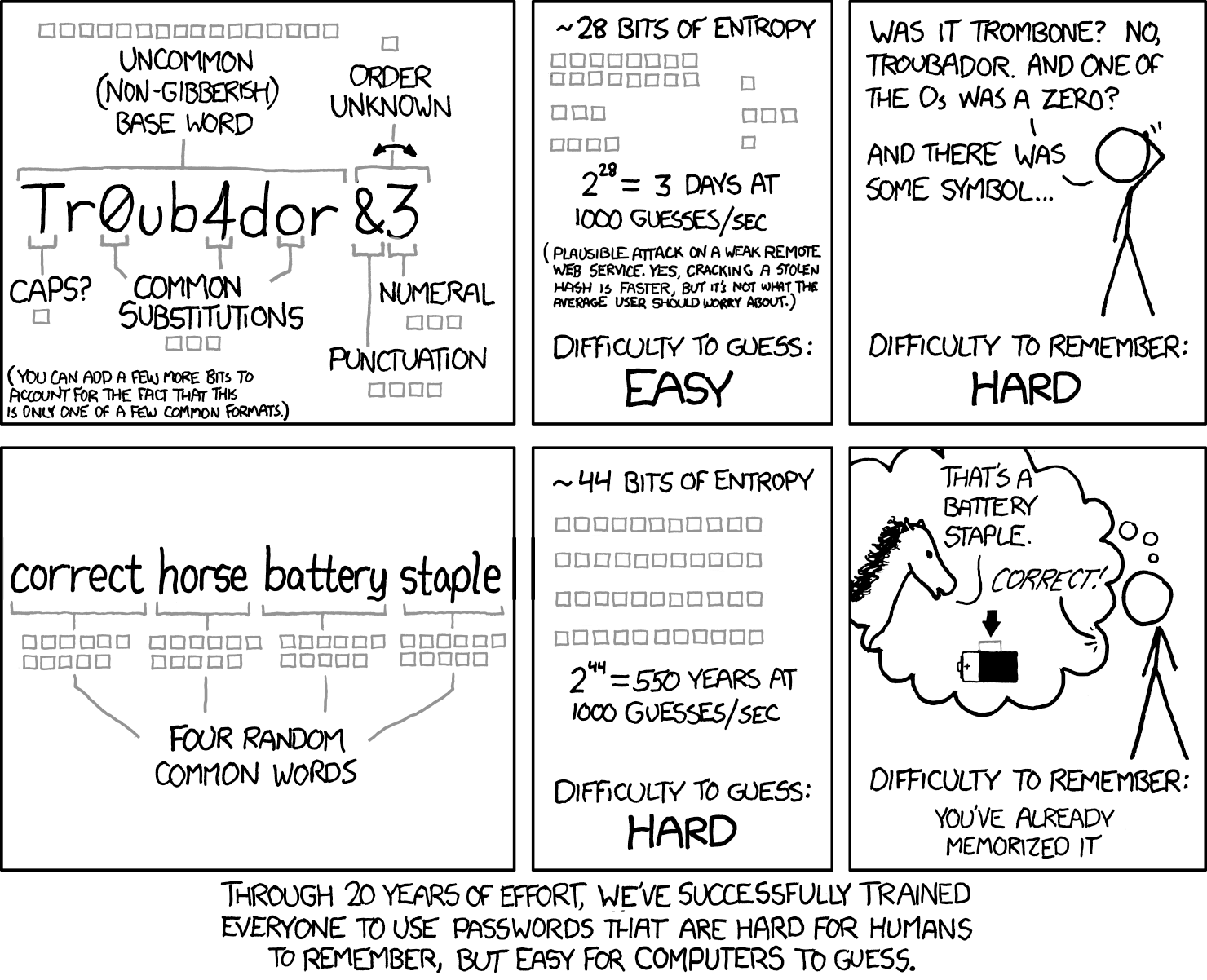
                            A lot of companies enforce the "special characters, capitals, and numbers" thing but it's flawed reasoning. Adding a number to your password only adds 10 more possible options per space, insignificant for software trying to brute force crack a password. Specials add another 30 or so, also insignificant.

                            This comic explains it really well:


                            And if you feel like testing your password strength:

                            Comment

                            • #15
                              glockman19
                              Banned
                              • Jun 2007
                              • 10486

                              Originally posted by billofrights
                              A lot of companies enforce the "special characters, capitals, and numbers" thing but it's flawed reasoning. Adding a number to your password only adds 10 more possible options per space, insignificant for software trying to brute force crack a password. Specials add another 30 or so, also insignificant.

                              This comic explains it really well:


                              And if you feel like testing your password strength:
                              http://www.passwordmeter.com/
                              There are 18,170,005,425,000 possible combinations using 8 characters...Good luck trying to figure out my personal algorithm out of 18 TRILLION possible combinations.

                              Comment

                              Working...
                              UA-8071174-1