Unconfigured Ad Widget

Collapse

Anyone here using Microsoft Edge??

Collapse
X
 
  • Time
  • Show
Clear All
new posts
  • GMG
    Calguns Addict
    • Dec 2008
    • 7974

    Anyone here using Microsoft Edge??

    The reason I'm asking, on 10/4 I lost my favorites and can't find them. I need help!! Microsoft did an update on 10/3 and another on 10/4.

    After the 10/3 update I still had my favorites, on 10/4 they disappeared.
    sigpic

    A member of The Tonkin Gulf Yacht Club
  • #2
    glockman19
    Banned
    • Jun 2007
    • 10486

    Originally posted by GMG
    The reason I'm asking, on 10/4 I lost my favorites and can't find them. I need help!! Microsoft did an update on 10/3 and another on 10/4.

    After the 10/3 update I still had my favorites, on 10/4 they disappeared.
    I hate the Microsoft 10 updates.

    Comment

    • #3
      bigdawg86
      Veteran Member
      • Mar 2012
      • 3554

      Google Chrome /thread.

      Yes I realize I am not helping.

      Comment

      • #4
        Zorba
        Banned
        • May 2014
        • 767

        Originally posted by bigdawg86
        Google Chrome /thread.

        Yes I realize I am not helping.
        FireFox. It ain't perfect either, but it isn't Chrome - thank Goddess.

        Comment

        • #5
          vintagearms
          Calguns Addict
          • Jan 2009
          • 6841

          Interesting. Im on Edge did the update and haven't lost anything. I do save all my favorites in a folder just in case though.

          Comment

          • #6
            the86d
            Calguns Addict
            • Jul 2011
            • 9587

            hahahhaaaaaahahhaaaaaa
            Nope. i don't even use Win 10.

            Comment

            • #7
              ojisan
              Agent 86
              CGN Contributor
              • Apr 2008
              • 11756

              Win 10 sucks so far.
              So many updates.
              The latest one happened mid-afternoon a couple days ago and just ran by itself.
              It took over my PC while I was using it.
              It took a couple hours, then I got to use my PC again.
              The next morning I restarted the PC and the same old no-wireless keyboard-and-no-mouse problem happened just like the original Win 10 install did.
              I spent a couple hours searching the net on my laptop for the fix but found none that would work without a keyboard or mouse.
              Finally, desperate, I plugged in an old non-WiFi keyboard and then the wireless board and mouse started working.
              WTF?
              MS needs to check their updates more carefully.
              Last edited by ojisan; 10-05-2016, 4:35 PM.

              Originally posted by Citadelgrad87
              I don't really care, I just like to argue.

              Comment

              • #8
                Pally
                Senior Member
                • Jul 2013
                • 874

                Originally posted by ojisan
                Win 10 sucks so far.
                So many updates.
                The latest one happened mid-afternoon a couple days ago and just ran by itself.
                It took over my PC while I was using it.
                It took a couple hours, then I got to use my PC again.
                The next morning I restarted the PC and the same old no-wireless keyboard-and-no-mouse problem happened just like the original Win 10 install did.
                I spent a couple hours searching the net on my laptop for the fix but found none that would work without a keyboard or mouse.
                Finally, desperate, I plugged in an old non-WiFi keyboard and then the wireless board and mouse started working.
                WTF?
                MS needs to check their updates more carefully.
                I had this problem as well. MS wholly took over my machine, while I was working, for hours! I also lost the wireless functionality.

                With this latest update, I lost the search functionality. Bad software!
                NRA PATRON LIFE MEMBER

                Comment

                • #9
                  Dragunov
                  Senior Member
                  • Dec 2008
                  • 1953

                  Originally posted by GMG
                  The reason I'm asking, on 10/4 I lost my favorites and can't find them. I need help!! Microsoft did an update on 10/3 and another on 10/4.

                  After the 10/3 update I still had my favorites, on 10/4 they disappeared.
                  No problem with Edge. Your problem is with updates, just like everyone else. The inability to shut updates off, is a deal killer with me, so I fixed the problem. I now only update when I want to. Not when Microsoft says I have to. I won't update at all, if I don't want to.

                  I shut down Cortana, and still use edge (I have WinX, on only one of my computers). I haven't had any unwanted updates after the first ones. I've had no problems with anything "missing", or broken. I posted a thread on how to do this.

                  Comment

                  • #10
                    Dragunov
                    Senior Member
                    • Dec 2008
                    • 1953

                    Once again, the HowTo:

                    BIG DISCLAIMER HERE!!!! BACKUP YOUR HARD DRIVE, MAKE SURE SYSTEM RESTORE IS ON!!!

                    Because the video shows you how to do the other things I have already done, my
                    First advice.... FOLLOW the instructions in the video posted later in this thread.... THEN:


                    "Some of you were "forced" into WinX, some upgraded because they wanted to, but either way, Microsnot has control.

                    TAKE CONTROL BACK!

                    Here' how to STOP Automatic Updates from randomly updating your computer, OR updating your computer at all:

                    GOTO: START, then type in "Services" (no quotes). This will bring up your SERVICES console.

                    In your services console, STOP, and DISABLE the following services by RC (Right Click) on the service you wish to stop, then LC (Left Click) "Properties".

                    These are the services you'll want to stop and disable:

                    "Background Intelligence Transfer Service" *FIRST*. This service is required for Microsnots Automatic Updates, to access your computer remotely.

                    "Windows Update".

                    "Live Updates".

                    You may not get the STOP option for Windows Update. If this is the case, RC on that service, LC "Properties", then DISABLE. After a few reboots, the service will be stopped. There is a way to completely remove this service, although, it's ill-advised/not recommended, unless you're COMPLETELY comfortable with screwing around with windows.

                    NOTE! If you have updates in the queue, you'll have to wait until the updates are applied for this to work. You have to wait until automatic update, is "sleeping".

                    I KNOW this works, because I'm going on 4 weeks, and no WinX updates...... So far.


                    DISABLE EDGE PERMANENTLY!

                    If you want to disable EDGE completely......

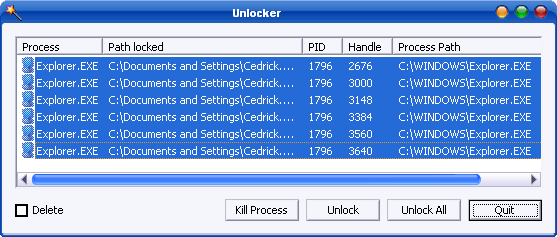
                    Download a free program called "Unlocker" (Link, further down).

                    Install it, let it install with defaults (explorer extension, etc.). This program will unlock ANY file. It's easy to use, and even if you're a n00b, very safe to use. Not difficult.

                    GOTO: the "C:\Windows\SystemApps\Microsoft.MicrosoftEdge _8we kyb3d8bbwe" folder.

                    In that folder, you'll see two executables with blue "Edge" icons.
                    MicrosoftEdge (Application)
                    MicrosoftEdgeCP (Application)

                    Right click (RC) each one of those. "Unlocker" should be in your RC menu. LC "Unlocker".

                    "Unlocker" will ask you what you want to do.

                    Choose "rename". You may want to use Edge later.

                    Rename each file to something like "MicrosoftEdge1.exe" and "MicrosoftEdgeCP1.exe"

                    Click on "Rename" to confirm your action.

                    Do this with both files.

                    THEN: go back up to, "C:\Windows\SystemApps".
                    RC the "Microsoft.MicrosoftEdge_8wekyb3d8bbwe" folder.

                    Choose "Unlocker" once again, and rename same as you did with the executables.

                    Close out, and return to your desktop. You'll see a blank on the taskbar where Edge once was. RClick on that, and "Unpin from Taskbar".

                    REBOOT.

                    You're done! No more edge.

                    KILL CORTANA!

                    This works for CORTANA also, Here's how to do it:


                    Rename the "C:\Windows\SystemApps\Microsoft.Windows.Corta na_c w5n1h2txyewy" folder with Unlocker.

                    Unlocker will probably prompt you to REBOOT. Do so.

                    Indeed! It completely removes Cortana... BUT, you lose your search function. You'll have to download and use IObit Start menu 8, or Classic Shell, to get the basic, Win7 search function. A small price to pay to keep your PRIVACY, IMHO.

                    Here's the link for those:

                    Classic Shell

                    http://everydownload.net/usa3/classi...indows+10&t202 kw=classic+shell+for+Win+10&mkwid=T5i6C4qM&crid=31 266167447&mp_kw=&mp_mt=e&pdv=c

                    IOBit Start Menu 8

                    Start Menu 8 brings back Start Menu to Windows 8, and allows users to skip Metro start page and boot to Windows 8 desktop directly.


                    Here is the link to get "Unlocker":

                    Unlocker helps delete locked files with error messages including "cannot delete file," and "access is denied." Video tutorial available.


                    And in case you missed it in the video, here's the link to SpybotAntiBeacon:

                    Spybot – Search & Destroy offers a comprehensive set of functions and tools. This one is about preventing your data being sent out without your consent.


                    *NOTE*:

                    You also lose your fast boot if you shut down through Start Menu 8. You must Ctrl, Alt+Del, and shut down from the Task Manager screen. STILL, a small price to pay."

                    THIS is the video I'm referring to:


                    He misses a bit of stuff, but still, a good video.

                    The following will be the results of this work:

                    Locked down WinX, with basic Win7 search function.
                    Completely disables both Edge, and Cortana, 100%
                    Completely STOPS Automatic updates, until you re-enable the services you shut down.
                    You can still Fast-boot.
                    Still stable.
                    Faster than ever.

                    Good Luck!

                    Dragunov.

                    Comment

                    • #11
                      ojisan
                      Agent 86
                      CGN Contributor
                      • Apr 2008
                      • 11756

                      Thank you for the info.
                      As my computer skill level is "user" I don't want to mess around too much.
                      Hopefully MS gets Win 10 working correctly soon and then can leave us alone.

                      In the meantime, they need to be less intrusive and also make darn sure that "users" can still use their computers after an update.

                      Originally posted by Citadelgrad87
                      I don't really care, I just like to argue.

                      Comment

                      • #12
                        stilly
                        I need a LIFE!!
                        • Jul 2009
                        • 10685

                        Originally posted by bigdawg86
                        Google Chrome /thread.

                        Yes I realize I am not helping.
                        True, you are not, but I agree with you, that REALLY is a very good answer...

                        :D
                        7 Billion people on the planet. They aint ALL gonna astronauts. Some will get hit by trains...

                        Need GOOD SS pins to clean your brass? Try the new and improved model...


                        And remember- 99.9% of the lawyers ruin it for the other .1%...

                        Comment

                        • #13
                          stix213
                          AKA: Joe Censored
                          CGN Contributor - Lifetime
                          • Apr 2009
                          • 18998

                          Overall I'm happy with Windows 10. I work in software QA, currently doing outside contracting work so I am on a variety of projects, and I'm just now seeing support for new software releases ending for Windows 7 users. Every project now at least has a discussion on if they should or should not support 7, and a few are deciding against supporting it anymore. We all know 8 is worthless, so it is 10 or nothing in a short time from now.

                          I didn't run into an issue of favorites disappearing after the last patches. Favorites are linked to your account, are you sure you're logged in with the same account? Have you tried logging into another machine with the same account and see if you have your favorites there? (I use my Hotmail account as my user for both my Win 10 boxes, and my favorites on Edge share between them pretty seamlessly, for example)

                          Comment

                          • #14
                            CaMakarovnik
                            Junior Member
                            • Oct 2005
                            • 92

                            The folder for favorites in Edge is: C:\Users\username\AppData\Local\Packages\Microsoft .MicrosoftEdge_8wekyb3d8bbwe\AC\MicrosoftEdge\User \Default

                            hth

                            Comment

                            • #15
                              the86d
                              Calguns Addict
                              • Jul 2011
                              • 9587

                              Bluetooth keyboards and rats seem to have driver issues with Win8+...
                              Win8-10 are REAL SLOW on response time when you want to get something simple done, like opening a menu. If you upgrade one machine that you used to run Win 7 on, you will notice the difference. Win7 was response times generally immediate, if running an SSD with enough RAM, not so much on newer versions...

                              I'll probably run a Linux Distro before running 8-10 as the native OS.

                              Edge is even more unresponsive.
                              Last edited by the86d; 10-06-2016, 9:00 AM.

                              Comment

                              Working...
                              UA-8071174-1