Unconfigured Ad Widget

Collapse

I need recommendations for improving Windows Media Center configuration

Collapse
X
 
  • Time
  • Show
Clear All
new posts
  • LastCalifornian
    Banned
    CGN Contributor
    • May 2013
    • 2642

    I need recommendations for improving Windows Media Center configuration

    My current setup. The issue that I'm having is that from time to time the connection lags really bad and if one of my dogs walks between the wireless switch and my laptop it drops really bad.

    My current configuration


    What I'm thinking is to add a repeater, future configuration


    What I do notice is that for Windows Media Center to run well you have to have restarted your system to make sure that nothing else is running, sucking up bandwidth or processor power, dunno what the deal is. But what I do find odd is that the performance is worse in the evenings, but wtf should higher internet activity impact a LAN connection?

    Any thoughts?

    .
  • #2
    Bastard
    • Jul 2009
    • 2209

    I am going to assume that wired is not an option. also is the picture correct for the Xbox that you are using? it has been awhile but I want to say that the original 360 wireless adapters were only G. that said; I seem to recall that some wireless routers will throttle everything to match the lowest device on the network

    Comment

    • #3
      Brianguy
      Veteran Member
      • Sep 2009
      • 3836

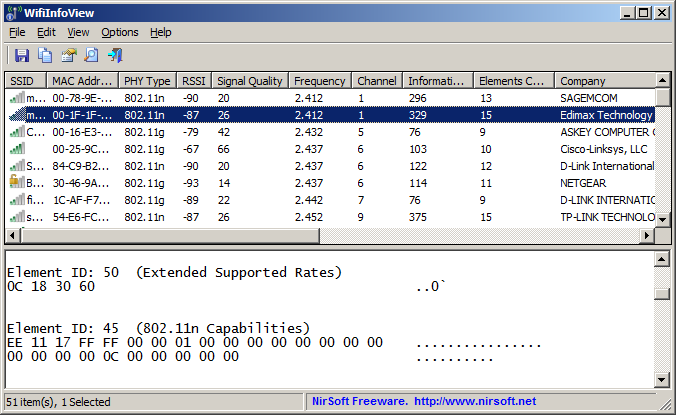
      try scanning for clear channel
      Tool for Windows that scans wireless networks in your area and displays extensive information, including: SSID, MAC Address, PHY Type (802.11g or 802.11n), RSSI, Signal Quality, Frequency, Channel Number, and more...
      Last edited by Brianguy; 01-21-2014, 10:01 PM.

      Comment

      • #4
        sl0re10
        Calguns Addict
        • Jan 2013
        • 7242

        A: You're not using the WAN port on a downstream router correct? Its usually slower than the LAN ports.
        B: wireless router hops [even if logically they are a single subnet] are also terrible for streaming media center (or any other streaming)
        C: I'll go further; wireless at all is also terrible for media center (I had an airport extreme right next to a linksys media center box and it just wouldn't work right with wireless.. as in 1ft... for testing).
        D: Are you using TV tuners? If so; be mindful that media center will just record and playback whatever they send. So; if your model of TV tuners send uncompressed HD to be recorded... thats what your recording and playing back... I had homerun TV tuners and thats what they did. Uncompressed HD. 70mb per second per stream (coming and going).
        E: Help media center out by spreading the disk reads and writes. I wrote a script to move the TV programs recorded each day to another disk for playback. You can pick more than one library to be used by Media Center... so I just added the second disk / disk folder as one and the tv programs saved there showed up along with the ones on the disk that the recordings are initially written to. If thats still not enough; remember you can use 4 drives and raid 0 each side (initial write drive location and the library for previously recorded stuff)... I did (raid 0 SSDs for the write drive and two 1T drives for storage) so I could record a couple things and have people watching shows in more than one room all at the same time...
        F: ram helps. Windows will use it for disk caching without being prompted or told to.
        Last edited by sl0re10; 01-28-2014, 5:16 PM.

        Comment

        Working...
        UA-8071174-1