Unconfigured Ad Widget

Collapse

Installed my old SATA HDD into computer, Powers up but won't boot

Collapse
X
 
  • Time
  • Show
Clear All
new posts
  • #16
    Pablo5959
    Senior Member
    • Jan 2013
    • 1289

    Did you put the RAM back in?
    So now you are trying to run 2 SATA hard drives?
    If that's the case your OS is freaking out and trying to boot from the HD that has no OS installed. I looked into adding a SSHD in my computer along side my SATA. Even doing that the new SSHD needed to be prepped using a USB port and special software to do it. Things started looking to complicated for a lap top and no room , so I didn't try.


    Comment

    • #17
      SonofWWIIDI
      I need a LIFE!!
      • Nov 2011
      • 21583

      When you got the computer, did it come with or did you make a set of recovery disks?
      Sorry, not sorry.
      🎺

      Dear autocorrect, I'm really getting tired of your shirt!

      Comment

      • #18
        HmoobWarrior
        Member
        • Feb 2013
        • 279

        Do you see BIOS at all or is it a black screen? You can try to take out cmos battery but you may also need to reset the BIOS jumper. Its usually located near the CMOS battery. You switch it to the other side.... power the system up, power it back down..... move the jumper back.... then power the system back up. That should reset BIOS. If it's not posting... and not showing BIOS... it may be your motherboard... did you use ESD strap or atleast ground yourself? That's one reason why you should.... Could also be RAM.... eliminate all this headache by making sure you use ESD strap and make sure the system is unplugged when being worked on I like to press the power a couple time to help drain power after unplugging the power cord....
        Last edited by HmoobWarrior; 05-04-2013, 10:11 PM.

        Comment

        • #19
          HmoobWarrior
          Member
          • Feb 2013
          • 279

          You might want to check if your PSU (Power supply unit) is working properly. How? Easiest is something like this....


          Lights up to tell you that you have all power coming from the PSU.

          Comment

          • #20
            Verci0013
            Member
            • Mar 2010
            • 496

            Originally posted by paul0660
            Go back to zero with original HD, one stick of ram, optical drives unplugged. No reason it should not start. I mean no GOOD reason.
            I've tried this, I even rotated the RAM as suggested by creampuff. same result.

            Originally posted by paul0660
            Multiple restarts, including hitting the switch on the power supply, and waiting 10 min, can help too. There are capacitors on motherboards that are not easily fooled.
            Giving this a shot right now.

            Originally posted by njineermike
            Compaq. Figures. Do what paul0660 suggested. Go back to when it was running. Hopefully yanking the CMOS battery didn't turn your PC into an elaborate paperweight.
            I'm starting to regret making that decision of yanking the CMOS battery...

            Comment

            • #21
              HmoobWarrior
              Member
              • Feb 2013
              • 279

              Originally posted by Verci0013
              I've tried this, I even rotated the RAM as suggested by creampuff. same result.


              Giving this a shot right now.


              I'm starting to regret making that decision of yanking the CMOS battery...
              Yanking your CMOS battery doesn't do crap to your motherboard. As long as it holds a charge and you reset the jumper near the CMOS battery for BIOS reset... you should be able to see BIOS. IF not... it may be other issue... potentially PSU or other possibility.

              Comment

              • #22
                Verci0013
                Member
                • Mar 2010
                • 496

                Originally posted by HmoobWarrior
                Do you see BIOS at all or is it a black screen? You can try to take out cmos battery but you may also need to reset the BIOS jumper. Its usually located near the CMOS battery. You switch it to the other side.... power the system up, power it back down..... move the jumper back.... then power the system back up. That should reset BIOS. If it's not posting... and not showing BIOS... it may be your motherboard... did you use ESD strap or atleast ground yourself? That's one reason why you should.... Could also be RAM.... eliminate all this headache by making sure you use ESD strap and make sure the system is unplugged when being worked on I like to press the power a couple time to help drain power after unplugging the power cord....
                Thank you, Going to give this a shot too, completely forgot about the jumper haha

                Comment

                • #23
                  HmoobWarrior
                  Member
                  • Feb 2013
                  • 279

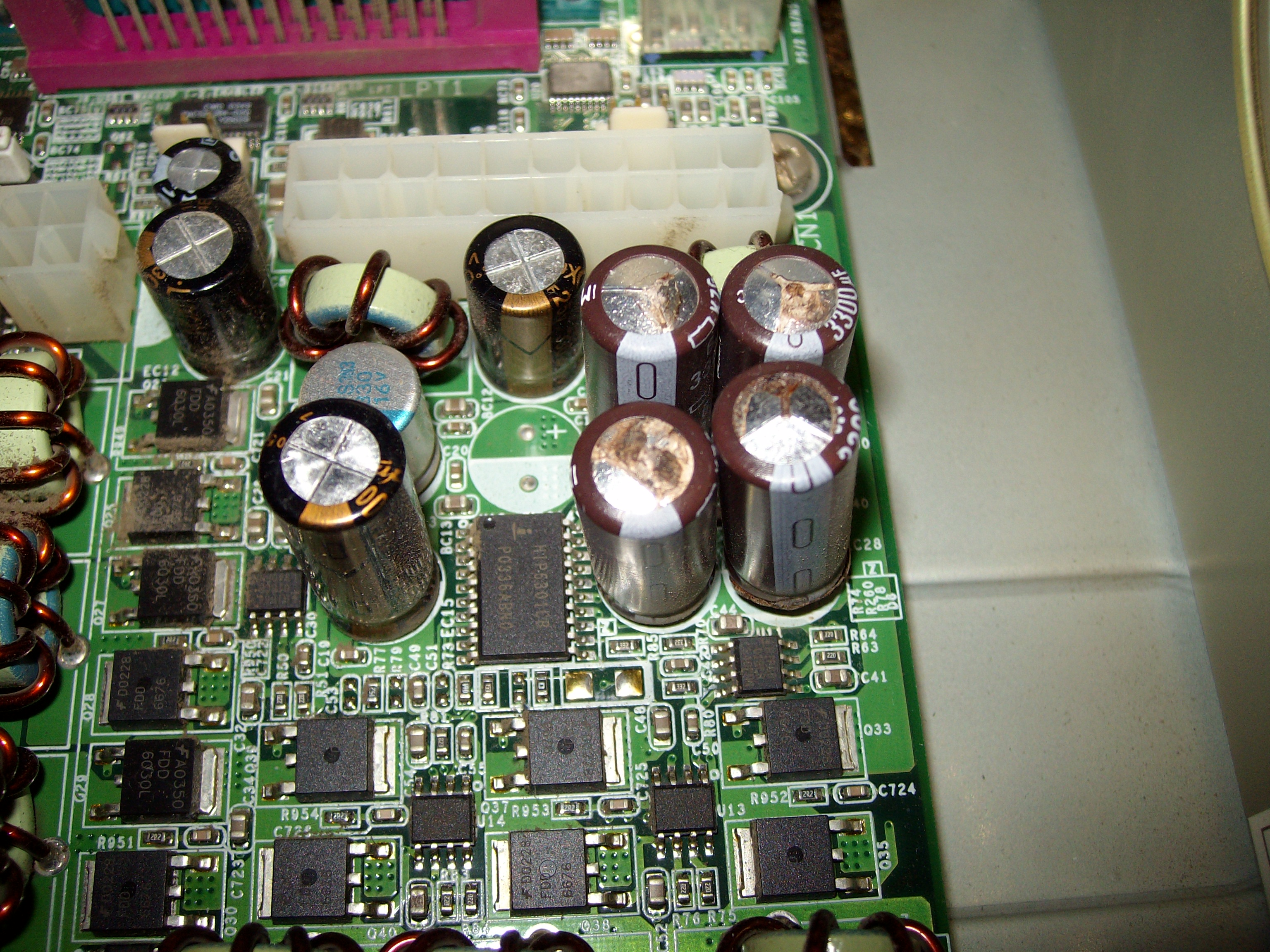
                  Check your motherboard if there are any shiny black burnt color on the chipset like your north bridge and or south bridge.... and check the capacitor for leaks.... here is a shot of blown cap

                  Comment

                  • #24
                    Verci0013
                    Member
                    • Mar 2010
                    • 496

                    WELL...I don't know how the hell this happened. But as I was searching to reset the BIOS Jumper, I found it on the bottom of the case and it was unplugged...so now I don't know where to put it.

                    Comment

                    • #25
                      HmoobWarrior
                      Member
                      • Feb 2013
                      • 279

                      Originally posted by Verci0013
                      WELL...I don't know how the hell this happened. But as I was searching to reset the BIOS Jumper, I found it on the bottom of the case and it was unplugged...so now I don't know where to put it.
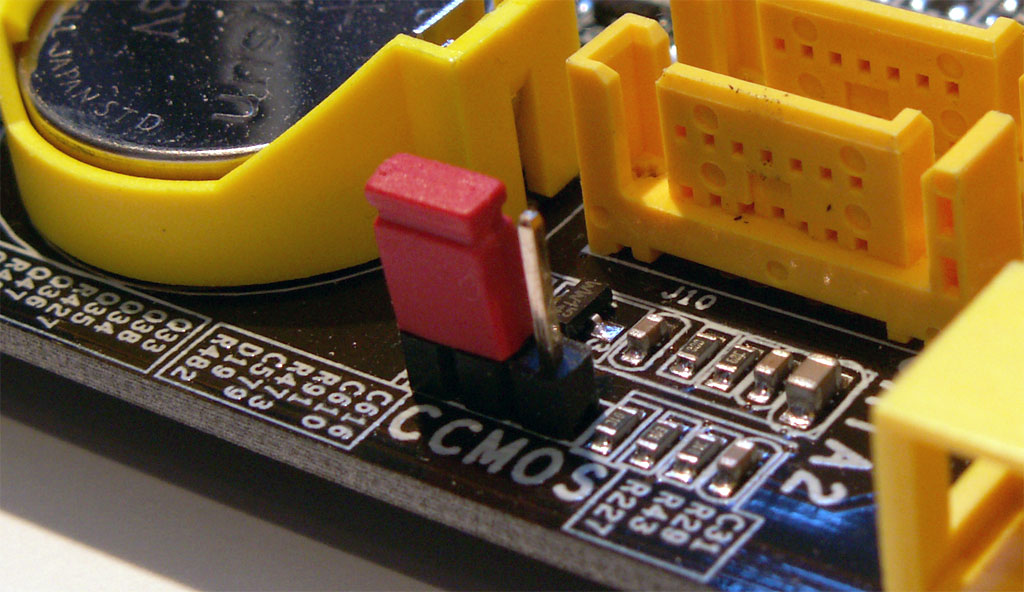
                      There's only three pin. The jumper usually sits on the first two left side. Then when you place it on the second and third pin, that is reseting it. Once done... just put it back to pin one and two. Here is a shot. Notice this one is sitting on pin one and two.

                      Last edited by HmoobWarrior; 05-04-2013, 10:23 PM.

                      Comment

                      • #26
                        HmoobWarrior
                        Member
                        • Feb 2013
                        • 279

                        Originally posted by Verci0013
                        WELL...I don't know how the hell this happened. But as I was searching to reset the BIOS Jumper, I found it on the bottom of the case and it was unplugged...so now I don't know where to put it.
                        Hmm... that maybe the problem too I hope... it is

                        Comment

                        • #27
                          billofrights
                          CGN/CGSSA Contributor
                          CGN Contributor
                          • Oct 2012
                          • 2343

                          Take a pic of where the CMOS battery is, the jumper goes close by. Probably knocked it loose when you pulled the battery. Pulling the CMOS doesn't hurt anything, all it does is keep the motherboard's clock running when the machine has no power.

                          Also, once you get it working boot it up without the old hdd plugged in to the Sata cable, just power. After you get to the desktop you can plug in the sata cable. Sata is a hot-swappable protocol, won't harm anything. Most likely you'll have to reassign the drive letter so there's no conflict, then you should be able to access it.
                          Last edited by billofrights; 05-04-2013, 10:26 PM.

                          Comment

                          • #28
                            Verci0013
                            Member
                            • Mar 2010
                            • 496

                            Originally posted by HmoobWarrior
                            There's only three pin. The jumper usually sits on the first two left side. Then when you place it on the second and third pin, that is reseting it. Once done... just put it back to pin one and two. Here is a shot. Notice this one is sitting on pin one and two.

                            http://blog.thepcmechanic.org/wp-con...11/08/cmos.jpg
                            THANK GOD YOU ARE A LIFE SAVER. Apparently they put the jumper right under the SATA connections, so I must have knocked it off while I was installing it

                            IT BOOTED UP! THANK YOU EVERYONE!!!!

                            Comment

                            • #29
                              HmoobWarrior
                              Member
                              • Feb 2013
                              • 279

                              Originally posted by Verci0013
                              THANK GOD YOU ARE A LIFE SAVER. Apparently they put the jumper right under the SATA connections, so I must have knocked it off while I was installing it

                              IT BOOTED UP! THANK YOU EVERYONE!!!!
                              I'm a Computer Technician Anytime man... glad I can help... makes me feel warm and fuzzy inside. Have fun.. you learned something today... make sure you use ESD, unplug power cord and push power button a couple time to help drain power from components.

                              Comment

                              • #30
                                Verci0013
                                Member
                                • Mar 2010
                                • 496

                                Originally posted by HmoobWarrior
                                I'm a Computer Technician Anytime man... glad I can help... makes me feel warm and fuzzy inside. Have fun.. you learned something today... make sure you use ESD, unplug power cord and push power button a couple time to help drain power from components.
                                Yep, I need to start doing this more often. I was starting to fear I shorted something

                                Thanks again man!

                                Comment

                                Working...
                                UA-8071174-1