Unconfigured Ad Widget

Collapse

Win 7 wont save passwords, windows not genuine

Collapse
X
 
  • Time
  • Show
Clear All
new posts
  • tackdriver
    Senior Member
    • Jun 2009
    • 1121

    Win 7 wont save passwords, windows not genuine

    All of sudden my windows 7 stopped saving passwords etc. It is set up to do so in auto complete. ??

    After being in use for over two years I am getting a pop up window when I start up and every hour there after that says "Currently not running genuine windows"... Mine is legit, I called Micro and they'd be happy to sell me a new product # for over $100 to get rid of it..

    I cant find an answer on line (least, one I can understand) for these problems, any suggestions?

    thx
  • #2
    nothinghere2c
    Senior Member
    • Mar 2012
    • 2259

    if your key is truly legit, you should be able to call microsoft and ask what has flagged your pc as being not genuine.

    the only thing that generally flags that is when you swap your motherboard because microsoft considers that a new "pc."

    even if you did a mobo swap, you can usually call MS and say your old one died and you had to replace it.

    as for not saving passwords, are you referring to Internet Explorer not saving web page passes?

    Comment

    • #3
      ElDub1950
      Calguns Addict
      • Aug 2012
      • 5688

      Originally posted by nothinghere2c
      if your key is truly legit, you should be able to call microsoft and ask what has flagged your pc as being not genuine.

      the only thing that generally flags that is when you swap your motherboard because microsoft considers that a new "pc."

      even if you did a mobo swap, you can usually call MS and say your old one died and you had to replace it.

      as for not saving passwords, are you referring to Internet Explorer not saving web page passes?
      ^ this is the case. Have you changed motherboards? If nothing has changed, same system etc. then call MS again. You may have just gotten a numbnutz the first time.

      Alternatively, you can reinstall from your original CD. Back up all your data, do a clean install (reformat/repartition) and it should be ok.

      Comment

      • #4
        1LAGuy
        Junior Member
        • Dec 2012
        • 36

        Personally I don't recommend using the built in PW saver in IE for various reasons. I prefer to use AI Roboform (commerical sw) or you can use something free like Keepass or Lastpass.

        Comment

        • #5
          tackdriver
          Senior Member
          • Jun 2009
          • 1121

          I bought it from Frys and it has the product key on the outside yadda, yadda. In the property section of the computer it shows it is activated etc. I didnt change the motherboard. THe original ms person I talked with said something about I didnt "register" the key way back when. I guess calling to get a different tech would be worth a shot. I'd think my pop up blocker setting would stop the "warning" from showing
          The password problem would be like when you log onto calguns, click on the user area and the "saved" user and password would show so I dont need to type it all again... Do these sound like some sort of registry problem?

          Comment

          • #6
            ElDub1950
            Calguns Addict
            • Aug 2012
            • 5688

            Originally posted by tackdriver
            Do these sound like some sort of registry problem?
            No these are all related to the "no a genuine version" problem.

            Those will go away after you get MS to reactivate it.

            Comment

            • #7
              bg
              Calguns Addict
              • Aug 2002
              • 5207

              I have had good success using the tutorials from this very helpful
              site. One of the best for W7 and W8.

              Comment

              • #8
                Peter.Steele
                Calguns Addict
                • Oct 2010
                • 7351

                Okay, seriously, this sounds like its malware of one sort or another.

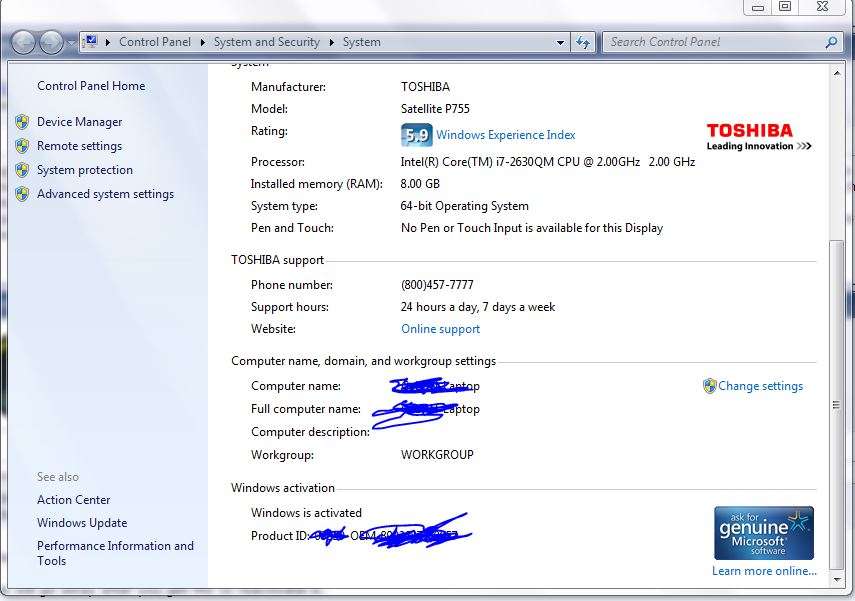
                Find this screen, by clicking on your start menu, then right clicking on "Computer," and selecting "Properties." Does it look substantially similar to the screen that I've shown here? If it does, then you've got some sort of malware that's telling you that you've got an invalid copy of Windows for the purpose of getting you to give them a credit card number or some such.

                On the other hand, if you don't have something that looks substantially similar to what I've shown here, then there's some sort of issue.

                Which is it? I suspect that it's more likely the former than the latter ...


                NRA Life Member

                No posts of mine on Calguns are to be construed as legal advice, which can only be given by a lawyer.

                sigpic

                Comment

                • #9
                  Packy14
                  Calguns Addict
                  • Jul 2008
                  • 5312

                  malware.
                  NRA Lifetime Member

                  1A-2A = -1A

                  Comment

                  • #10
                    njineermike
                    Calguns Addict
                    • Dec 2010
                    • 9784

                    Look for KB971033 installed in "add/remove programs". It's a Windows "update" that goes to re-check the validation every 90 days. I suspect it failed to get q check on it's schedule, the KB did it's job, and you need to re-certify windows. It happened to us on air-gapped servers one too many times so we deleted it.

                    If this is the case, (check first), re-certify windows. After a reboot, go to add/remove programs, uninstall KB971033, then go to windows update. Run an update check and it will re-list that KB. Right click the KB, and select "Hide Update".
                    Originally posted by Kestryll
                    Dude went full CNN...
                    Peace, love, and heavy weapons. Sometimes you have to be insistent." - David Lee Roth

                    Comment

                    • #11
                      tackdriver
                      Senior Member
                      • Jun 2009
                      • 1121

                      HI guys, I am sure that it is not a malware, in my discussion with ms she had me run thru things to prove it was genuine. I have the screen that Peter s shows (only without the blue scribbles, hmmm we might be onto something..) I am currently downloading a system update readiness tool from the site that bg had recommended. Time will tell on this one
                      I couldnt find the K8971033 file that njineer recommended, is it in another file? I couldnt pull it up on "search" either.
                      As always, thanks a lot guys. I let you know what happens with the download.
                      She said they'd be happy to reactivate by giving me a new key code, for $120

                      Comment

                      • #12
                        Peter.Steele
                        Calguns Addict
                        • Oct 2010
                        • 7351

                        Originally posted by tackdriver
                        HI guys, I am sure that it is not a malware ... [snip] ...
                        She said they'd be happy to reactivate by giving me a new key code, for $120


                        One way or another, you've gotten malware. If that screen that you pulled up says "Windows is activated" and shows the little blue logo in the bottom right, then you're activated and good to go, and you've got a different set of issues.


                        Maybe. Hmm. Where did you get the number that you called where they told you it would cost $120? Was it from a dialog box on your computer? I'd recommend verifying that number through the judicious application of Google, from a different computer, just to be paranoid (or safe, depending on your point of view).

                        Download and install a program called "Magical Jelly Bean Key Finder." (Yeah, I know, laugh it up. It works.) Run it, and see if the key that it gives you is the same as the key that's on your sticker.

                        I've bought Windows 7 pre-installed on 3 computers now, and in all 3 cases the number that was on the sticker was not the key that was actually installed. The installed key was an OEM license used by HP, Toshiba or Asus, respectively.

                        If they key is different from the one that is on the sticker, well, your problem might be solved.
                        NRA Life Member

                        No posts of mine on Calguns are to be construed as legal advice, which can only be given by a lawyer.

                        sigpic

                        Comment

                        • #13
                          tackdriver
                          Senior Member
                          • Jun 2009
                          • 1121

                          Number I called was the one shown on the computer/properties list: 866 408-5408.
                          I downloaded that system readiness tool. I think another name I saw was CHeckSur tool. Downloaded it, now I cant find the damn thing to run it.... No wonder why Im going bald!!!

                          Comment

                          • #14
                            njineermike
                            Calguns Addict
                            • Dec 2010
                            • 9784

                            Originally posted by tackdriver
                            HI guys, I am sure that it is not a malware, in my discussion with ms she had me run thru things to prove it was genuine. I have the screen that Peter s shows (only without the blue scribbles, hmmm we might be onto something..) I am currently downloading a system update readiness tool from the site that bg had recommended. Time will tell on this one
                            I couldnt find the K8971033 file that njineer recommended, is it in another file? I couldnt pull it up on "search" either.
                            As always, thanks a lot guys. I let you know what happens with the download.
                            She said they'd be happy to reactivate by giving me a new key code, for $120
                            You find that update in the control panel window. It's not a file, it's a windows component, like a program add-on. I'm on a phone or I'd post screen shots.
                            Originally posted by Kestryll
                            Dude went full CNN...
                            Peace, love, and heavy weapons. Sometimes you have to be insistent." - David Lee Roth

                            Comment

                            • #15
                              bg
                              Calguns Addict
                              • Aug 2002
                              • 5207

                              Thanks for the magical jelly bean key finder software. That is sweet.

                              I found update KB971033 this way.
                              Control panel > Programs and Features > over in the left top corner,
                              View Installed Updates > [Click it and the installed updates will
                              appear with an option to uninstall] I found it close to the bottom
                              of the page. I uninstalled it, did a restart and it came up as a
                              update avail. I chose to hide it as per the post 10 suggested.

                              I hope you find your problem. I bought a bogus version of W7
                              Ultimate and didn't know it. After about 4 months I got the same
                              issue you have. I bought a key from a trusted vendor on eBay
                              for 80 bucks and it has worked ever since the 1.5 years I've used
                              it. It is a real pain in the butt, that's for sure.

                              Comment

                              Working...
                              UA-8071174-1