Unconfigured Ad Widget

Collapse

Help with Dual Monitor

Collapse
X
 
  • Time
  • Show
Clear All
new posts
  • #16
    MattG.
    Junior Member
    • Jul 2011
    • 9

    Originally posted by stilly
    I agree.

    If you do NOT have dual outputs then your vga out can only be split and put on multiple monitors, but it will be the same image. Meanwhile, back at the hall of justice using a video card with TWO outputs will get you the dual monitor setup you want. Depending on what kind of computer it is, you can get a simple $40 card prolly or you might have to spend a few dollars more.
    Exactly, for work purposes you can easily find a $35-40 card that will more than meet your need.

    Comment

    • #17
      Oshiat
      Member
      • Jun 2008
      • 319

      You may be using the wrong splitter cable. I'm running dual monitors on my work PC with a single d-sub output. My splitter cable outputs are marked 1 (mon 1) and 2 (mon 2). It may be as easy as making sure you have the proper cable.

      Comment

      • #18
        Peter.Steele
        Calguns Addict
        • Oct 2010
        • 7351

        Originally posted by Oshiat
        You may be using the wrong splitter cable. I'm running dual monitors on my work PC with a single d-sub output. My splitter cable outputs are marked 1 (mon 1) and 2 (mon 2). It may be as easy as making sure you have the proper cable.


        Sorry, nope. If you've got a single standard D-sub 15 pin VGA port, you're not running dual monitors off it, no matter what cable you've got. You have something different.
        NRA Life Member

        No posts of mine on Calguns are to be construed as legal advice, which can only be given by a lawyer.

        sigpic

        Comment

        • #19
          Eddy's Shooting Sports
          Senior Member
          • Sep 2011
          • 1326

          He probably has a DVI with a splitter cable. I forget the exact terminology, but there are video cards that have DVI ports that have both digital and analog output combined and can be used for dual monitors.....
          Greg David
          Eddy's Shooting Sports
          (650)969-GUNS

          400 Moffett Blvd., Suite F
          Mountain View, CA 94043

          www.eddysguns.com

          Tue-Fri 12-7, Sat 11-5

          Comment

          • #20
            Merc1138
            I need a LIFE!!
            • Feb 2009
            • 19742

            dual monitors(and not just splitting the signal to display the same thing on 2 screens) = "dual head". Triple monitor = "triple head".

            Then of course there are the more recent company specific makreting terms... "nvsurround" "eyefinity" and so on.

            There are external devices you can get that don't require an internal card. The Matrox DualHead2Go and TripleHead2go come to mind. However they aren't cheap. Finding an empty expansion slot and getting a 2nd card altogether will be cheaper(if that's possible, otherwise you're going to be paying more).

            Fortunately since dual monitor setups have been mainstream for so long, all you need is a free PCI(doesn't even have to be PCI-e) slot and a card:


            It doesn't matter if the video chipset doesn't match your onboard or already installed video(it needs to some for advanced gaming related stuff, but then again this question wouldn't be getting asked and I wouldn't be recommending a $40 card if that were the case). Install the card, connect the monitor, install the driver, and just set it up in your display properties. Takes 2 minutes.

            Comment

            • #21
              JackRydden224
              Calguns Addict
              • Aug 2011
              • 7226

              There is the update on this. My boss decided that it's better for everybody in the office (there are only 5 employees) to have dual monitors since we look at so many different documents. He also wants to go paperless so he is buying a PCI card for me to test it out.

              If the PCI card with two heads work then he'll buy new 24" monitors and get everybody setup that way. Awesome

              Comment

              • #22
                Peter.Steele
                Calguns Addict
                • Oct 2010
                • 7351

                Merc- that's not entirely true. You could run nvidia and ATI together under XP, but as of Vista - and I don't think it's changed in 7 - you can't have bot driver models coexisting.
                NRA Life Member

                No posts of mine on Calguns are to be construed as legal advice, which can only be given by a lawyer.

                sigpic

                Comment

                • #23
                  Merc1138
                  I need a LIFE!!
                  • Feb 2009
                  • 19742

                  Originally posted by Peter.Steele
                  Merc- that's not entirely true. You could run nvidia and ATI together under XP, but as of Vista - and I don't think it's changed in 7 - you can't have bot driver models coexisting.
                  Yes it does, there's just some very specific combinations of GPUs that don't work together(due to drivers being outdated due to architecture, or GPUs and interfaces no longer supported).

                  That being said, the guy has Intel integrated video, and I know for a fact that current Radeon and Nvidia drivers will work just fine when installed along side the Intel drivers(I'm doing it on the system I'm typing this post from at work, and my gaming system at home).

                  Comment

                  • #24
                    the86d
                    Calguns Addict
                    • Jul 2011
                    • 9587

                    Some lower end PCI cards (sub $50-$60) might not have drivers for 64bit OSs (but are still being sold).
                    Check the specs and make sure they are included, if you are running a 64bit OS... BUT I have only run into this 2x.

                    Comment

                    • #25
                      Merc1138
                      I need a LIFE!!
                      • Feb 2009
                      • 19742

                      The card I linked to on newegg has 64bit drivers and support for windows 8. You'd have to go back to the Geforce 4 Ti series and earlier to start running into driver support issues.

                      Comment

                      • #26
                        Peter.Steele
                        Calguns Addict
                        • Oct 2010
                        • 7351

                        Originally posted by Merc1138
                        Yes it does, there's just some very specific combinations of GPUs that don't work together(due to drivers being outdated due to architecture, or GPUs and interfaces no longer supported).

                        That being said, the guy has Intel integrated video, and I know for a fact that current Radeon and Nvidia drivers will work just fine when installed along side the Intel drivers(I'm doing it on the system I'm typing this post from at work, and my gaming system at home).


                        Hm.

                        Looks like WDDM 1.1 removed the restriction on using nVidia and ATI alongside each other. In Windows 7 it will work. Still won't work in Vista, though. BUT ... if anyone's still using Vista, they've got problems.
                        NRA Life Member

                        No posts of mine on Calguns are to be construed as legal advice, which can only be given by a lawyer.

                        sigpic

                        Comment

                        • #27
                          JackRydden224
                          Calguns Addict
                          • Aug 2011
                          • 7226

                          Okay guys. I got two monitors working now. I just gotta train my brain to the two monitors because switching back and forth is giving me a headache

                          Comment

                          • #28
                            Merc1138
                            I need a LIFE!!
                            • Feb 2009
                            • 19742

                            Originally posted by JackRydden224
                            Okay guys. I got two monitors working now. I just gotta train my brain to the two monitors because switching back and forth is giving me a headache
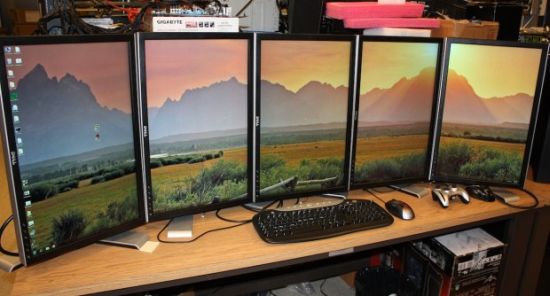
                            Noob

                            3+ monitors is where it's at these days

                            Comment

                            • #29
                              pdq_wizzard
                              Veteran Member
                              • May 2008
                              • 3813

                              Originally posted by Peter.Steele
                              Hm.

                              Looks like WDDM 1.1 removed the restriction on using nVidia and ATI alongside each other. In Windows 7 it will work. Still won't work in Vista, though. BUT ... if anyone's still using ever Vista, they've got problems.
                              FIFY
                              Q: What was the most positive result of the "Cash for Clunkers" program?
                              A: It took 95% of the Obama bumper stickers off the road.

                              Originally posted by M. Sage
                              More what? More crazy?
                              You live in California. There's always more crazy. It's a renewable resource.

                              Comment

                              • #30
                                yellowsulphur
                                Senior Member
                                • May 2007
                                • 1627

                                [QUOTE=Merc1138;9135621]Noob

                                3+ monitors is where it's at these days


                                Those are a calibration nightmare.

                                Comment

                                Working...
                                UA-8071174-1
