Unconfigured Ad Widget

Collapse

Calguns Blocked ????

Collapse
X
 
  • Time
  • Show
Clear All
new posts
  • cntrolsguy
    Senior Member
    • Jun 2005
    • 1397

    Calguns Blocked ????

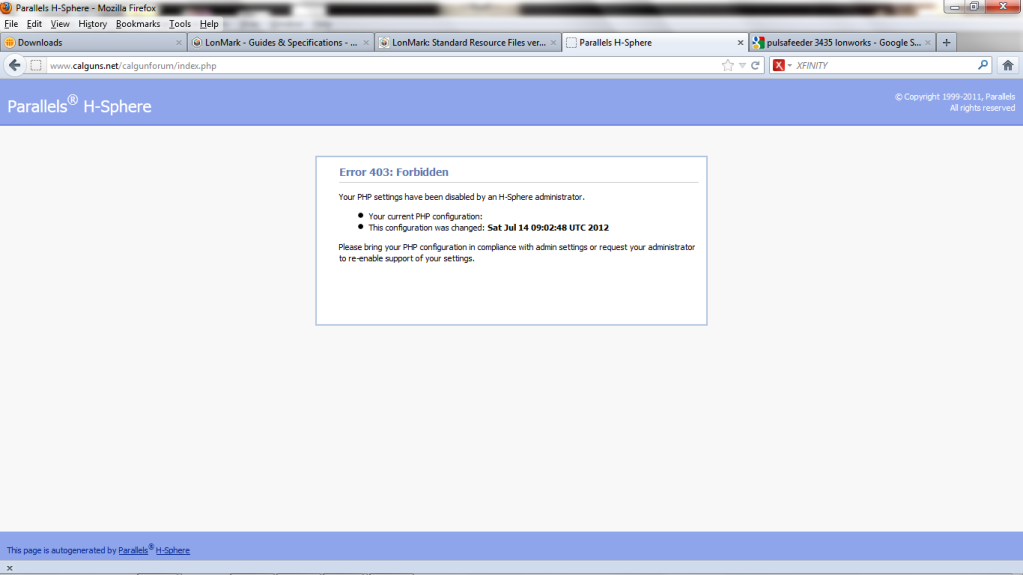
    So I am currently in Salt Lake City for worked and we have Comcast xfinity high speed. When I try to log into calguns I get an error and can't log in. When I try my sprint air card I can login with no issues. Any one have an idea of what's going on?
  • #2
    wjc
    I need a LIFE!!
    • Dec 2009
    • 10873

    Are you going through VPN to your work network?

    My company blocks some sites related to firearms...not Calguns or the m14forum.com.

    Figure that one out...
    sigpic

    NRA Benefactor Member
    NRA Golden Eagle
    SAF Life Member
    CGN Contributor

    Comment

    • #3
      cntrolsguy
      Senior Member
      • Jun 2005
      • 1397

      No, I am not going through a VPN. It sucks because the high speed internet here rocks but no Calguns

      Comment

      • #4
        Tripeaks69
        Senior Member
        • Mar 2011
        • 942

        Try using secures http, on URL Box, type manually, "https://www.calguns.net" that works @ my place of work, used that for facebook at work too hehehehe but i dont access those banned websites @ work often, because system admin can see it on their log. But i can, using secured HTTP, whenever i feel like accessing it.

        Comment

        • #5
          dem0critus
          Senior Member
          • Mar 2012
          • 619

          prolly blocked at the gateway.

          Comment

          • #6
            Merlin40
            Junior Member
            • Sep 2012
            • 9

            Originally posted by cntrolsguy
            No, I am not going through a VPN. It sucks because the high speed internet here rocks but no Calguns
            We have that problem at college, also. There is a work-around for that. change your Internet Options. Right-Click on the box checked IPv4. Go to properties. In the lower box, click on Use This DNS. In the first DNS box, type 8.8.8.8. in the second, or alternate DNS box, type 8.8.4.4. that should do it. before you log off, make sure to return there, and choose Obtain DNS automatically, otherwise you could get in trouble. LOL

            Comment

            • #7
              njineermike
              Calguns Addict
              • Dec 2010
              • 9784

              Do you have proxy enabled in the browser?
              Originally posted by Kestryll
              Dude went full CNN...
              Peace, love, and heavy weapons. Sometimes you have to be insistent." - David Lee Roth

              Comment

              • #8
                bigbearbear
                Calguns Addict
                • Jun 2011
                • 5378

                Try using a redirecting web site, designed to hide your IP address. Here's one:

                Comment

                • #9
                  JDay
                  I need a LIFE!!
                  • Nov 2008
                  • 19393

                  Is it your works connection? Likely blocked to keep people from doing non-work related stuff.
                  Oppressors can tyrannize only when they achieve a standing army, an enslaved press, and a disarmed populace. -- James Madison

                  The Constitution shall never be construed to authorize Congress to prevent the people of the United States, who are peaceable citizens, from keeping their own arms. -- Samuel Adams, Debates and Proceedings in the Convention of the Commonwealth of Massachusetts, 86-87 (Pearce and Hale, eds., Boston, 1850)

                  Comment

                  Working...
                  UA-8071174-1