

 Tweet
Tweet
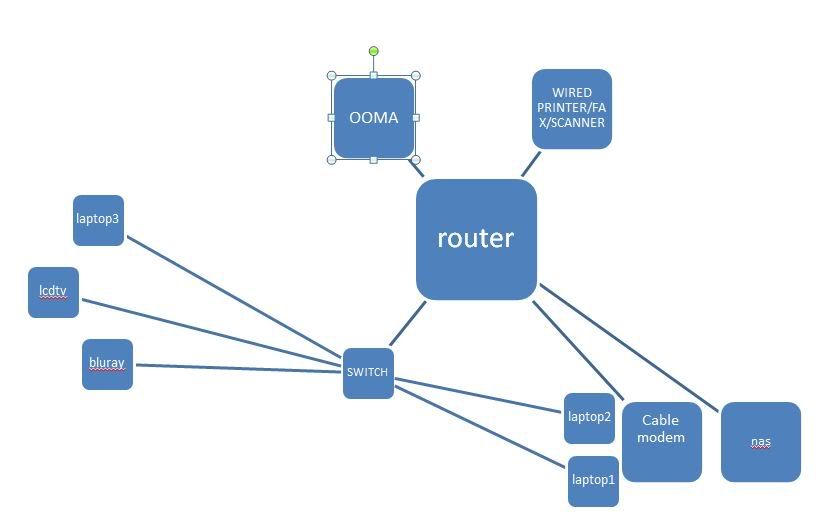
since i'm planning on running cabling for my network to move stuff around, i'm now stuck deciding on the multi-port keystone jack vs. a single port and running a switch.
pros of something like a 4-port keystone jack:
- no switch to deal with by appliances (2 switches in my design below)
- clean, 1 less cable. one less power cord for switch
- less load on router since the 8-port switch would route internal network traffic, right?
cons:
- run more cabling (one for each port, right?)
- would need a 8-port switch somewhere by router since router only has 4 ports and i need more than that.
pros of single keystone jack and use switch by appliances:
- one single cable to/from router
- still clean
con:
- need switches where i would need multiple hardwired devices
- not sure if it'll add unnecessary load on router if i'm moving from say laptop 3 to nas having to route that traffic.
- another power supply to feed the switches + extra short cabling (minor, but just clutter)
how much speed is lost with sharing of a single cable carrying the traffic from a switch to the router? granted and in my diagram below, tv and bluray won't be used concurrently. but laptop3 might if i'm xferring files to it from nas, until i can figure out the whole media server thing since that laptop is what plays my media. (still sorting out dlna and media server so i can just play directly on tv connected to media server, instead of serving it up via hdmi from laptop)
the group of machines at the top would be sharing traffic in a single line to the router though since all 3 would be running stuff from the web.
i guess an alternative, i can install multi-port keystone jack in 2 rooms connected to 8-port switch that is connected to router. instead of one 4-port switch per room? that 8-port would connect to the router then like the ooma and printer. just more cabling though.
not sure what is better network design here.

pros of something like a 4-port keystone jack:
- no switch to deal with by appliances (2 switches in my design below)
- clean, 1 less cable. one less power cord for switch
- less load on router since the 8-port switch would route internal network traffic, right?
cons:
- run more cabling (one for each port, right?)
- would need a 8-port switch somewhere by router since router only has 4 ports and i need more than that.
pros of single keystone jack and use switch by appliances:
- one single cable to/from router
- still clean
con:
- need switches where i would need multiple hardwired devices
- not sure if it'll add unnecessary load on router if i'm moving from say laptop 3 to nas having to route that traffic.
- another power supply to feed the switches + extra short cabling (minor, but just clutter)
how much speed is lost with sharing of a single cable carrying the traffic from a switch to the router? granted and in my diagram below, tv and bluray won't be used concurrently. but laptop3 might if i'm xferring files to it from nas, until i can figure out the whole media server thing since that laptop is what plays my media. (still sorting out dlna and media server so i can just play directly on tv connected to media server, instead of serving it up via hdmi from laptop)
the group of machines at the top would be sharing traffic in a single line to the router though since all 3 would be running stuff from the web.
i guess an alternative, i can install multi-port keystone jack in 2 rooms connected to 8-port switch that is connected to router. instead of one 4-port switch per room? that 8-port would connect to the router then like the ooma and printer. just more cabling though.
not sure what is better network design here.



 On a side note -- the terms 'MDF' and 'IDF' were being 'phased out' for 'MCC' (main cross-connect) and 'ICC' (intermediate cross-connect) when I got my RCDD way back when. Now my son, who is studying for his RCDD, tells me there's newer terminology that BICSI wants to incorporate (forget what they are at the moment...)




Comment