Unconfigured Ad Widget

Collapse

determining wifi frequency conflicts

Collapse
X
 
  • Time
  • Show
Clear All
new posts
  • high_revs
    CGN/CGSSA Contributor
    CGN Contributor
    • Feb 2006
    • 7566

    determining wifi frequency conflicts

    ready to pull the plug on ddwrt wrt54g routers and get asus or buffalo or airport. wifi over wired sometimes as slow as 3-4 mbps, sometimes slower. i might reboot as much as 5x a night some nihts or days

    i compare right away with wired internet with same machine but still thru router and i get 5_6x faster. wifi wise on testing, i'm only 5 ft away from router. to eliminate variances i also turned off my nas and another machine running torrent, and turned off the bridge repeater so it's only me. wifi just slow and unstable and this just started maybe 2_3 mos ago. as part of troubleshooting, i also turned off the sound baby monitor and the video baby monitor (late night testing, he's sleeping with his mom). i read the video monitor operates off the 2.4ghz frequency. i think the sound monitor is too.only part left is the telephone but that operates at 5ghz.

    this morning. it was pretty fast and that is off the bridged repeater. same circumstances and cannot understand why. hate to plunge $130 or so if i get same results as not every machine is on 802.11n to go up to 5ghz.

    thought it might be neighbor's appliance or sometjing but cannot explain whysomestimes fast like this morning at 6am. anything else i can do to che k for conflicts? thinking of cycling thru the router channels but cannot find a way to change channel of the repeater w/o setups from scratch.

    just eliminating possibilities here as a new router might result in same scenario
  • #2
    ocabj
    Calguns Addict
    • Oct 2005
    • 7924

    I've got over a dozen WiFi access points visible to my laptop right now from within my house.

    The primary issue is that many of these WiFi access points are set to one of three non-overlapping channels for 802.11b: 1, 6, or 11. If you have another access point close to yours on the same channel, they can conflict and result in unstable connections for your end-point device.

    Get a wifi scanning utility and get stats on the wifi networks visible to you within your residence. Take note of the channels they use as well as the signal strength. You will want to be on a different non-overlapping channel than the strongest wifi ssids you see.

    I was reading wiki to reverify what is non-overlapping, and it states that 802.11g has 4 non-overlapping channels, but I was reading white-papers that indicated that it's still the original three created in the 802.11b specification draft.

    Other than the conflict of nearby wireless access points, anything that runs on 2.4GHz can cause issues. The most common household items: microwaves, cordless phones. My old Linksys WAP11 from several years ago was notorious for being affected by my microwave. If I was pulling down a file on my laptop near the kitchen and went to heat something up in the microwave, my wifi connection would just go into a 'zombie' state and my file transfer would just idle, and then the second the microwave finished my wifi connection came back to life and the transfer would continue.

    Distinguished Rifleman #1924
    NRA Certified Instructor (Rifle and Metallic Cartridge Reloading) and RSO
    NRL22 Match Director at WEGC

    https://www.ocabj.net

    Comment

    • #3
      the_natterjack
      Senior Member
      • Dec 2006
      • 1056

      Go here http://tools.meraki.com/stumbler and run the Java applet. Quick and easy way to measure signal strength and which channels are being used by you and your neighbor.

      Also, try adjusting the position of your wireless router / modem. Most people put in absolutely terrible positions in the house. Try getting some more height, position away from the wall, be aware that "dense" objects like appliances, fish tanks, mirrors can create WiFi shadows that will lower signal strength.

      Use the app on a laptop to make measurements when you move the router/modem around.

      Brian

      Comment

      • #4
        JDay
        I need a LIFE!!
        • Nov 2008
        • 19393

        Set the wireless channel on the router to 'auto' and it will automatically change to the channel with the least interference.
        Oppressors can tyrannize only when they achieve a standing army, an enslaved press, and a disarmed populace. -- James Madison

        The Constitution shall never be construed to authorize Congress to prevent the people of the United States, who are peaceable citizens, from keeping their own arms. -- Samuel Adams, Debates and Proceedings in the Convention of the Commonwealth of Massachusetts, 86-87 (Pearce and Hale, eds., Boston, 1850)

        Comment

        • #5
          sholling
          I need a LIFE!!
          CGN Contributor
          • Sep 2007
          • 10360

          There are lots of free utilities that will tell you which channels your neighbors are on. I went with 5ghz 802.11n for my notebook and (before I installed cables) my media devices using DAP-1522s in bridge mode to connect them. There's a ton of 2.4ghz in my neighborhood but I seem to be the only one on 5ghz. I do keep a 2.4ghz channel going for my smartphone and my Kindle but those aren't on my wifi network all that much. In your case you could run the baby monitors and security cameras on 2.4ghz and run your other stuff at 5ghz.

          FWIW I just upgraded my router from a dual band DLink DIR-825 to a dual band Asus RT-N56U Black Diamond and the range is a lot better. It's also smaller and easier to place. The only thing I don't like about the Asus is that it doesn't allow you to name the devices in your reserved IP table. I like to know at a glance what's what.
          "Government is the great fiction, through which everybody endeavors to live at the expense of everybody else." --FREDERIC BASTIAT--

          Proud Life Member: National Rifle Association, the Second Amendment Foundation, and the California Rifle & Pistol Association

          Comment

          • #6
            high_revs
            CGN/CGSSA Contributor
            CGN Contributor
            • Feb 2006
            • 7566

            thanks guys (ocabj, jday, sholling & natterjack)

            don't mind shelling out for the asus black diamond (top of my list) though ddwrt says not supported by ddwrt can be installed.

            just as you sholling, i recently went to static dhcp and w/o the naming, it's kinda hard to tell which device is which. else, i keep a desktop notepad with the mac addresses to tell but i do like knowing who has the static IP.

            i'll try the wifi tools to see who has conflict. weird.. i've been at this place since april and haven't really had any issue until maybe mid-late sept. sometimes, goes a whole week or two w/o reboots. then suddenly.. multiple reboots. was just doing another speedtest earlier both on same machine, one after the other (wifi vs. hardwired) and wifi was not bad at all though the SF server was pretty slow. palo alto/san jose were pretty fast for wifi test. used another machine that's hardwired and was giving me same result as my other laptop.

            will do more. just hate to plunk good money and then i still have same problem @ the 2.4ghz band. (granted, all is connected and working sans the baby sound and video monitors right now). but i've had this issue stating almost/more than 2 mos after we had the baby sound monitor too so thinking it's not quite that then since network was fine before.

            Comment

            • #7
              hcbr
              Veteran Member
              • Jul 2010
              • 4733

              ditto on what the people say here, might want to change the channel to see if you get better reception.
              Be the change that you wish to see in the world.Mahatma Gandhi

              "A bullet sounds the same in every language..."
              Stewie Griffin (Family Guy Episode: Stewie Griffin: The Untold Story 2005)

              Comment

              • #8
                ibanezfoo
                I need a LIFE!!
                • Apr 2007
                • 11692

                If you have an Android phone get wi-fi analyzer and check it out... You can see all the channels and power levels around you.
                vindicta inducit ad salutem?

                Comment

                • #9
                  high_revs
                  CGN/CGSSA Contributor
                  CGN Contributor
                  • Feb 2006
                  • 7566

                  i used to see more wifi AP around when we first moved in. but now i see only 4, and 2 of those are mine (i have a bridged repeater).

                  i changed the channels also even if only 1 other AP is using same channel as me.

                  jday, can't do auto. running a ddwrt wireless repeater bridge and in that repeater bridge mode, must match what the primary has for channel.


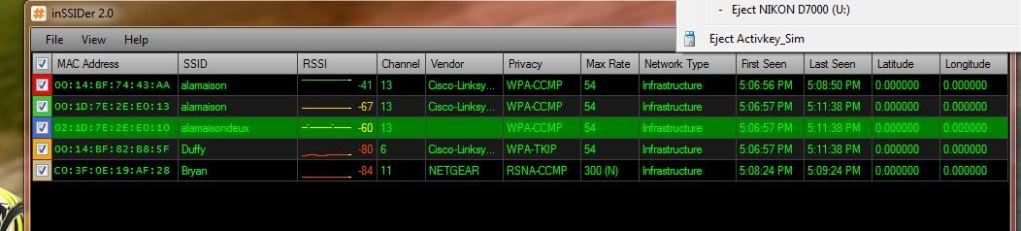
                  i can't seem to find a utility to display non-wifi machines operating in 2.4ghz range. is that an FCC limitation/legal thing? like how many wireless telephones are around. basically the true network traffic/interference data. or other devices causing interference? weird.. not many AP's at all. even downloaded inSSIDer 2.0
                  Last edited by high_revs; 11-28-2011, 12:05 PM.

                  Comment

                  • #10
                    sholling
                    I need a LIFE!!
                    CGN Contributor
                    • Sep 2007
                    • 10360

                    Originally posted by ibanezfoo
                    If you have an Android phone get wi-fi analyzer and check it out... You can see all the channels and power levels around you.
                    +1 it works very well and is free. So does inSSIDer for the Windows which is also free. inSSIDer can do both 2.4 and 5ghz if your device supports them.
                    "Government is the great fiction, through which everybody endeavors to live at the expense of everybody else." --FREDERIC BASTIAT--

                    Proud Life Member: National Rifle Association, the Second Amendment Foundation, and the California Rifle & Pistol Association

                    Comment

                    • #11
                      high_revs
                      CGN/CGSSA Contributor
                      CGN Contributor
                      • Feb 2006
                      • 7566

                      am actually using inSSIDer right now. Odd that it picks up many other APs but my laptop's wireless network detector (win7) can only see 3 of them. 4 sometimes if i'm by the window. guess win7 has a threshold what it'll show and if the signal is lower, it won't list it?

                      odd i got a "ghost" AP also off the same SSID as mine. inSSIDer shows the mac but it's not anything listing in either router (none of the lan/wan/wireless mac numbers). really strange as it popped up when i had to reboot several times in the early afternoon.


                      arrghhh!!! the stupid network was acting up again tonight. even had to re-do the repeater bridge since it won't get back unless i do a 30-30-30 reset (ddwrt term). this happened after i changed channels again since it was acting up again.

                      i'm just going to plunk $ into a new router. tired of this shiet at this point though did learn a little. (even tried to increase the TX rate of the router though it's already at the recommended level and anymore might not be good).

                      is there a way to find out if someone is causing a DOS-type broadcast that just disrupts wifi networks?

                      Comment

                      • #12
                        ibanezfoo
                        I need a LIFE!!
                        • Apr 2007
                        • 11692

                        Originally posted by high_revs
                        is there a way to find out if someone is causing a DOS-type broadcast that just disrupts wifi networks?
                        Someone could be trying to seed your network to crack your key...
                        vindicta inducit ad salutem?

                        Comment

                        • #13
                          high_revs
                          CGN/CGSSA Contributor
                          CGN Contributor
                          • Feb 2006
                          • 7566

                          that's what i was thinking. i.e. someone mimics my ssid right? and hopes someone puts in the network wpa key? no one here knows it. i configure the machines for them and they're not savvy enough to figure out what it is (wifi settings). because my machine is set, it auto connects already. for others, they'll just have to wait until i get home to check.

                          but that ghost is weird. i only saw it yesterday after using the tools above. have to keep an eye on it and now gotta run inSSIDer.

                          today, just reading more about the netgear 4500. but freaking ay.. $180 for a damn router? linksys 4200 or something like that was $150. i thought the asus was expensive enough at $130. so reading more about dual/triple band stuff.

                          Comment

                          • #14
                            JDay
                            I need a LIFE!!
                            • Nov 2008
                            • 19393

                            Originally posted by high_revs
                            that's what i was thinking. i.e. someone mimics my ssid right? and hopes someone puts in the network wpa key?
                            Cracking WPA doesn't work that way. All you need to do to crack WPA is capture a bunch of handshake packets and use one of the many WPA cracking services on the web. If you use an uncommon SSID and set your security to WPA2/AES (do not use TKIP) and use a strong password that is over 14 characters long (lower-case, uppercase, numbers and symbols) though you are pretty safe.
                            Oppressors can tyrannize only when they achieve a standing army, an enslaved press, and a disarmed populace. -- James Madison

                            The Constitution shall never be construed to authorize Congress to prevent the people of the United States, who are peaceable citizens, from keeping their own arms. -- Samuel Adams, Debates and Proceedings in the Convention of the Commonwealth of Massachusetts, 86-87 (Pearce and Hale, eds., Boston, 1850)

                            Comment

                            • #15
                              sholling
                              I need a LIFE!!
                              CGN Contributor
                              • Sep 2007
                              • 10360

                              Originally posted by high_revs
                              i'm just going to plunk $ into a new router. tired of this shiet at this point though did learn a little. (even tried to increase the TX rate of the router though it's already at the recommended level and anymore might not be good).
                              Do yourself a favor and go with a simultaneous dual band router. Trust me it's nice to have a dozen channels all to yourself. The more I use my Asus the more I like it. The signal is strong and I've had zero issues so far. You'd find 5ghz bridges starting at about $60 and going up from there and dual band replacement internal notebook NICs are like $30. The range on 5ghz isn't quite as great as 2.4ghz but the odds are you won't have a lot of other devices stepping on you.

                              For what it's worth I called Asus support with a feature request for a better routing table and the support tech was fantastic. He even called back for a bit more detail for the feature request. That tells me that they take customer requests seriously enough to actually submit them.

                              inSSIDer finds lots of stuff Windows 7 misses. Windows sees about 6 networks including 2 of mine (2.4 & 5ghz) while inSSIDer sees a few more and apparently all but mine are poorly (WEP) secured.
                              Last edited by sholling; 12-02-2011, 9:34 AM.
                              "Government is the great fiction, through which everybody endeavors to live at the expense of everybody else." --FREDERIC BASTIAT--

                              Proud Life Member: National Rifle Association, the Second Amendment Foundation, and the California Rifle & Pistol Association

                              Comment

                              Working...
                              UA-8071174-1