Unconfigured Ad Widget

Collapse

need help with removing malware

Collapse
X
 
  • Time
  • Show
Clear All
new posts
  • audiophil2
    Senior Member
    CGN Contributor - Lifetime
    • Jan 2007
    • 8736

    need help with removing malware

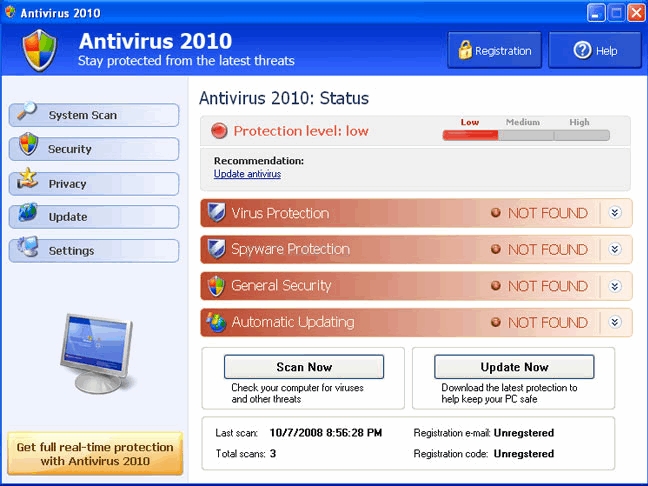
    I got this nasty fake "windows security center" malware installed on my laptop. It's the one that pretents it is windows security center, then does a fake scan, then prompts you to buy some fake anti-malware software.
    So far I have tried the following:
    f8 and restore pc to earlier date--fail
    install rkill.exe to stop root processes and then install and run malwarebytes---fail
    i don't know what next to do to get the out of the pc. It almost has the pc completley useless now.
    sigpic


    Private 10 acre range rentals
    [/URL]
  • #2
    koxx.dta
    Member
    • Mar 2010
    • 248

    go back to a recent restore point before u got the virus...on my hp u have to press esc at the setup when u turn it on...i had the same virus...try different restore points go back as far as u can

    also spybot search & destroy works well for me

    Comment

    • #3
      JDay
      I need a LIFE!!
      • Nov 2008
      • 19393

      Antivirus 2010 represents new generation of rogue security tools. Not only it uses misleading advertisements to gain a purchase, but also it crashes a system and loads fake Blue Screen


      Read that.
      Oppressors can tyrannize only when they achieve a standing army, an enslaved press, and a disarmed populace. -- James Madison

      The Constitution shall never be construed to authorize Congress to prevent the people of the United States, who are peaceable citizens, from keeping their own arms. -- Samuel Adams, Debates and Proceedings in the Convention of the Commonwealth of Massachusetts, 86-87 (Pearce and Hale, eds., Boston, 1850)

      Comment

      • #4
        Booshanky
        In Memoriam
        • Dec 2007
        • 7822

        I use malwarebytes and trendmicro's housecall all run from safe-mode. 90% of infections can be cleared by that. The other 10% require you to pull the infected drive, attach it to a clean computer, and run the scan there.
        "Please use the comments to demonstrate your own ignorance, unfamiliarity with empirical data, ability to repeat discredited memes, and lack of respect for scientific knowledge. Also, be sure to create straw men and argue against things I have neither said nor even implied. Any irrelevancies you can mention will also be appreciated. Lastly, kindly forgo all civility in your discourse . . you are, after all, anonymous."
        -Barry Ritholtz


        Help be a better advocate for the 2nd Amendment here.

        Comment

        • #5
          audiophil2
          Senior Member
          CGN Contributor - Lifetime
          • Jan 2007
          • 8736

          Well, I think I got rid of it. I ran rkill.exe as a pdf file and then downloaded Avira. Avira scanned my system and removed 5 infected files in the registry.

          I realized that I could not do a system restore because my laptop was unable to make new restore points due to the HDD being full.

          So, I am thinking of installing a new HDD with higher capacity, installing a fresh XP and then only installing the programs I really need.
          I now want a NAS to store all my media files. I don;t know if I should go RAID 1 plus dvd back-ups or RAID 5 and hope the HDDs don;t fail all at once. Suggestions? I don;t want to spend more than $600 for total security/backup/archival for 2 laptops and one business desktop. I have seen something from Synology that looks interesting.
          sigpic


          Private 10 acre range rentals
          [/URL]

          Comment

          • #6
            Doheny
            I need a LIFE!!
            • Sep 2008
            • 13820

            I use Microsoft Security Essentials. It's free and has gotten stuff of my HD that others have not.

            Good luck...let us know how it goes.
            Sent from Free America

            Comment

            • #7
              VictorFranko
              I need a LIFE!!
              • Jan 2010
              • 13737

              +1 on Malwarebytes. Also try CCleaner, both are free downloads

              Comment

              • #8
                Booshanky
                In Memoriam
                • Dec 2007
                • 7822

                Remember safe mode though! i almost find it irrelevant to try and remote viri in standard mode.
                "Please use the comments to demonstrate your own ignorance, unfamiliarity with empirical data, ability to repeat discredited memes, and lack of respect for scientific knowledge. Also, be sure to create straw men and argue against things I have neither said nor even implied. Any irrelevancies you can mention will also be appreciated. Lastly, kindly forgo all civility in your discourse . . you are, after all, anonymous."
                -Barry Ritholtz


                Help be a better advocate for the 2nd Amendment here.

                Comment

                • #9
                  audiophil2
                  Senior Member
                  CGN Contributor - Lifetime
                  • Jan 2007
                  • 8736

                  Safemode did nothing. I had successfully removed this a few weeks ago on a Dell laptop in 2 hours but it was dug in deep on my Lenovo. I had to run rkill as a .com and as a .pdf file so the virus would not shut it down. Then I was able to install Avira and remove it. Took me 3 days to get this thing out of the system.
                  sigpic


                  Private 10 acre range rentals
                  [/URL]

                  Comment

                  Working...
                  UA-8071174-1