Unconfigured Ad Widget

Collapse

Windows 11 Logon Failure

Collapse
X
 
  • Time
  • Show
Clear All
new posts
  • Flouncer
    Senior Member
    • May 2010
    • 1307

    Windows 11 Logon Failure

    At some point in the last two days my HP laptop changed itself, or the Windows bull**** did. Pretty sure it's Win 11 via passive update. The problem is the logon screen, the screen that the PC boots up to has fooked itself. In the logon bar, the entry bar for the logon key in that unlocks the screen, the bar does not show or recognize either the first 7 keystrokes or it does not allow letter entry. Letters like A,b,C. So as I key in my logon pw, only the last two numbers show and the logon fails.

    So I have to select "forgot password" and do that Windows PASSWORD bs, and I "re-set" that to exactly what it is/was, and then I have to get 2nd confirmation with code on gmail, then It bypasses the logon screen and goes to my home screen.

    I just spent 10 minutes searching for how to change or turn off the Win Logon screen. No dice. F$#ing Windows. Maybe it's time to erase this 6 yo laptop, wipe the drive and re-install.

    After you enjoy a good chuckle, any advice or help ? - thanks
    A Nation of Sheep Will Beget a Government of Wolves
  • #2
    Skip_Dog
    Veteran Member
    • Apr 2017
    • 2656

    Plug in a USB keyboard and try tgat.

    Comment

    • #3
      Flouncer
      Senior Member
      • May 2010
      • 1307

      This POS wont even recognize a USB keyboard.

      Hey !! Calguns fired up instantly !!!
      A Nation of Sheep Will Beget a Government of Wolves

      Comment

      • #4
        Marauder2003
        Waiting for Abs
        CGN Contributor - Lifetime
        • Aug 2010
        • 2933

        Simple choice. Working PC or working CG.
        #NotMyPresident
        #ArrestFauci
        sigpic

        Comment

        • #5
          Reno-Kid
          Veteran Member
          • Apr 2021
          • 2581

          Originally posted by Flouncer
          At some point in the last two days my HP laptop changed itself, or the Windows bull**** did. Pretty sure it's Win 11 via passive update. The problem is the logon screen, the screen that the PC boots up to has fooked itself. In the logon bar, the entry bar for the logon key in that unlocks the screen, the bar does not show or recognize either the first 7 keystrokes or it does not allow letter entry. Letters like A,b,C. So as I key in my logon pw, only the last two numbers show and the logon fails.

          So I have to select "forgot password" and do that Windows PASSWORD bs, and I "re-set" that to exactly what it is/was, and then I have to get 2nd confirmation with code on gmail, then It bypasses the logon screen and goes to my home screen.

          I just spent 10 minutes searching for how to change or turn off the Win Logon screen. No dice. F$#ing Windows. Maybe it's time to erase this 6 yo laptop, wipe the drive and re-install.

          After you enjoy a good chuckle, any advice or help ? - thanks
          Or your keyboard is is old and dirty...it happens.

          Comment

          • #6
            WoodTurner
            CGN/CGSSA Contributor
            CGN Contributor
            • Apr 2010
            • 286

            Little accessibility button in the corner can turn on an on-screen keyboard. Worth a try.

            Comment

            • #7
              Flouncer
              Senior Member
              • May 2010
              • 1307

              Thanks for the replies. As I stated its a laptop so the keyboard is integral and it works without error on everything, everything else. I left the thing on last night with out the power so it drained down and shut fully off. This Am after I plugged it in, The logon window accepted laptop keyboard entry from the first stroke. All 69 characters without interruption. Yay ! Nope. Incorrect msg.

              Critical question remains, more focused. How do I change the screen logon pw ? Windows help and search shows nothing. LMAO

              Next CG post will be about Linux Ubuntu
              A Nation of Sheep Will Beget a Government of Wolves

              Comment

              • #8
                SkyHawk
                I need a LIFE!!
                • Sep 2012
                • 23495

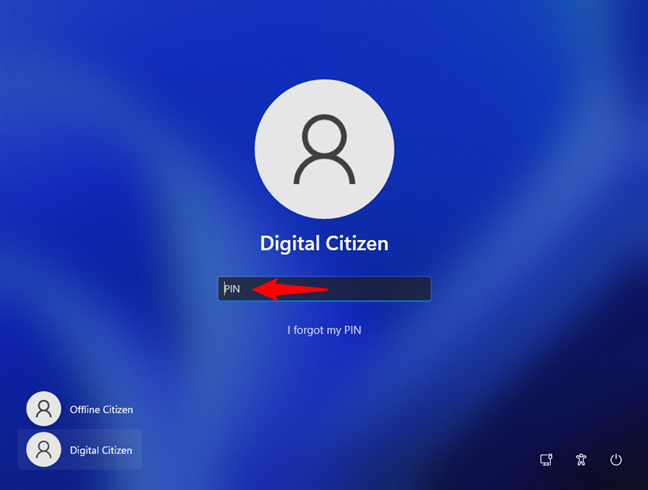
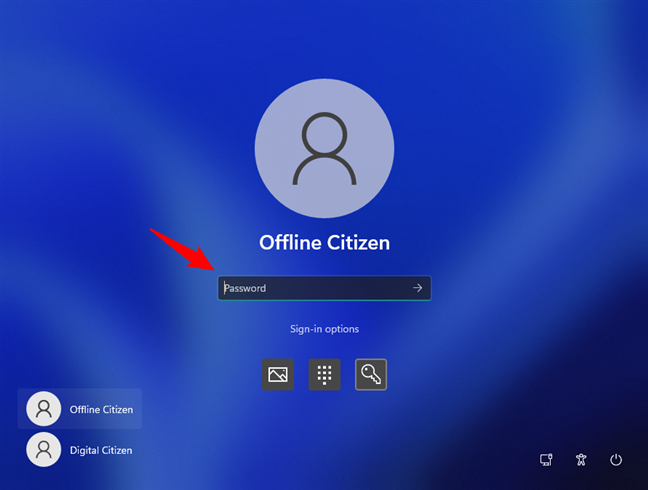
                Are you sure it is asking for a password and not a PIN? Sometimes windows will ask for a PIN not a pwd. That would explain why it is ignoring everything you type but the numbers

                See this for the various login methods, and how to switch between them at the login screen
                All the methods you can use to sign in or log into Windows 11: password, PIN, Windows Hello Face Recognition, fingerprint scanning etc.


                Here is more on PIN login, including how to turn it off.
                A PIN is a faster and equally secure way of logging into your Windows PC. Here's how to set it up.


                You need to pay attention to what it is asking you for - the box looks the same but there is a difference you can see between PIN and password login

                To change the password, literally click the start menu once and then start typing the word PASSWORD which will bring up options related to password management


                Last edited by SkyHawk; 12-12-2023, 9:48 AM.
                Click here for my iTrader Feedback thread: https://www.calguns.net/forum/market...r-feedback-100

                Comment

                Working...
                UA-8071174-1