Unconfigured Ad Widget

Collapse

Recommend a video editing program

Collapse
X
 
  • Time
  • Show
Clear All
new posts
  • DentonandSasquatchShow
    Senior Member
    • Jun 2018
    • 1343

    Recommend a video editing program

    I tried to use the video editor preinstalled on my computer and it worked fine but it was going to take over an hour to extract.

    I need something that is fairly simple to use, I don't have a lot of experience video editing but some. And something that extracts faster than an hour.

    I want to start uploading my podcast to Rumble so if anyone knows something that works in concert with Rumble that'd be even better.
    I will stand for truth even if I stand alone.

    The last time I had faith in the News was when it was with Huey Lewis.
  • #2
    WoodTurner
    CGN/CGSSA Contributor
    CGN Contributor
    • Apr 2010
    • 286

    It's possible that the software you have is fine. Is it a 4k video? H265? If so, I believe you have to buy something from the Windows store to make it work right. I remember a friend having a similar issue a few years ago. He was trying to process a 4k gopro video and it was taking waaay too long. Didn't have the Windows HEVC support.
    Might not be the case but it might be something to look into.

    Comment

    • #3
      ibanezfoo
      I need a LIFE!!
      • Apr 2007
      • 11608

      What are you looking for? An NLE? Simply something to change the codec?

      Theres Divinci Resolve, Openshot, Lightworks, Movavi, Blender

      Otherwise for codec manipulation Handbrake is free and easy
      vindicta inducit ad salutem?

      Comment

      • #4
        arrix
        Veteran Member
        • May 2012
        • 3721

        Probably should try Adobe Premiere.
        There is no week nor day nor hour, when tyranny may not enter upon this country, if the people lose their supreme confidence in themselves -- and lose their roughness and spirit of defiance -- Tyranny may always enter -- there is no charm, no bar against it -- the only bar against it is a large resolute breed of men.

        -Walt Whitman

        Comment

        • #5
          brassburnz
          Veteran Member
          • Nov 2006
          • 3553

          Originally posted by arrix
          Probably should try Adobe Premiere.
          Adobe Premier Pro is excellent video editing software. Probably overkill for the OP. The price and learning curve is fairly steep.

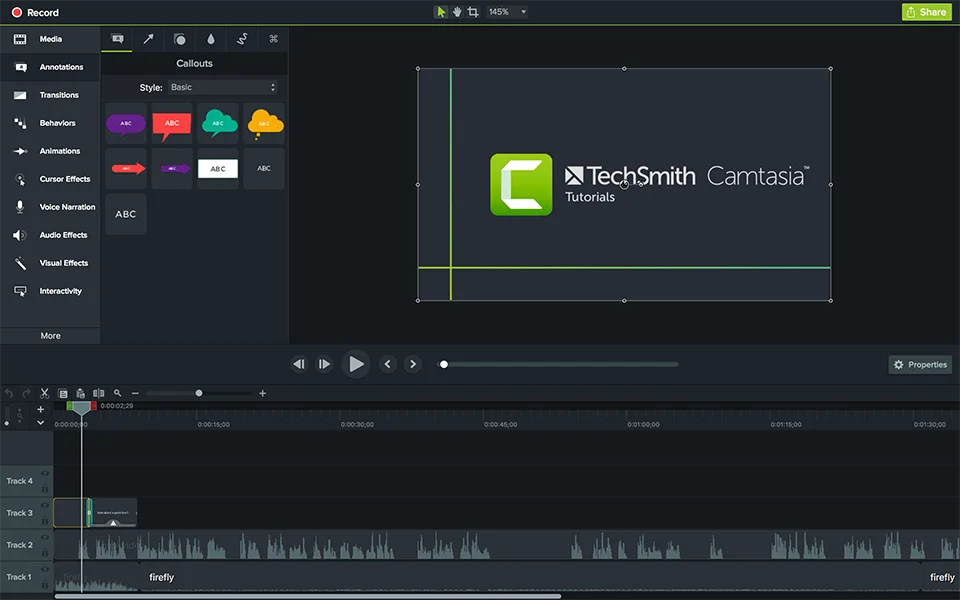
          For smaller projects I prefer Camtasia from Techsmith. Not as versatile as Premier Pro but powerful enough for something like Rumble. Not free but a good value at $300 for a lifetime license. 2 installs. Works with Windows and Mac OS. 30 day free trial.

          World's leading screen capture + recorder from Snagit + Screencast by Techsmith. Capture, edit and share professional-quality content seamlessly.


          Last edited by brassburnz; 08-21-2023, 10:36 AM.
          NRA Life Member
          CRPA Life Member

          Comment

          • #6
            musick
            CGSSA Associate
            • Sep 2012
            • 1062

            Originally posted by DentonandSasquatchShow
            I tried to use the video editor preinstalled on my computer and it worked fine but it was going to take over an hour to extract.

            I need something that is fairly simple to use, I don't have a lot of experience video editing but some. And something that extracts faster than an hour.

            I want to start uploading my podcast to Rumble so if anyone knows something that works in concert with Rumble that'd be even better.
            Not sue what OS you are running but Kdenlive is quite capable and free.

            Comment

            • #7
              gorn5150
              Senior Member
              • Aug 2007
              • 1453

              A great free editor is Shotcut https://shotcut.org/download/
              Another one is Davinci Resolve, also free https://www.blackmagicdesign.com/pro...davinciresolve

              Comment

              • #8
                .sam.
                Junior Member
                • May 2014
                • 78

                Try ClipChamp and see if it import/export quicker. Free version is limited to 1080p, https://clipchamp.com/en/
                COTEFT#45
                Winchester/NRA Basic Pistol: Distinguished Expert

                Comment

                • #9
                  Warbonnet
                  Veteran Member
                  • Oct 2022
                  • 2829

                  Originally posted by DentonandSasquatchShow
                  I tried to use the video editor preinstalled on my computer and it worked fine but it was going to take over an hour to extract.

                  I need something that is fairly simple to use, I don't have a lot of experience video editing but some. And something that extracts faster than an hour.

                  I want to start uploading my podcast to Rumble so if anyone knows something that works in concert with Rumble that'd be even better.
                  Avid Media Composer is the go to today by most post production houses.
                  Adobe Premier Pro a second choice.

                  There is also Final Cut Pro X that is pretty easy to use.

                  I still use Final Cut Pro 7 on an older Mac system because that is what I'm used to. But Apple hasn't supported Final Cut Pro 7 in years now.

                  Comment

                  • #10
                    DolphinFan
                    Veteran Member
                    • Dec 2012
                    • 2579

                    I use Adobe Premiere Pro
                    10/15/2022 - Called to get on the list
                    2/18/2023 - Interview set
                    4/27/2023 - Class
                    4/30/2023 - Live Scan
                    5/9/2023 - Interview
                    6/26/2023 - Approval Letter
                    8/1/2023 - Issued

                    Comment

                    • #11
                      rodralig
                      CGN Contributor
                      • Apr 2016
                      • 4262

                      Originally posted by DentonandSasquatchShow
                      I tried to use the video editor preinstalled on my computer and it worked fine but it was going to take over an hour to extract.

                      I need something that is fairly simple to use, I don't have a lot of experience video editing but some. And something that extracts faster than an hour.

                      I want to start uploading my podcast to Rumble so if anyone knows something that works in concert with Rumble that'd be even better.

                      In order of preference, depending on use case
                      1. Pro-user (quick) - Filmora
                      2. Advanced - DaVinci Resolve
                      3. Mobile - LumaFusion (iPad)


                      _

                      WEGC - Shooting at 10-yards VS 20-yards - https://www.youtube.com/watch?v=h7mdbNZ4j9U

                      Comment

                      • #12
                        67Cuda
                        Senior Member
                        • Oct 2013
                        • 1705

                        I use Chimp Champ for uploading to YouTube. It's from Microsoft, I believe.
                        I'd use Davinci Resolve, but it doesn't like mp4 format.
                        Originally posted by ivanimal
                        People that call other member stupid get time off.
                        So much for being honest.

                        Comment

                        Working...
                        UA-8071174-1