Unconfigured Ad Widget

Collapse

Cloning and partitioning an SSD

Collapse
X
 
  • Time
  • Show
Clear All
new posts
  • lone shooter
    Senior Member
    • Dec 2014
    • 2469

    Cloning and partitioning an SSD

    So, I currently have a 256GB SSD in my desktop. I have run out of space so I recently bought a 1TB SSD. I cloned the 256 onto the 1TB using AOMEI freeware. But, I guess I didn't understand how to set up the partition because my 1TB SSD is only showing 256GBs. How can I fix this to show 1TB on my 1TB SSD (or close to it, I realize some gets lost)?

    TIA
    The koolaid only works if EVERYONE drinks it - Jim Jones
  • #2
    Mute
    Calguns Addict
    • Oct 2005
    • 8534

    Originally posted by lone shooter
    So, I currently have a 256GB SSD in my desktop. I have run out of space so I recently bought a 1TB SSD. I cloned the 256 onto the 1TB using AOMEI freeware. But, I guess I didn't understand how to set up the partition because my 1TB SSD is only showing 256GBs. How can I fix this to show 1TB on my 1TB SSD (or close to it, I realize some gets lost)?

    TIA
    Is the remaining space showing up as unallocated in your disk management control panel? If it is, use your AOMEI software to either merge or extend your c drive with the unallocated space.
    NRA Benefactor Life Member
    NRA Certified Pistol, Rifle, Personal Protection In The Home, Personal Protection Outside The Home Instructor, CA DOJ Certified CCW Instructor, RSO


    American Marksman Training Group
    Visit our American Marksman Facebook Page

    Comment

    • #3
      MrBlazito
      Senior Member
      • May 2011
      • 1005

      use partition manager to merge the partitions
      As one of the best free hard disk partition manager software for Windows 11/10/8/7, AOMEI Partition Assistant Standard enables you to manage hard drives and partitions for peak performance, while ensuring the safety of your data.

      Comment

      • #4
        SkyHawk
        I need a LIFE!!
        • Sep 2012
        • 23495

        I always use Acronis True Image when migrating a boot drive to a new drive. It handles everything in one step and lets you lay out the partitions how you want. It is not free but it is probably the best.
        Last edited by SkyHawk; 03-22-2021, 11:13 PM.
        Click here for my iTrader Feedback thread: https://www.calguns.net/forum/market...r-feedback-100

        Comment

        • #5
          SkyHawk
          I need a LIFE!!
          • Sep 2012
          • 23495

          Originally posted by Mute
          Is the remaining space showing up as unallocated in your disk management control panel? If it is, use your AOMEI software to either merge or extend your c drive with the unallocated space.
          Usually that only works if the free space is directly adjacent to the partition you want to extend. That is usually not the case with a boot partition, because it is frequently followed by a recovery partition.
          Click here for my iTrader Feedback thread: https://www.calguns.net/forum/market...r-feedback-100

          Comment

          • #6
            HecklerNKoch
            Member
            • Jan 2016
            • 428

            EFF this sub-forum.


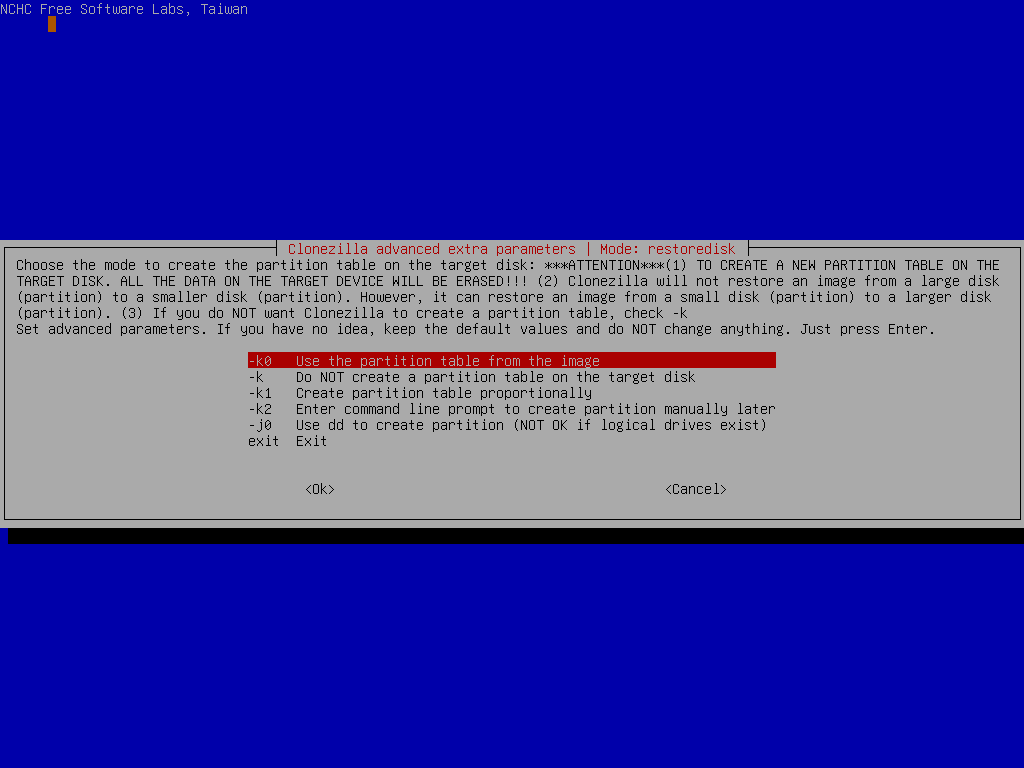
            You will need to re-clone and do it "proportionately," unless you want to spend a tedious mount of time meticulously doing it manually.


            You can use Clonezilla. I can provide you with alternatives.

            Acronis True Image 2021.Build 30290 Bootable


            Should take you 5 minutes if that. I'm at 20+ clones for a Monday.


            Use option "-k1" which will create the partition table "proportionally" in the target disk and turn on option "-r" to resize the file file system in the partition "automatically" for you.


            If you want basic cloning software as an ISO that can probably do it in 3-5 minutes let me know. Acronis True Image 2021.Build 30290 Bootable


            Otherwise:


            Comment

            • #7
              Dragunov
              Senior Member
              • Dec 2008
              • 1953

              You can use several software titles to clone your SSD. Macrium Reflect, is my go-to. You clone your drive, then go into windows disk managment, allocate the rest of the disk, if unallocated, then expand your C: drive, to include the rest of the disk.

              Comment

              • #8
                the86d
                Calguns Addict
                • Jul 2011
                • 9587

                Just resize in disk management?

                Comment

                • #9
                  high_revs
                  CGN/CGSSA Contributor
                  CGN Contributor
                  • Feb 2006
                  • 7566

                  you can resize in disk management. when i cloned drives (going up or down in size and if done, so long as the actual data is smaller than the capacity) i used mini-partition wizard (freebie).

                  prior i used partition magic but mine is much to old when i bought it in the early 2000s probably.

                  Comment

                  • #10
                    SkyHawk
                    I need a LIFE!!
                    • Sep 2012
                    • 23495

                    Originally posted by the86d
                    Just resize in disk management?
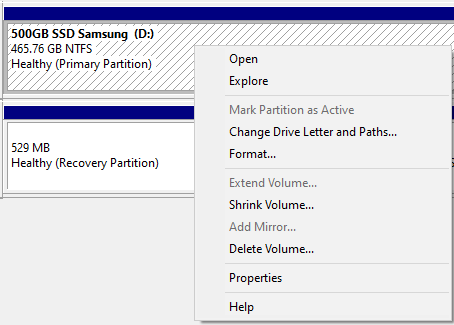
                    Once again, that only works if the empty space is is directly adjacent to the volume that you wish to extend. You can see in your screenshot for example, there is a recovery partition following the boot partition. If you did have free space on the disk, you still would not be able to extend the boot partition using disk management.

                    Extend a basic or dynamic volume in Windows or Windows Server. Use Disk Management or PowerShell to add unallocated space to a volume.


                    If Extend Volume is grayed out, check the following:
                    ...
                    There is unallocated space directly after (to the right) of the volume, as shown in the graphic above. If there's another volume in-between the unallocated space and the volume you want to extend, you can either delete the in-between volume and all files on it (make sure to back up or move any important files first!), use a non-Microsoft disk partitioning app that can move volumes without destroying data, or skip extending the volume and instead create a separate volume in the unallocated space.
                    Click here for my iTrader Feedback thread: https://www.calguns.net/forum/market...r-feedback-100

                    Comment

                    • #11
                      lone shooter
                      Senior Member
                      • Dec 2014
                      • 2469

                      Still not sure what I'm doing. This is where I'm currently at. C:/ is my current drive and F:/ is the future replacement.
                      Attached Files
                      The koolaid only works if EVERYONE drinks it - Jim Jones

                      Comment

                      • #12
                        lone shooter
                        Senior Member
                        • Dec 2014
                        • 2469

                        Originally posted by MrBlazito
                        use partition manager to merge the partitions
                        https://www.diskpart.com/free-partition-manager.html
                        Ok, I ended up using the linked app and ended up with this.

                        The true test will be once I swap out SSDs.
                        Attached Files
                        The koolaid only works if EVERYONE drinks it - Jim Jones

                        Comment

                        • #13
                          HecklerNKoch
                          Member
                          • Jan 2016
                          • 428

                          What a parody of a thread at the expense of someone's time.

                          My condolences.

                          Comment

                          • #14
                            OlderThanDirt
                            FUBAR
                            CGN Contributor - Lifetime
                            • Jun 2009
                            • 5808

                            Originally posted by SkyHawk
                            I always use Acronis True Image when migrating a boot drive to a new drive. It handles everything in one step and lets you lay out the partitions how you want. It is not free but it is probably the best.
                            ^^^This. In addition to regular backups, I clone my drive to a replacement disk monthly. The process has been flawless.
                            We know they are lying, they know they are lying, they know we know they are lying, we know they know we know they are lying, but they are still lying. ~ Solzhenitsyn
                            Thermidorian Reaction . . Prepare for it.

                            Comment

                            Working...
                            UA-8071174-1