Unconfigured Ad Widget

Collapse

Weird CPU core usage?

Collapse
X
 
  • Time
  • Show
Clear All
new posts
  • the86d
    Calguns Addict
    • Jul 2011
    • 9587

    Weird CPU core usage?

    I don't think I have ever seen CPU core usage all asymmetrical:
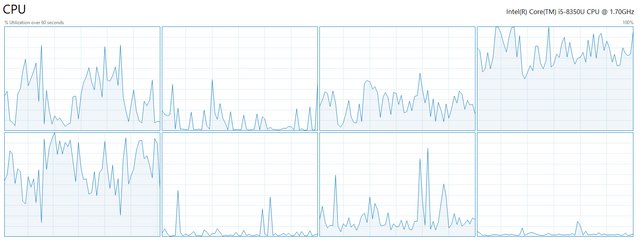

    Then this:
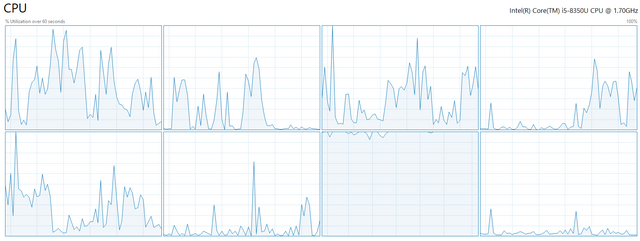

    My work rig is whacky... CPU usage is usually nearly the same for all cores, most of the time I look...
  • #2
    WoodTurner
    CGN/CGSSA Contributor
    CGN Contributor
    • Apr 2010
    • 286

    Some programs don't take advantage of multi-core/multi-threading.

    Comment

    • #3
      xfer42
      CGN/CGSSA Contributor
      CGN Contributor
      • Sep 2007
      • 709

      Originally posted by WoodTurner
      Some programs don't take advantage of multi-core/multi-threading.
      ^This


      A process will usually stick to a single core. If it spawns child processes, or parts of the application use libraries that spawn other processes, then the load starts to spread. There is a simple load test I do on VM that are allocated to me where I have no clue on the actual bare metal.

      [root@localhost tmp]# python
      Python 2.7.5 (default, Aug 7 2019, 0029)
      [GCC 4.8.5 20150623 (Red Hat 4.8.5-39)] on linux2
      Type "help", "copyright", "credits" or "license" for more information.
      >>> while True:
      ... pass
      ...

      This will basically loop and rail a processor. All CPUs will report no load, while one will report 100% utilization. If my VM has 8 CPUS, and 4 processes locks it up, I know I really dont have 8 CPUs.

      Comment

      • #4
        the86d
        Calguns Addict
        • Jul 2011
        • 9587

        Originally posted by xfer42
        ^This


        A process will usually stick to a single core. If it spawns child processes, or parts of the application use libraries that spawn other processes, then the load starts to spread. There is a simple load test I do on VM that are allocated to me where I have no clue on the actual bare metal.

        [root@localhost tmp]# python
        Python 2.7.5 (default, Aug 7 2019, 0029)
        [GCC 4.8.5 20150623 (Red Hat 4.8.5-39)] on linux2
        Type "help", "copyright", "credits" or "license" for more information.
        >>> while True:
        ... pass
        ...

        This will basically loop and rail a processor. All CPUs will report no load, while one will report 100% utilization. If my VM has 8 CPUS, and 4 processes locks it up, I know I really dont have 8 CPUs.
        Every time I have seen spikes happen, it used to really be on core 0.

        I guess I haven't rally looked as much since I switch to Win10 about a year and a half ago, so maybe Win10 does a better job of assigning one, randomly?

        Here at home on my old Phenom x6 it would always use the 1st core (0), and would bear the brunt of single core schtuffz. I think it was the same when I switched to Win10.

        Hmm. Maybe one of the Win10 builds changed something, for the better.
        I am too lazy to research that much, but curious...

        Comment

        • #5
          xfer42
          CGN/CGSSA Contributor
          CGN Contributor
          • Sep 2007
          • 709

          Mine is random. Its a roll of the dice of which process gets what processor. Depends on load on all CPUs at that very time the process starts. This is loading a 3D rendering in a VM on mine. You can see what lucky processors got the job.

          2-15-2021 10-17-12 PM.jpg

          Comment

          • #6
            ibanezfoo
            I need a LIFE!!
            • Apr 2007
            • 11955

            You can set the affinity for any app to any core(s) otherwise Windows just figures it out by itself.

            We had to do that back in the day because AutoCAD is not multicore friendly and Windows isn't great at moving stuff around. We'd move the two acad threads to the least used cores on a particular machine.
            vindicta inducit ad salutem?

            Comment

            • #7
              Epaphroditus
              Veteran Member
              • Sep 2013
              • 4888

              Turn off hyperthreading and performance increase. Always.
              CA firearms laws timeline BLM land maps

              Comment

              • #8
                ibanezfoo
                I need a LIFE!!
                • Apr 2007
                • 11955

                Originally posted by Epaphroditus
                Turn off hyperthreading and performance increase. Always.
                Thats not true at all. That is entirely dependent on what you are doing. Rendering models with Revit goes significantly faster with hyperthreading. Modeling goes faster with it disabled.

                I have piles of benchmarks for this stuff for our CAD machine tuning...
                vindicta inducit ad salutem?

                Comment

                • #9
                  Fastattack
                  Senior Member
                  • Mar 2008
                  • 1655

                  Have you investigated the task manager task list (or other tools) to see what processes are consuming the CPU? I sometimes notice my anti-virus s/w doing things like this when it runs.

                  Comment

                  • #10
                    the86d
                    Calguns Addict
                    • Jul 2011
                    • 9587

                    Uh, yeah, but I found process explorer to be much more useful... ... ...
                    :P

                    Comment

                    Working...
                    UA-8071174-1