Unconfigured Ad Widget

Collapse

Engineering Computer

Collapse
X
 
  • Time
  • Show
Clear All
new posts
  • rero360
    Veteran Member
    • Dec 2009
    • 3926

    Engineering Computer

    I am currently in school for a Mechanical Engineering degree and am need of a new computer, and am in the process of requesting one from the VA. I've been doing a lot of research but there is still a lot of unknowns for me. I was hoping to hear what you all have to say. The big resource hog is SolidWorks, which on their website they have listed as minimums of:

    Processor 3.3 GHz or higher (not sure if they mean individual core speed or combined)
    RAM 16 GB or more
    Graphics card is a bit weird, they don't come right out and say which to use, probably because there are so many different ones, but they list a bunch that have been tested and certified.

    So now the VA generally limits you to $1,200 for a laptop, but if you show proof that you need a specific computer they will spend more, just how much more, I don't know.

    I've spec'ed out a few HPs, some OMENs and a ZBook G6, with proces ranging between $1970, and $3578. The ZBook has a 15.6" diagonal FHD LED UWVA anti-glare slim Ambient Light Sensor screen, Intel i7-9850H vPro processor(2.6 GHz, up to 4.6 GHz with Turbo Boost, 12 MB cache, 6 core) NVIDIA Quadro RTX 3000 (6 GB GDDR6 dedicated) 32 GB of DDR4 2666 RAM (one stick so I can add another one in the future to double the RAM) and two 512 GB PCIe NVMe Self Encrypted (SED) OPAL2 TLC SSDs.

    I also looked at ACER, Lenovo, ASUS, Dell, Gigabyte, and MSI, but outside of Dell, which I last used one like 15 years ago, I have no experience with them and I'm not sure who to go with. I figure I'll submit a few options, at different price points, and see which one the VA will be willing to pay for. Ideally, and I'm going to tell the VA this as well, I would like one that is somewhat future proof, something that will last more than 3 or 4 years.
  • #2
    bigmike82
    Bit Pusher
    CGN Contributor
    • Jan 2008
    • 3876

    This might be a silly question, but why do you need an engineering laptop? You're paying primo dollars for miniature components and extra cooling.

    Can you build up a good spec desktop and run solidworks remotely?

    Or look at their cloud platform?

    The 1200 limit can get you a solid, durable laptop, but if you want it to rendering it's not ideal.

    The other option is refurb. I've bought several refurb and returns from the Dell outlet in the past, and when coupled with a 3-year full warranty (costs extra) they've worked very well for me.
    -- 09 F9 11 02 9D 74 E3 5B D8 41 56 C5 63 56 88 C0

    Comment

    • #3
      saxman
      Senior Member
      • Dec 2007
      • 555

      You don't need a $3k computer to run solid works.

      The specs solid works asks for are dependent on model size. I believe they break it into 3 categories. You'll never work on something larger than the smallest category as a student (and probably never in industry either, as the companies that run models that size are usually using different software.

      Analysis and rendering end up being the bigger system hogs, but again, as a student, you'll never be doing anything that complex. If you want a crazy computer, that's great, but a $1200 computer will meet your needs just fine.

      Comment

      • #4
        nn21
        Member
        • Nov 2015
        • 122

        Originally posted by saxman
        $1200 computer will meet your needs just fine.
        A $1200 laptop is arguably even a waste of money. I basically did my entire senior project on a surface laptop with 8 gigs of ram and a energy efficient i5.

        So I'm a senior mechE, lord knows I shouldn't be but saxman's undergraduate time rubbed off on me. You don't need to be spending anywhere near that much money. I'm typing this with my 260 component senior project assembly open in the background on a 700 dollar surface laptop with no gpu. I would buy my surface laptop again over anything you have listed as I could literally have my surface, build my desktop that will be just as good as those laptops, have two great sw machines and have over 2 grand in my pocket.

        The solidworks suggestions are just built in nonsense to keep the hardware warnings away (you will literally get hardware warnings on any gforce card even if it runs fine). Nothing you will do in your undergrad time will warrant any need for anything even remotely close to what you're looking at. The only time you'll need anything powerful is for any fea that youll do during your project. In those cases, save yourself $2500 and just use the engineering departments computers, they're there for a reason.

        If you really feel the need to have something to demolish the solidworks world, the answer is to build a desktop. I have a 8700k, 32gb, quadro p2000 system that barely cost 1200 dollars and will eat any model I've ever seen in both my undergrad time and as an aeroE intern/machinist.

        Comment

        • #5
          saxman
          Senior Member
          • Dec 2007
          • 555

          My work computer is a workstation laptop. It is useless as a laptop and running cad on small models works just as well on my older i5 dell laptop. If you're getting a laptop that's for school, get something you'll actually take to class.

          Comment

          • #6
            Dragunov
            Senior Member
            • Dec 2008
            • 1953

            You can go with a newer P series Lenovo workstation. They have high-end Quadro graphics, which are far better for what you're wanting to do, than a GeForce, or RTX card/chipset.

            I have a Lenovo W540, as my daily driver:

            i7-4900mq Quad Core.
            32gb PC3-14900 ram.
            Two, 1tb Samsung 860 EVO SSD's (One in the ODB).
            480gb M.2 NGFF drive.
            nVidia Quadro K2100m graphics chipset.
            3k display.
            4 USB 3.0 ports, Two of them are on a PCI Express card.
            2 USB 2.0 ports.
            5g Wireless.
            AND Thunderbolt.

            Cost of the computer, including upgrades, $553 USD, and it does absolutely everything I need.
            AutoCaD, Photoshop, and a few 3D rendering apps. It also will run a few VM's at the same time, and it's even a halfway decent gamer.

            I recommend it highly. I actually have two of them.

            Comment

            • #7
              nn21
              Member
              • Nov 2015
              • 122

              Originally posted by Dragunov
              They have high-end Quadro graphics, which are far better for what you're wanting to do, than a GeForce, or RTX card/chipset.
              A quadro at his skillpoint in engineering serves three purposes: enabling realview graphics in SW (which can be done with any other card by changing one value in the program files), making it impossible for him to do anything fun should his engineering buddies try to get him to play games with them on pc, and light money on fire.

              A quadro serves 0 practical purpose for an engineering student other than winning an engineering dick swinging contest. He wont notice any difference between a quadro of any sort. He will notice the difference between carrying around a workstation laptop to class and a normal laptop that runs SW just as well for his needs.

              Comment

              • #8
                rero360
                Veteran Member
                • Dec 2009
                • 3926

                Comment

                • #9
                  ibanezfoo
                  I need a LIFE!!
                  • Apr 2007
                  • 11617

                  Well, I work for a mechanical engineering and fab company and have 100's of these computers... Really it all boils down to the models you are opening. Small stuff doesn't matter, any old laptop with even built in 3D graphics can run it. Massive buildings in Revit or AutoCAD or whatever require very expensive laptops (ours are about $3800 our cost, which is probably around $5k street cost I would guess, but I don't know... Dell Precision 7000 series basically maxed out).

                  For the most part, CAD computers and gaming computers are the same thing. Quadro cards are simply there to satisfy support. They don't do anything the other gaming cards won't do. We only use them because if you call Autodesk support and you don't have a Quadro they will just blame that and not put any effort into helping you.

                  I would recommend just getting the best gaming machine you can get on your budget and it will run your CAD software just fine.

                  If you want something specifically made for engineering and have lots of money go get one of these

                  High-performance, purpose-built BOXX high end workstations and rackmount systems accelerate professional 3D CAD, animation, VFX, data science, and other applications, Creator PCs
                  vindicta inducit ad salutem?

                  Comment

                  • #10
                    Steveg13
                    Member
                    • Jan 2015
                    • 199

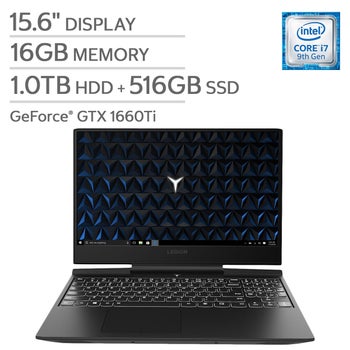
                    Would something like this get you by? I bought one of these for my son who just left for college and is pursuing a cyber security degree. He hasn't put it through its paces yet from that standpoint but the gaming has been fine on it. Occasionally it's $100 off of the current price.

                    Comment

                    • #11
                      vino68
                      Senior Member
                      • Jul 2016
                      • 1622

                      Originally posted by ibanezfoo
                      Well, I work for a mechanical engineering and fab company and have 100's of these computers... Really it all boils down to the models you are opening. Small stuff doesn't matter, any old laptop with even built in 3D graphics can run it. Massive buildings in Revit or AutoCAD or whatever require very expensive laptops (ours are about $3800 our cost, which is probably around $5k street cost I would guess, but I don't know... Dell Precision 7000 series basically maxed out).

                      For the most part, CAD computers and gaming computers are the same thing. Quadro cards are simply there to satisfy support. They don't do anything the other gaming cards won't do. We only use them because if you call Autodesk support and you don't have a Quadro they will just blame that and not put any effort into helping you.

                      I would recommend just getting the best gaming machine you can get on your budget and it will run your CAD software just fine.

                      If you want something specifically made for engineering and have lots of money go get one of these

                      https://www.boxx.com/systems/mobile-...ons/goboxx-mxl
                      I agree. I recommend a Dell Precision Mobile Workstation in the 7000 series.

                      Comment

                      • #12
                        rero360
                        Veteran Member
                        • Dec 2009
                        • 3926

                        Comment

                        • #13
                          ibanezfoo
                          I need a LIFE!!
                          • Apr 2007
                          • 11617

                          Well done sir. Should serve you fine, provided you don't get a lemon. I haven't heard bad things about Alienwares quality so you should be good to go.
                          vindicta inducit ad salutem?

                          Comment

                          • #14
                            vino68
                            Senior Member
                            • Jul 2016
                            • 1622

                            Nice. Alien ware is owned by Dell and is considered a consumer line, thus I have no experience using the line. But I hear good things as a gaming platform, same with Origin PC.

                            Comment

                            • #15
                              bigmike82
                              Bit Pusher
                              CGN Contributor
                              • Jan 2008
                              • 3876

                              Alienware is pretty solid.

                              Get insurance for it (especially the accidental damage protection). Trust me, if you have an accident it'll pay for itself and then some.
                              -- 09 F9 11 02 9D 74 E3 5B D8 41 56 C5 63 56 88 C0

                              Comment

                              Working...
                              UA-8071174-1