Unconfigured Ad Widget

Collapse

wifi being "hacked" problem

Collapse
X
 
  • Time
  • Show
Clear All
new posts
  • #16
    the86d
    Calguns Addict
    • Jul 2011
    • 9587

    A miles is 640 acres, and cantennas have a range of at least 1 mile+...

    Agreed reset SSID and passphrase, then create a guest SSID (almost all modern consumer routers have this "guest" feature) for your son, and give him his passphrase to only his SSID, only to change it on a regular basis.
    This also helps when my son does not do his chores, I can disable "HIS" SSID, and mine runs fine. My daughter has her own to so I can disable if abused, or caught late at night watching Youtube makeup videos, or whatever, independent of mine and his...
    Additionally, if being disassociated, try changing this to a valid MAC (anything that starts with 00, and is A-F and 0-9 seems to work for me, as long as chars aren't repeated, it seems), until you get a different IP via "ipconfig /release", then "ipconfig /renew":

    (000000000001 didn't work.)

    This MAC change does not guarantee it won't be changed on an attacker's side to include the change, but he can't know what specific MAC your son is using at that moment, just that it is an active on your ESSID:
    Originally posted by vino68
    ... I would also lock down Wi-fi access via MAC addresses...
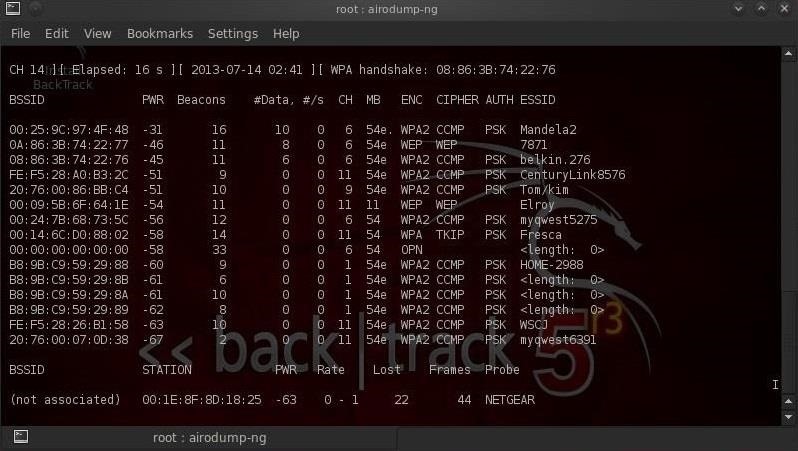
    Not my captures, but a screen-scrape I found real quick, and as you can see MAC filter's are of no use, in any way, shape, or form, they are all listed under BSSID, and the associated ESSID to the right. This can be done in a VM, or a natively running a FREE Linux distro, freely.
    All one has to do is plug the BSSID as their own MAC in the 1st screen(scrape), and one bypassed MAC filtering, that easy, and natively supported in modern OS's (well drivers actually?), even the current 1903 build of Windows 10, OOTB!


    If you think "friend" is getting on your network, what I have done in the past, and currently for most of my used devices is to give them reserved IPs, so they always get a low number in the 4th octet (say 192.168.1.[2-200]), and DHCP gives out the higher IPs (say: 192.168.1.[201-254]), if you want to go this route... I am not sure it is much of a "security thing", but you will know what is pulling DHCP, separate from "your" regular-stuff as just another "layer" for manual filtering/weeding, and it might be more noticeable if something is pulling DHCP against your will... (but won't help if they spoof a MAC). Personally, I don't use 192.168.x.1 as my router's address, in case someone gets on, they can't get out to the Internet if they don't use DHCP, by default, so they have to pull DHCP to get out, if they crack into my WiFi, if not MAC spoofing. My TVs I run wired Ethernet (where possible, but the danged new Roku's don't have a wired port anymore, the bastages).
    Last edited by the86d; 08-02-2019, 5:32 AM.

    Comment

    • #17
      Librarian
      Admin and Poltergeist
      CGN Contributor - Lifetime
      • Oct 2005
      • 44660

      Originally posted by the86d
      If you think "friend" is getting on your network, what I have done in the past, and currently for most of my used devices is to give them reserved IPs, so they always get a low number in the 4th octet (say 192.168.1.[2-200]), and DHCP gives out the higher IPs (say: 192.168.1.[201-254]), if you want to go this route... I am not sure it is much of a "security thing", but you will know what is pulling DHCP, separate from "your" regular-stuff as just another "layer" for manual filtering/weeding, and it might be more noticeable if something is pulling DHCP against your will... (but won't help if they spoof a MAC). Personally, I don't use 192.168.x.1 as my router's address, in case someone gets on, they can't get out to the Internet if they don't use DHCP, by default, so they have to pull DHCP to get out, if they crack into my WiFi, if not MAC spoofing. My TVs I run wired Ethernet (where possible, but the danged new Roku's don't have a wired port anymore, the bastages).
      Can you point me to a longer discussion of this? I understand the words and sentences, but I'm not getting the whole meaning.

      Never was a network admin ...
      Last edited by Librarian; 08-02-2019, 10:38 PM.
      ARCHIVED Calguns Foundation Wiki here: http://web.archive.org/web/201908310...itle=Main_Page

      Frozen in 2015, it is falling out of date and I can no longer edit the content. But much of it is still good!

      Comment

      • #18
        packnrat
        Veteran Member
        • Feb 2007
        • 3939

        if he believes someone is using his wifi. easy fix.

        just turn it off for a couple hrs.
        gamer gets the bill for losing the game. and do to his failures no one will play with him.
        big gun's...i love big gun's

        Comment

        • #19
          Robotron2k84
          Senior Member
          • Sep 2017
          • 2013

          MAC filters work best as outbound filters in the firewall (if your router lets you do this). MAC filtering by DHCP gets you to an IP mapping, but either can be changed. Traditional MAC filtering works by denying a DHCP request, ignoring a MAC on the PHY, or by black-holeing it as an ARP table entry.

          Once you whitelist ethers in your outbound firewall tables, only those devices can talk to the internet. Someone would have to know a legal device MAC to challenge this, which is much more difficult than just randomly changing their own MAC.

          Comment

          • #20
            Epaphroditus
            Veteran Member
            • Sep 2013
            • 4888

            Bad players blame everything under the sun except their own failings. Tell your boy to "git gud".

            That's what the meanies tell me anyway.
            CA firearms laws timeline BLM land maps

            Comment

            • #21
              SonofWWIIDI
              I need a LIFE!!
              • Nov 2011
              • 21583

              Is the friend local? Or just an internet “friend”.
              Sorry, not sorry.
              🎺

              Dear autocorrect, I'm really getting tired of your shirt!

              Comment

              • #22
                the86d
                Calguns Addict
                • Jul 2011
                • 9587

                Originally posted by Librarian
                Can you point me to a longer discussion of this? I understand the words and sentences, but I'm not getting the whole meaning...
                Never was a network admin ...
                Many network admins know little outside of job-function, w/blinders, these days anyways. Hell the Network Admin. at my job, when I came from another position didn't even know what a gateway was...
                It was bad.
                EDIT: ...and he now denies this fact...

                Assuming you are not being facetious, and I have never read a discussion on this, just had conversations among people, what they have done on their home routers, things I ran into, and what some did/do at work:

                DHCP only hands out 192.168.1.[201-254], once set like this.
                Reservations let devices always get the same IP via DHCP (same a statically putting them in, but the router just always assigns the same ones for that MAC), 192.168.1.[1-200].

                When "tinkering" back in the day... one could always assume the router's IP is the lowest number (192.168.1.1, or 192.168.0.1). If you were jumping on... "other network", if using an IP you plugged manually you would use something like (probably safe to assume "other network" has 50 devices MAX) 192.168.1.61, with a netmask of 255.255.255.0, the router would use is 192.168.1.1 (DNS, DHCP and gateway), as few people change it.

                If someone tries this, and doesn't pull DHCP, they can't get out to the Internet, if your router isn't set to 192.168.1.1. Wrong DNS, wrong Gateway, only local traffic to that subnet. If MAC is still pulling DHCP, but "son's" MAC has already been changed, you can see it easily in the current leases, or filter for no internet traffic for this IP.
                Last edited by the86d; 08-05-2019, 5:27 AM.

                Comment

                • #23
                  Marauder2003
                  Waiting for Abs
                  CGN Contributor - Lifetime
                  • Aug 2010
                  • 3055

                  What works for me? My router is set to block any new connection. My phone, iPad and X10 controller are all known WiFi devices. TV, PCs and Logitech Duet are all wired.

                  A friend came by with their Portable to fix a few things. Gave it the router WiFi password but still could not get out. Then I remembered I block new connections. Unblock the new IP and we were fine.
                  #NotMyPresident
                  #ArrestFauci
                  sigpic

                  Comment

                  • #24
                    Librarian
                    Admin and Poltergeist
                    CGN Contributor - Lifetime
                    • Oct 2005
                    • 44660

                    Originally posted by the86d
                    Many network admins know little outside of job-function, w/blinders, these days anyways. Hell the Network Admin. at my job, when I came from another position didn't even know what a gateway was...
                    It was bad.
                    EDIT: ...and he now denies this fact...

                    Assuming you are not being facetious, and I have never read a discussion on this, just had conversations among people, what they have done on their home routers, things I ran into, and what some did/do at work:

                    DHCP only hands out 192.168.1.[201-254], once set like this.
                    Reservations let devices always get the same IP via DHCP (same a statically putting them in, but the router just always assigns the same ones for that MAC), 192.168.1.[1-200].

                    When "tinkering" back in the day... one could always assume the router's IP is the lowest number (192.168.1.1, or 192.168.0.1). If you were jumping on... "other network", if using an IP you plugged manually you would use something like (probably safe to assume "other network" has 50 devices MAX) 192.168.1.61, with a netmask of 255.255.255.0, the router would use is 192.168.1.1 (DNS, DHCP and gateway), as few people change it.

                    If someone tries this, and doesn't pull DHCP, they can't get out to the Internet, if your router isn't set to 192.168.1.1. Wrong DNS, wrong Gateway, only local traffic to that subnet. If MAC is still pulling DHCP, but "son's" MAC has already been changed, you can see it easily in the current leases, or filter for no internet traffic for this IP.
                    Not facetious at all - thanks, that helps.
                    ARCHIVED Calguns Foundation Wiki here: http://web.archive.org/web/201908310...itle=Main_Page

                    Frozen in 2015, it is falling out of date and I can no longer edit the content. But much of it is still good!

                    Comment

                    Working...
                    UA-8071174-1