Unconfigured Ad Widget

Collapse

Wifi Keeps Slowing and Dropping

Collapse
X
 
  • Time
  • Show
Clear All
new posts
  • Doheny
    I need a LIFE!!
    • Sep 2008
    • 13820

    Wifi Keeps Slowing and Dropping

    Both my 2.4 and 5G keep slowing and dropping. The cable company promises whole house coverage and while it is hitting all areas, it drops at various times. We're running two iPhones, two iPads, three smart switches/plugs, three Amazon Alexas and a Ring Door Bell. Granted, not everything runs at once.


    The cable company has been out taken a look. They changed out the modem and did something with the connection from the street into the house but things are still dropping. Would we benefit from a mesh system, or would we still have the same issues?


    ETA: Pictures/etc., are slow to load too.


    Thx.
    Last edited by Doheny; 04-16-2019, 4:45 PM.
    Sent from Free America
  • #2
    osis32
    Calguns Addict
    • Jul 2009
    • 5912

    Sounds like the Russians have gotten to you.
    Just a libertarian guy in a Leftist Authoritarian state.

    Comment

    • #3
      71MUSTY
      Calguns Addict
      • Mar 2014
      • 7029

      That often happens at my office during peak business hours. I suspect Verizon has an overloaded server trying to handle too many accounts.
      Only slaves don't need guns

      Originally posted by epilepticninja
      Americans vs. Democrats
      We stand for the Anthem, we kneel for the cross


      We already have the only reasonable Gun Control we need, It's called the Second Amendment and it's the government it controls.


      What doesn't kill me, better run

      Comment

      • #4
        SkyHawk
        I need a LIFE!!
        • Sep 2012
        • 23526

        If you are using the wifi access point built into the cable modem or cable company provided router, you might consider disabling that and getting a real/dedicated access point from Meraki, Aerohive, Ubiquiti, or even a Nighthawk.

        You also need to determine where it is dropping. If the internet is dropping out, that may have nothing to do with the wifi access point. You need to be instrumenting the connections, internal and external, to see where the drop is happening.

        I would start by profiling the internet connection for a few days using a reliable WIRED device (like a laptop with wired network port). Once you know the internet connection is solid, you can expand your investigation. If the internet connection is not solid however, then no point looking at wifi until that is resolved.
        Last edited by SkyHawk; 04-16-2019, 5:24 PM.
        Click here for my iTrader Feedback thread: https://www.calguns.net/forum/market...r-feedback-100

        Comment

        • #5
          LongLiveTheRepublic
          Senior Member
          • Aug 2018
          • 625

          I read it as wife...

          Comment

          • #6
            DaveInOroValley
            CGN/CGSSA Contributor
            CGN Contributor
            • Jan 2010
            • 8967

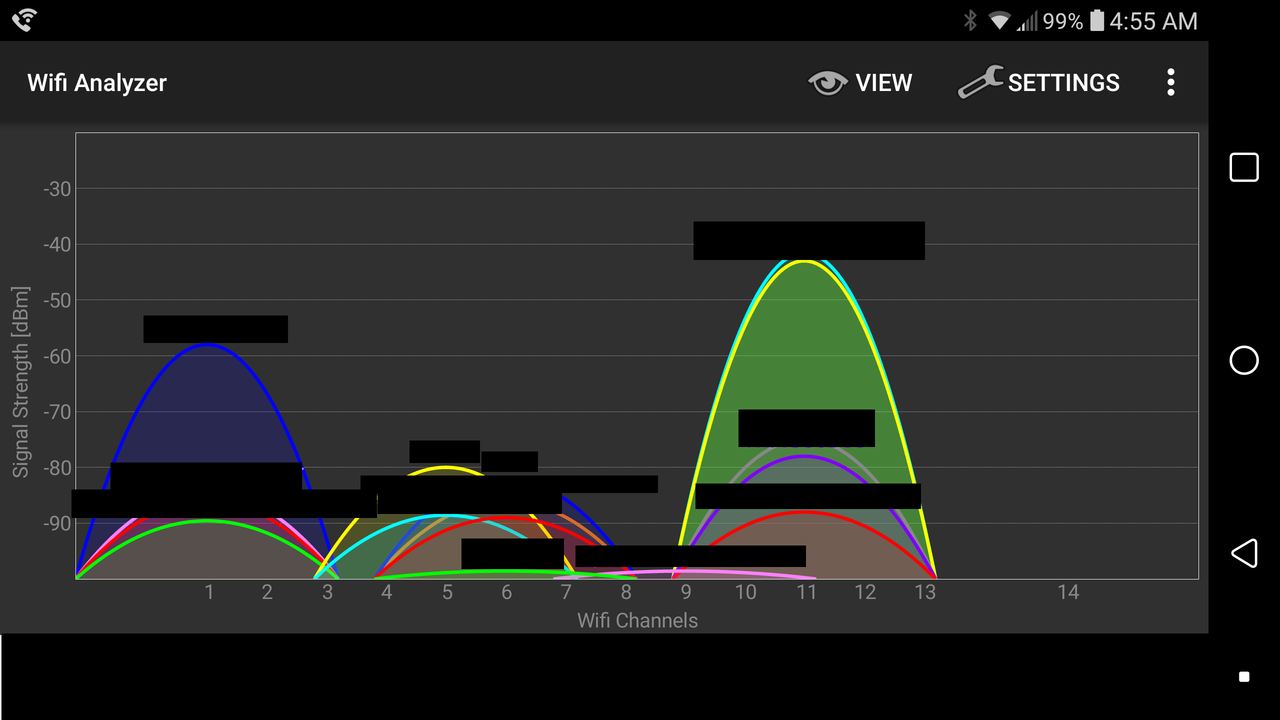
            Get one of the many available and free programs out there to check your wi-fi connections in the neighborhood. KisMac 2 is for Apple, not sure about Windows, but they have similar ones I'm sure. Sometimes it's something as simple someone close to you on the same channel especially on 2.4.

            Changing you own channels is easy and will help if you find there are too many people on the same.
            NRA Life Member

            Vet since 1978

            "Don't bother me with facts, Son. I've already made up my mind." -Foghorn Leghorn

            Comment

            • #7
              the_tunaman
              Senior Member
              • Dec 2012
              • 2445

              Changing channels is a great approach if your signals are overlapping.

              I just chased down an issue with my setup yesterday, which has been plaguing my wifi for a while now - my coverage kept degrading on a weekly basis and required router reboots to recover.

              I have a Nighthawk router/wifi AP, and a Nighthawk range extender. Coverage should be seamless across my property, for the most part, and it is when they are first initialized. Over a week or so I start developing dead spots and areas with weak signal strength until I went through the painful process of cycling them.

              It appears that this was due to an updated version of firmware - many were have g issues with the last two releases, so I downgraded two versions and it appeared to take care of my issues.
              MAGA - drain the swamp^D^D^D^D^Dcesspool!
              Proud deplorable wacist!
              #NotMyStateGovernment!
              Just remember BAMN - there is no level too low for them to stoop!
              COVID survivor - ain?t gonna get pricked!

              Comment

              • #8
                theLBC
                CGN/CGSSA Contributor
                CGN Contributor
                • Oct 2017
                • 7117

                somebody is piggy backing your wireless lan to connect to some gps device on an old jeep.

                Comment

                • #9
                  sholling
                  I need a LIFE!!
                  CGN Contributor
                  • Sep 2007
                  • 10360

                  Originally posted by SkyHawk
                  If you are using the wifi access point built into the cable modem or cable company provided router, you might consider disabling that and getting a real/dedicated access point from Meraki, Aerohive, Ubiquiti, or even a Nighthawk.

                  You also need to determine where it is dropping. If the internet is dropping out, that may have nothing to do with the wifi access point. You need to be instrumenting the connections, internal and external, to see where the drop is happening.

                  I would start by profiling the internet connection for a few days using a reliable WIRED device (like a laptop with wired network port). Once you know the internet connection is solid, you can expand your investigation. If the internet connection is not solid however, then no point looking at wifi until that is resolved.
                  Exactly!

                  OP, always start your tests at the beginning, in this case I'd run tracert to a known good sight (Yahoo.com?) and a problematic sight from a wired computer while things are running well and again when things slow down. That'll tell you if you have an Internet issue or a destination site issue. I'd also test a free DNS server (1.1.1.1) during a slowdown to see if your ISP has a doggy DNS server.

                  Only then would I start chasing wifi issues. I don't use Apple products but there must be a few wifi testing tools out there for your phones. Test all over the house on a good day and then repeat on a bad day. And that means everywhere in every room you have issues in.

                  I prefer to run cables over relying on mesh and installed a second and third 802.11ac router (cheap used T-Mobile/Asus AC1900 routers) as access points at the far end of my home and in my garage (near my Rings) but a good quality mesh system like an AC3000 Netgear Orbi might do the job. That I would not do is spend a dime until you've nailed down the source of the problem.
                  Last edited by sholling; 04-16-2019, 7:47 PM.
                  "Government is the great fiction, through which everybody endeavors to live at the expense of everybody else." --FREDERIC BASTIAT--

                  Proud Life Member: National Rifle Association, the Second Amendment Foundation, and the California Rifle & Pistol Association

                  Comment

                  • #10
                    the86d
                    Calguns Addict
                    • Jul 2011
                    • 9587

                    Are you getting dropped from WiFi, or staying connected to WiFi but Internet traffic stops?

                    How far are you from the router in feet as the crow flies?

                    Is the modem/router in a metal box?

                    Try a WiFi analyzer on a friend's android (or if it is available from the iPhruity store, but they like to charge for everything) to see the saturation of the channels, and maybe try less used channels in your area if just slow... but if you are staying connected. Plug a notebook into one of the wired router ports and ping google.com during the downtime?


                    I tried Spectrum (TWC/Charter) and FiOS plugged back w/in 3 days and returned hardware in less than 6 days.

                    30 seconds at a time Internet traffic would just stop for no reason at all.
                    Last edited by the86d; 04-17-2019, 5:06 AM.

                    Comment

                    • #11
                      67Cuda
                      Senior Member
                      • Oct 2013
                      • 1716

                      Is it dropping out in the evening when all of the other cord cutters are firing up their TV's?
                      Originally posted by ivanimal
                      People that call other member stupid get time off.
                      So much for being honest.

                      Comment

                      • #12
                        Reecek
                        • Dec 2012
                        • 844

                        I had my router/modem too close to my TV and it caused all kinds of problems. I just happened to put it on the floor one day and forgot to put it back and all of the connectivity problems went away.

                        Comment

                        • #13
                          Doheny
                          I need a LIFE!!
                          • Sep 2008
                          • 13820

                          Thanks all. Good suggestions so I can start troubleshooting.


                          Sent from my iPhone using Tapatalk Pro
                          Sent from Free America

                          Comment

                          • #14
                            the86d
                            Calguns Addict
                            • Jul 2011
                            • 9587

                            Any resolution found?

                            Comment

                            Working...
                            UA-8071174-1