Unconfigured Ad Widget

Collapse

Action Camera SD Card

Collapse
X
 
  • Time
  • Show
Clear All
new posts
  • Heydeck52
    Member
    • Nov 2010
    • 347

    Action Camera SD Card

    So I just bought an Akaso Brave 4 action camera to use when shooting matches. It says that you need to buy an SD card and format it to the camera. I'm not savy on micro cards and cameras, so I though I would ask for help.

    Can I format the card to the camera like I'm supposed to and then remove the card and put it in my phone so I can watch the videos? The camera has options to hook up to your TV or download the videos to your computer, but I want to have the option to also put them on my phone. Thanks.
    OIF 2006-2007 Camp Fallujah
  • #2
    gorn5150
    Senior Member
    • Aug 2007
    • 1453

    Yes, after your cam formats the card it can still be read by phones or computers.

    Comment

    • #3
      the86d
      Calguns Addict
      • Jul 2011
      • 9587

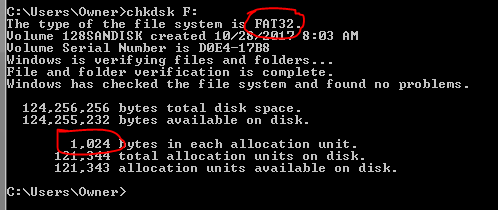
      After formatting in your camera, if using Windows, if you run a command prompt, then do a "chhdsk <drive letter>:" (aka "chkdsk F:" you can see the FS and block/cluster/allocation unit size.


      If FAT32, out of the device... you can try a format up to 32GB and in theory it should work, but max 4GB ea. file.
      If exFAT, no real limit with current tech available to the public (128 PB [128000TB?] as max Flash is 512GB-1TB currently).

      If your camera formats smaller (4GB max format on a Canon Rebel XT 350D, I understand, but will use up to 32GB cards if FAT32 formatted in something else, just don't format in the device/cam?) reformat on a computer, then just see if you can reformat on a computer with the same block size with a max size, but same block size, I assume...
      Last edited by the86d; 12-21-2018, 8:14 PM.

      Comment

      • #4
        gorn5150
        Senior Member
        • Aug 2007
        • 1453

        I would suggest you keep it simple. Format the card with the camera. That way you know the card will work with the camera. If you want to play around with the formatting and use exFAT it may or may not work with your camera. Same goes with other types of formatting. With exFAT you can get more data on the card if it works with your camera system. Or since cards are dirt cheap just buy a few extras to avoid unnecessary headaches.

        Comment

        • #5
          Mute
          Calguns Addict
          • Oct 2005
          • 8567

          Keep it simple. People have lost pictures when they do anything other than a simple read or copy of the files on the SD card to their computers. There are recovery tools that can sometimes fix corruptions and allow you to recover the pictures but they're not 100% guaranteed to work.
          NRA Benefactor Life Member
          NRA Certified Pistol, Rifle, Personal Protection In The Home, Personal Protection Outside The Home Instructor, CA DOJ Certified CCW Instructor, RSO


          American Marksman Training Group
          Visit our American Marksman Facebook Page

          Comment

          Working...
          UA-8071174-1