Unconfigured Ad Widget

Collapse

Not Secure: http: calguns.net

Collapse
X
 
  • Time
  • Show
Clear All
new posts
  • hermosabeach
    I need a LIFE!!
    • Feb 2009
    • 19642

    Not Secure: http: calguns.net

    I am now seeing a red Triangle in the URL bar showing that cal guns is not secure.

    Is this a browser setting or what hiccuped?


    Rule 1- ALL GUNS ARE ALWAYS LOADED

    Rule 2 -NEVER LET THE MUZZLE COVER ANYTHING YOU ARE NOT PREPARED TO DESTROY (including your hands and legs)

    Rule 3 -KEEP YOUR FINGER OFF THE TRIGGER UNTIL YOUR SIGHTS ARE ON THE TARGET

    Rule 4 -BE SURE OF YOUR TARGET AND WHAT IS BEYOND IT
    (thanks to Jeff Cooper)
  • #2
    Daze
    Senior Member
    • Nov 2009
    • 644

    HTTPS:

    add an S to the address and you should be secured.

    Comment

    • #3
      hermosabeach
      I need a LIFE!!
      • Feb 2009
      • 19642

      So I have to manually add the S

      Something hiccuped
      Rule 1- ALL GUNS ARE ALWAYS LOADED

      Rule 2 -NEVER LET THE MUZZLE COVER ANYTHING YOU ARE NOT PREPARED TO DESTROY (including your hands and legs)

      Rule 3 -KEEP YOUR FINGER OFF THE TRIGGER UNTIL YOUR SIGHTS ARE ON THE TARGET

      Rule 4 -BE SURE OF YOUR TARGET AND WHAT IS BEYOND IT
      (thanks to Jeff Cooper)

      Comment

      • #4
        smird
        CGN/CGSSA Contributor
        CGN Contributor
        • May 2009
        • 8314

        You'll see a yellow triangle even if you are on https. Some object like a pic linked from another site may not be secure.

        Comment

        • #5
          mrdd
          Senior Member
          • Jan 2009
          • 2023

          The site is marked as insecure by my browser, latest Chrome.

          I have not looked into it extensively, but I noticed that there are several scripts being loaded via http:, even when accessing the site using https:.

          Comment

          • #6
            the86d
            Calguns Addict
            • Jul 2011
            • 9587

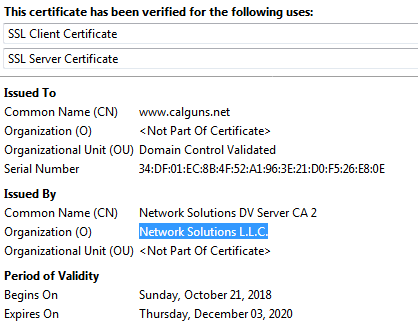
            I always see https:// calguns as "Connection is not secure", and I assumed it was because they were using self-generated certificates, rather than a paid 3rd party cert like Verisign.
            Looking into it, CLEARLY I was wrong.
            Last edited by the86d; 11-16-2018, 5:30 AM.

            Comment

            • #7
              hermosabeach
              I need a LIFE!!
              • Feb 2009
              • 19642

              Should I post this in another forum to get a mod to educate me
              Rule 1- ALL GUNS ARE ALWAYS LOADED

              Rule 2 -NEVER LET THE MUZZLE COVER ANYTHING YOU ARE NOT PREPARED TO DESTROY (including your hands and legs)

              Rule 3 -KEEP YOUR FINGER OFF THE TRIGGER UNTIL YOUR SIGHTS ARE ON THE TARGET

              Rule 4 -BE SURE OF YOUR TARGET AND WHAT IS BEYOND IT
              (thanks to Jeff Cooper)

              Comment

              • #8
                SkyHawk
                I need a LIFE!!
                • Sep 2012
                • 23526

                Chrome started doing this back in July. Google is trying to shame site operators into encryption. https://www.wired.com/story/google-c...-secure-label/

                Just ignore it. Screw Google.
                Click here for my iTrader Feedback thread: https://www.calguns.net/forum/market...r-feedback-100

                Comment

                • #9
                  nine mil thrill
                  Senior Member
                  • Sep 2010
                  • 1050

                  even using https:// it says that the site is not fully secure........
                  sigpic

                  Comment

                  • #10
                    SkyHawk
                    I need a LIFE!!
                    • Sep 2012
                    • 23526

                    Originally posted by nine mil thrill
                    even using https:// it says that the site is not fully secure........
                    Because there are page elements that are not using HTTPS. In particular - images. Every single person on this site who posted an inline image hosted on another server, would have to use HTTPS in their image URL and be sure the remote server hosting the image supported SSL and had a valid cert for that warning to go away. Same for images in signatures etc.

                    Never gonna happen.

                    Go to any forum that allows people to post pics hosted on any random remote server - you will see the same thing.

                    The only way that warning goes away, is if every single page element on any given page is loaded via HTTPS. If even one of a thousand page elements is loaded with HTTP, that warning appears. If you aren't banking, stock trading or shopping - just ignore it.
                    Last edited by SkyHawk; 11-20-2018, 11:17 AM.
                    Click here for my iTrader Feedback thread: https://www.calguns.net/forum/market...r-feedback-100

                    Comment

                    Working...
                    UA-8071174-1