Unconfigured Ad Widget

Collapse

Router web interface in "Asian" language...

Collapse
X
 
  • Time
  • Show
Clear All
new posts
  • the86d
    Calguns Addict
    • Jul 2011
    • 9587

    Router web interface in "Asian" language...

    As of Sunday (last logged into), my router's web interface (all pages) were in like Korean, or Taiwanese(?). I am not versed in what dialect, or whatever, but check yours, if you have an ASUS. Maybe someone can drop some knowledge if you can read it, but it doesn't look like a romance language, or Germanic-based,


    I am not sure if this is a bit-flip, beta firmware auto-update (although, it seem that it was the same firmware rev listed as I had before), but I rebooted, backrev'd, then uprev'd, to no avail, so I had to factory-reset.

    Bit-Flip related, and to know why you might have to reboot PCs:


    I am not sure if the intel/ARM proc. exploit is what was used, or not, or just a glitch, or a bit-flip in it's flash?

    I did have some buffering issues via youtube Friday, and we were watching Netflix all weekend w/out issue, and do not know if it is relevant but I was watching a HD stream, and I do not usually have this issue...
    Last edited by the86d; 03-19-2018, 6:50 AM.
  • #2
    67Cuda
    Senior Member
    • Oct 2013
    • 1713

    I have an ASUS router. The one or two times I've upgraded the firmware it had a flashing icon that I clicked on. Did you hit the upgrade icon or did this happen on it's own?
    Originally posted by ivanimal
    People that call other member stupid get time off.
    So much for being honest.

    Comment

    • #3
      the86d
      Calguns Addict
      • Jul 2011
      • 9587

      Originally posted by 67Cuda
      I have an ASUS router. The one or two times I've upgraded the firmware it had a flashing icon that I clicked on. Did you hit the upgrade icon or did this happen on it's own?
      It must have changed on it's own. I did not do it manually, as there have been no updates in a while. It was on the latest and greatest via the Asus firmware for this router.

      I did have the "Get Beta Firmware" checked, but it looks like the auto-update isn't a "feature" on this, unless I am missing it.

      I do have it set to reboot most days, at about 2-2:30AM.

      I used to check for rouge devices on the LAN/WLAN occationally, and used to have that on the lock, but with all the devices we have that are wireless now, it becomes an issue to keep up...
      I did just save my config, so if this happens again, I should be able to drop config quickly.

      Shoot, I have to set my printer to a static IP, and just remembered, or the lady is going to go gorolla, as it's tax season and she was just working on those yesterday.
      Last edited by the86d; 03-19-2018, 7:12 AM.

      Comment

      • #4
        MrFancyPants
        Senior Member
        • Jun 2017
        • 1160

        So this is how the invasion begins...

        Sent from my SM-G935P using Tapatalk

        Comment

        • #5
          Mute
          Calguns Addict
          • Oct 2005
          • 8564

          It's in Korean. Chances are, if you can log in, the interface and settings layout will be exactly the same. I haven't used any Asus routers so I can't confirm, but did the software have any settings for languages? If so, perhaps you can navigate your way to that setting and change it back to English. If you don't remember the exact settings navigation, try to find it online.
          NRA Benefactor Life Member
          NRA Certified Pistol, Rifle, Personal Protection In The Home, Personal Protection Outside The Home Instructor, CA DOJ Certified CCW Instructor, RSO


          American Marksman Training Group
          Visit our American Marksman Facebook Page

          Comment

          • #6
            Robotron2k84
            Senior Member
            • Sep 2017
            • 2013

            If your router is not on a UPS and it had a crash, there is the possibility of the NVRAM becoming corrupted. In most cases the firmware will detect this and revert the firmware values to defaults, but sometimes it doesn't and the corrupted NVRAM values persist. Always best to keep computer equipment on a UPS.

            If you did the factory reset (which restores NVRAM defaults) and it still didn't fix the problem, you could have a failed NVRAM module or controller chip.

            I wouldn't expect malware as firmware, but if you do, download the correct firmware on a separate computer and then use the offline utility to install the new firmware, erasing the flash beforehand. Malware exploits against routers are getting more sophisticated, like with Mikrotik units, but haven't heard of Asus units being affected, yet.

            Comment

            • #7
              the86d
              Calguns Addict
              • Jul 2011
              • 9587

              Yes, no UPS on this router, and it has been on wall power for about year... after many years of all my routers being UPS protected, but in a different room now, well closet actually (free antennas though). Probably need to invest in a small true sine UPS for this, as I have had to reboot it more than I ever did on a UPS, but still more rare these days than DSL days.

              No Language setting, as far as I can tell.

              No problems since the factory-reset, and this time (as I used to do a LOT, just no so much anymore) I saved the config, for easy-restore-try next time.

              I did have some power hiccups about a month ago, clocks needed setting again, and had to power-cycle the router's AC adapter (I never reboot just the router, but the power supply for the router).
              Last edited by the86d; 03-19-2018, 4:27 PM.

              Comment

              • #8
                Robotron2k84
                Senior Member
                • Sep 2017
                • 2013

                One of my pet peeves with Asus gear is the ridiculously small amount of NVRAM that is carved from the flash. It's logically in the same storage, but partitioned, and more modern Asus routers have 128MB or more of flash, but still stick to 64KB or 128KB of NVRAM. Ideally it should be logically configurable.

                The crime here isn't recognizable unless you've run an alternative firmware like Tomato or OpenWRT (which the Asus firmware is a fork of). The stock firmware litters NVRAM with values that may be used in prior versions but is then disused and not cleared, leading to bloat and ultimate exhaustion of NVRAM. The symptoms of NVRAM exhaustion are inability to commit the in-memory copy and checksum errors which may be silently hidden from the user and upon next reboot the router has gone back to defaults or worse, ends up in a configuration requiring a hard-reset.

                With Tomato, et al. you have full control over the NVRAM and can keep it tidy. It would honestly be better in the long run if Asus just made the configuration a Linux file system and did away with the CFE partitioning. That's a bit of a chicken and egg problem at this point because Asus designs around a downstream fork of OpenWRT and the upstream folks won't add hardware support for a non-existing target platform.

                I generally run a cron job to export the configuration and store it to locally attached media or SCP it to another host. It can be done with cURL from another computer as well, but that's less secure.

                Comment

                • #9
                  the86d
                  Calguns Addict
                  • Jul 2011
                  • 9587

                  AS I WAS, there is a language setting, at the top right, I just never noticed it.

                  Either way it needed a factory reset, as if a bit was flipped, it make me wonder if other bits were whacked too.

                  Still, no issues since the factory-reset button was pressed and then reconfig'd.

                  My son is grounded, but likes to be sneaky, and scoot over to FB on this school chromebook when he says he's doing his homework on another tab.
                  Bugger, so I am logging where he goes now...
                  Last edited by the86d; 03-22-2018, 4:46 AM.

                  Comment

                  • #10
                    the86d
                    Calguns Addict
                    • Jul 2011
                    • 9587

                    Nope, happened again. Caught it today when my pipe was slow to the house from work, all because I was going to reboot the router, via the web interface.

                    DDNS was enabled to some name they gave it. No additional ports I could see opened. Logging disabled. (My most important pass-worded passwd XLSX file was not accessed since I last modified.) No accounts added to Linux box.

                    Don't be the dumb-arse that leaves the default external port enabled... well alt-default.port 8433 anyway.

                    Should be on another IP now, and no external access enabled...
                    FSCK that was dumb, and I hereby admit it.

                    It was brute-force cracked, I assume, as I only used https to get to it, with an non-standard username, and 2-upper, 3-Lower, numbers, and special-char.

                    10 years and I don't think I was ever hit, but I was now, and blaming myself, AND Asus, because Asus makes you use a special port by default for EXT https access to router (need access to block my kids, if they are home, and grounded), and changes to this don't work well due to some glitches with said router you can lock yourself out of.
                    Last edited by the86d; 03-27-2018, 3:29 AM.

                    Comment

                    • #11
                      jdfthetech
                      Member
                      • Dec 2017
                      • 189

                      ASUS routers have had known vulnerabilities for a few years now.

                      If you are on a cable modem it's possible someone in your node is gaining access to UDP and hacking it, there are a few other hacks floating around as well, some with remote exploits. If you have the HTTP server on, just turn it off for anything but local network.

                      Do a search on duckduckgo for asus router hacks to read up on a bunch of the issues.
                      while (bullets > 0 && target == 1){fire == 1;}

                      Comment

                      • #12
                        the86d
                        Calguns Addict
                        • Jul 2011
                        • 9587

                        Yes, I knew about some cable-security issues when I used to do side-computer work in the early cable-modem days, and their machine would (I think it was a Dell) power on when shut off, plugged straight into the cable modem with a magic packet, I think.

                        Another funny thing I noticed is that this is the first router I have had that will not allow extended ASCII chars in a wireless passphrase, which is disabling something MORE secure, in my book.
                        Thanks Asus.
                        Last edited by the86d; 03-27-2018, 3:38 AM.

                        Comment

                        • #13
                          Robotron2k84
                          Senior Member
                          • Sep 2017
                          • 2013

                          Do you have any evidence that it was breached? NVRAM overflow still sounds likely.

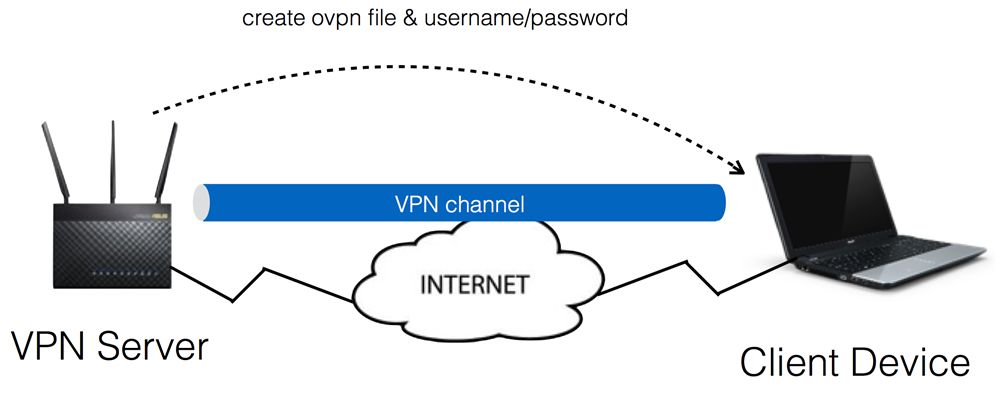
                          In any event, why would you ever leave the default web server open to the internet? It's a simple httpd server built on busybox, not the best code out there. If you absolutely must use the admin console remotely, at least turn on OpenVPN and tunnel to the inside interface, and leave the admin server only open to internal addresses.

                          Last edited by Robotron2k84; 03-27-2018, 8:55 PM.

                          Comment

                          • #14
                            67Cuda
                            Senior Member
                            • Oct 2013
                            • 1713

                            Originally posted by Robotron2k84
                            Do you have any evidence that it was breached? NVRAM overflow still sounds likely.

                            In any event, why would you ever leave the default web server open to the internet? It's a simple httpd server built on busybox, not the best code out there. If you absolutely must use the admin console remotely, at least turn on OpenVPN and tunnel to the inside interface, and leave the admin server only open to internal addresses.
                            If you could put this in to Barney Talk, that would help me.
                            Originally posted by ivanimal
                            People that call other member stupid get time off.
                            So much for being honest.

                            Comment

                            • #15
                              Robotron2k84
                              Senior Member
                              • Sep 2017
                              • 2013

                              Don't run services on your gear that listen for incoming traffic, like a web server, unless you really understand networks and security. The fewer ports you have open, the less likelihood of a compromised program allowing some form of access.

                              Most decent routers today have OpenVPN or another tunnel server built in, so you can access your router remotely and have it be encrypted and similar to being joined to the protected network.

                              The most secure way to remotely access the admin interface on a router is being plugged into the box with Ethernet. Next would be wireless on the protected network, and leastly over the internet. With VPN tunneling you are getting the better security of appearing on the local network, even though you are over the internet.

                              Barney enough?

                              Comment

                              Working...
                              UA-8071174-1