Unconfigured Ad Widget

Collapse

DVI cable problem..

Collapse
X
 
  • Time
  • Show
Clear All
new posts
  • Steve1968LS2
    CGN/CGSSA Contributor
    CGN Contributor
    • Feb 2010
    • 9267

    DVI cable problem..

    My old Samsung 27-inch model display developed a vertical line, so I saw a deal on a 27 inch Atron Vision monitor that said it was a good gaming monitor.

    I have a really nice Nvidia card, but it'a couple years old and the main output is DVI with is why I bought the Atron Vision (since is also had a DVI port)

    So, the monitor works with the DVI cable that came with the monitor but not with the longer one I was already using.. I went an bought another 6' DVI cable but it wont work with that one either.. the screen is just black. If I unplug it I get a no-signal error.

    So why would it work with it's DVI cable but not with any other DVI cable I've tried (both longer 6' cables)

    The way my desk is set up I really need a longer cable..

    This monitor: https://www.newegg.com/Product/Produ...82E16824491001

    Ideas?
    Last edited by Steve1968LS2; 01-14-2018, 8:30 PM.
    Originally posted by tony270
    It's easy to be a keyboard warrior, you would melt like wax in front of me, you wouldn't be able to move your lips.
    Member: Patron member NRA, lifetime member SAF, CRPA
  • #2
    Marauder2003
    Waiting for Abs
    CGN Contributor - Lifetime
    • Aug 2010
    • 2933

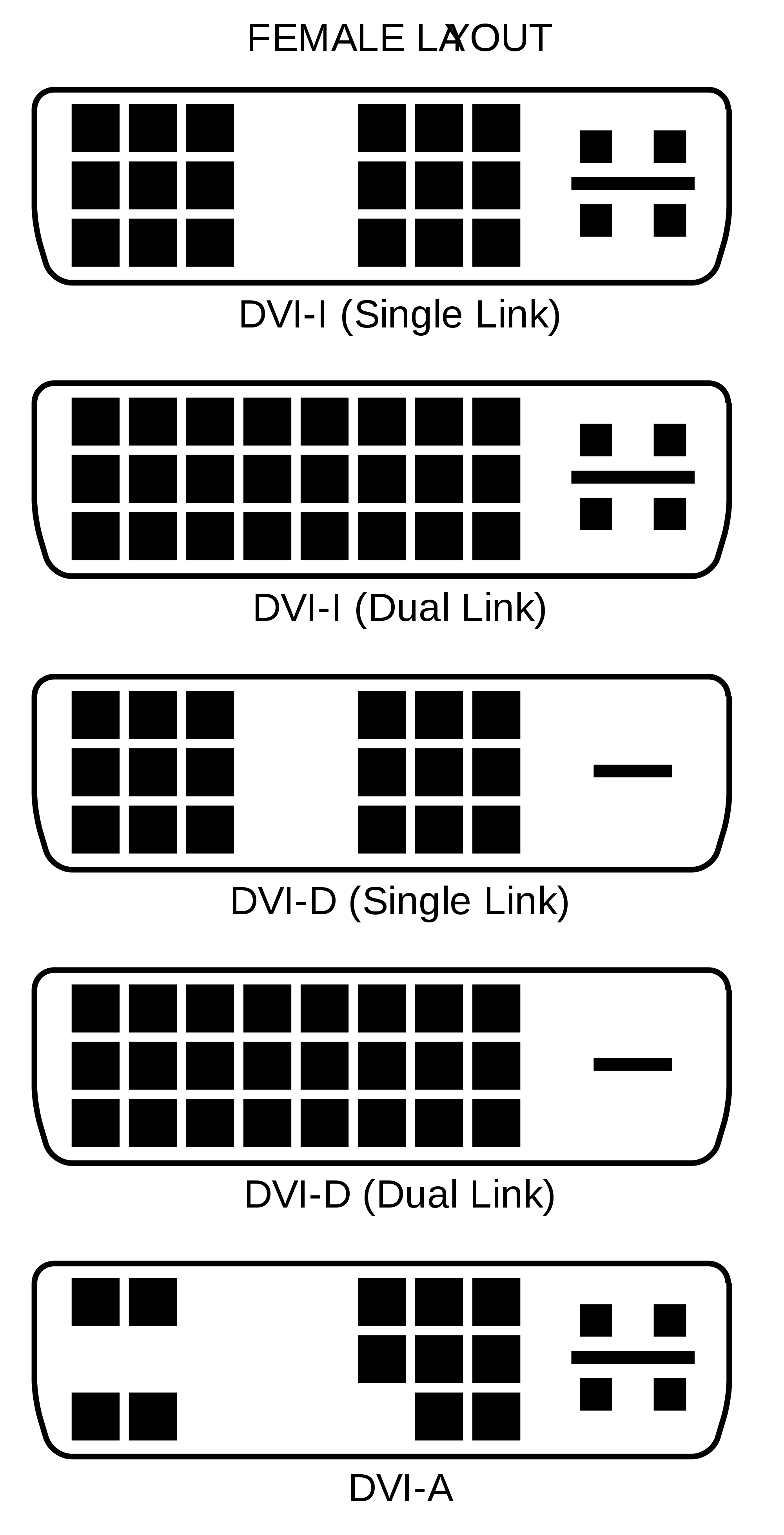
    There are 2 types of DVI. One populates all the pin locations and the other only half. Compare the 2 cables.

    On the other hand you can use a DVI - HDMI cable.

    #NotMyPresident
    #ArrestFauci
    sigpic

    Comment

    • #3
      Steve1968LS2
      CGN/CGSSA Contributor
      CGN Contributor
      • Feb 2010
      • 9267

      Originally posted by Marauder2003
      There are 2 types of DVI. One populates all the pin locations and the other only half. Compare the 2 cables.

      On the other hand you can use a DVI - HDMI cable.

      https://smile.amazon.com/Cable-Matte...+to+hdmi&psc=1
      Will the DVI to HDMI effect my resolution or picture quality? I've always used the DVI out on my NVidia since I thought it would superior to using my HDMI outs or the HDMI in on the monitor.

      I will look at the pins.. thanks!
      Originally posted by tony270
      It's easy to be a keyboard warrior, you would melt like wax in front of me, you wouldn't be able to move your lips.
      Member: Patron member NRA, lifetime member SAF, CRPA

      Comment

      • #4
        Steve1968LS2
        CGN/CGSSA Contributor
        CGN Contributor
        • Feb 2010
        • 9267

        Originally posted by Marauder2003
        There are 2 types of DVI. One populates all the pin locations and the other only half. Compare the 2 cables.

        On the other hand you can use a DVI - HDMI cable.

        https://smile.amazon.com/Cable-Matte...+to+hdmi&psc=1
        I checked and both look the same.. neither the new DVI cable that came with the monitor (that works) or the old cable have the extra pins around the flat pin (DVI-D vs DVI-I)

        Still can figure our why the cable the came gives a picture and the other ones just give a black screen..

        So, next question would be: Do I get better video performance (games, picture) from the DVI compared to the HDMI outputs on my Nvidia card? It's a Gforce GTX 960

        Or is Display Port the best out to use? Is Display Port better or worse than DVI?

        Thanks
        Last edited by Steve1968LS2; 01-15-2018, 11:12 AM.
        Originally posted by tony270
        It's easy to be a keyboard warrior, you would melt like wax in front of me, you wouldn't be able to move your lips.
        Member: Patron member NRA, lifetime member SAF, CRPA

        Comment

        • #5
          Steve1968LS2
          CGN/CGSSA Contributor
          CGN Contributor
          • Feb 2010
          • 9267

          Actually.. I looked closer.. there are actually 5 types of DVI cables.. my new one requires a dual link (DVI-D or DVI-I) but the longer cables I have are SINGLE LINK DVI-D..

          So, the next question is should I just switch to my Display Port V1.2 output? I know it's a newer protocol, but is it better/same as my current dual-link DVI?

          Originally posted by tony270
          It's easy to be a keyboard warrior, you would melt like wax in front of me, you wouldn't be able to move your lips.
          Member: Patron member NRA, lifetime member SAF, CRPA

          Comment

          • #6
            sonofeugene
            Veteran Member
            • Oct 2013
            • 4348

            I run an old 30" Apple Cinema Display on my new Lenovo laptop. The display is dual DVI. I convert that to a mini DP plug and it works perfectly.

            Most monitors and computers also have HDMI so you might try that as well.
            Let us not pray to be sheltered from dangers but to be fearless when facing them. - Rabindranath Tagore

            A mind all logic is like a knife all blade. It makes the hand bleed that uses it. - Rabindranath Tagore

            Talent hits a target no one else can hit. Genius hits a target no one else can see. - Arthur Schopenhaur

            Comment

            • #7
              Steve1968LS2
              CGN/CGSSA Contributor
              CGN Contributor
              • Feb 2010
              • 9267

              Originally posted by sonofeugene
              I run an old 30" Apple Cinema Display on my new Lenovo laptop. The display is dual DVI. I convert that to a mini DP plug and it works perfectly.

              Most monitors and computers also have HDMI so you might try that as well.
              I care a bit more about performance do HDMI is out. Just trying to figure out if I should buy a longer Dual-DVI cable or a Display Port 1.2 cable.. can't seem to find out which is better or if they are pretty much the same.

              Thanks!
              Originally posted by tony270
              It's easy to be a keyboard warrior, you would melt like wax in front of me, you wouldn't be able to move your lips.
              Member: Patron member NRA, lifetime member SAF, CRPA

              Comment

              • #8
                MrBlazito
                Senior Member
                • May 2011
                • 1005

                What performance advantage does DVI have over HDMI? I've always though they perform the same, except HDMI also carries audio.

                Comment

                • #9
                  Steve1968LS2
                  CGN/CGSSA Contributor
                  CGN Contributor
                  • Feb 2010
                  • 9267

                  Originally posted by MrBlazito
                  What performance advantage does DVI have over HDMI? I've always though they perform the same, except HDMI also carries audio.
                  Dual DVI can carry MUCH more data..

                  So my question is Dual-DVI or Display port?

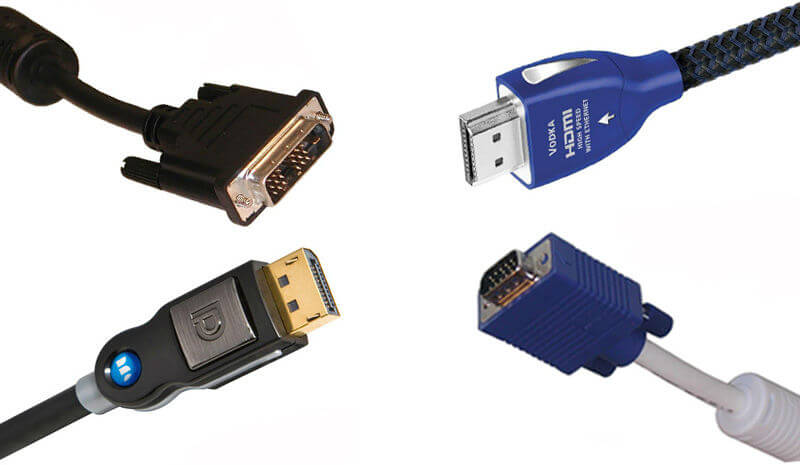
                  Both HDMI 2.0 and DisplayPort 1.3 can deliver 4K at 60 Hz. If you're looking for higher refresh rates or more monitors go with DisplayPort.
                  Originally posted by tony270
                  It's easy to be a keyboard warrior, you would melt like wax in front of me, you wouldn't be able to move your lips.
                  Member: Patron member NRA, lifetime member SAF, CRPA

                  Comment

                  Working...
                  UA-8071174-1