Unconfigured Ad Widget

Collapse

*HELP* Corrupted SD card (updated 7-3)

Collapse
X
 
  • Time
  • Show
Clear All
new posts
  • liberty47
    Senior Member
    • Jun 2012
    • 1566

    *HELP* Corrupted SD card (updated 7-3)

    Got home from vacation last night and went to look back at some of the pictures I took on my cell phone (I have a samsung galaxy s5 with a 32gb sd card to save media). To my horror, the pictures were gone. Even the movies I downloaded from Amazon were gone. I plugged the sd card into a kindle and only type of file that came up was "other" with about 3-5 gb on it. I then put it in my cannon and the camera didn't detect anything. I was devastated. My five year old son was crying because we lost an awesome picture I took of him, it broke my heart.

    I looked online and found some software called 'Wondershare dr phone'. The download is about $60 (but I need to go pick up an Sd card reader first). What I read on this website seemed like it wasn't too complicated.

    Then I called geek squad and they told me it was extremely difficult to recover, they would need to send it out and likely cost $1000-2500

    I can't justify spending thousands of dollars to recover the sd card, but the software for $60 would be great, if it is something likely to work and get the pictures back.

    Has anyone had experience with something like this?

    Any advice is appreciated.
    Last edited by liberty47; 07-03-2017, 9:00 AM.
  • #2
    Carcassonne
    Veteran Member
    • Jul 2012
    • 4897

    Chances are the info is gone.

    I would try a Linux program. Sometimes Windows will block you from seeing things. Puppy is the smallest Linux program. Mint might be good also. Just download the free program and burn a bootable CD/DVD. Then boot your computer from the CD/DVD. When you put the card in the reader, an icon should show up on the screen. click on it and see if there is anything in the folder.


    .
    Be sure to ask your doctor if depression, rectal bleeding, and suicide are right for you.

    In the United States a person's expertise on a subject is inversely proportional to their knowledge of the subject: The less they know about something, the more they become an expert on it.

    I am being held hostage in a giant insane asylum called Earth.

    Comment

    • #3
      ocabj
      Calguns Addict
      • Oct 2005
      • 7924

      I have used SanDisk Recovery Pro to recover an accidentally formatted SD card (with some overwrite):

      SanDisk® recommends RescuePRO® by LC Tech for flash drive data recovery. Works on PC & Mac & recovers any file format. Download a free demo or buy online.


      You can try the evaluation version which will show you files that it can recover, but it won't let you actually copy them off; you have to buy a full version. But at least you can try it to see if it even works before buying.

      Distinguished Rifleman #1924
      NRA Certified Instructor (Rifle and Metallic Cartridge Reloading) and RSO
      NRL22 Match Director at WEGC

      https://www.ocabj.net

      Comment

      • #4
        garyngwind
        Member
        • May 2010
        • 363

        not sure if this will apply, but i accidentally delete a few files in my hdd, someone recommended me RECUVA
        Recover and un-delete files with Recuva, the award-winning file recovery tool by the makers of CCleaner. Download the latest version today.

        not sure if it will work on a SD card though, but it did saved a bit of files that i lost

        Comment

        • #5
          Skip_Dog
          Veteran Member
          • Apr 2017
          • 2656

          Do not go to geek squad. You most likely can get the pictures back. At least most of them. Use a program called recuva by Piriform.

          $25.00
          What ever you do not reformat.

          Comment

          • #6
            Skip_Dog
            Veteran Member
            • Apr 2017
            • 2656

            Originally posted by garyngwind
            not sure if this will apply, but i accidentally delete a few files in my hdd, someone recommended me RECUVA
            Recover and un-delete files with Recuva, the award-winning file recovery tool by the makers of CCleaner. Download the latest version today.

            not sure if it will work on a SD card though, but it did saved a bit of files that i lost
            Beat me to it. I was looking up their site...

            Comment

            • #7
              SkyHawk
              I need a LIFE!!
              • Sep 2012
              • 23526

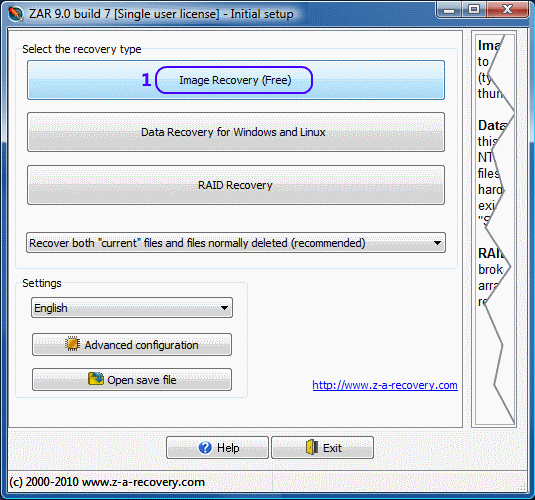
              Try Zero Assumption Recovery.

              Learn how to do data recovery yourself. Data recovery software, data recovery tools and data recovery tutorials by well-known and time-tested ZAR Data Recovery.


              Free for recovery of images.
              Need to recover lost photos? Click here and recover your images for free with well-known and time tested ZAR photo recovery software.
              Last edited by SkyHawk; 06-27-2017, 4:28 PM.
              Click here for my iTrader Feedback thread: https://www.calguns.net/forum/market...r-feedback-100

              Comment

              • #8
                Dragunov
                Senior Member
                • Dec 2008
                • 1953

                Where did you purchase the card? Chinese copies have made their way in, and they are NOT RELIABLE!

                Comment

                • #9
                  liberty47
                  Senior Member
                  • Jun 2012
                  • 1566

                  I purchased the card on Amazon, its a san disk. Ordered a sd card reader and will likely try the recommendation from skyhawk.

                  Thanks a lot everyone, keeping fingers crossed, will update once I try. Part of me is nervous to try knowing they could be gone forever.....

                  Comment

                  • #10
                    Megalomegalodon
                    Senior Member
                    • Apr 2014
                    • 798

                    Have you tried to run a check disk on it.
                    Mount the card and open a command prompt.
                    Type in the drive letter of the card ie..F: and hit enter
                    Type chkdsk /r
                    NRA Endowment Member

                    Comment

                    • #11
                      the86d
                      Calguns Addict
                      • Jul 2011
                      • 9587

                      Best time to learn to use photorec, if Windows sees the device as a drive... even if Windows can't see the data, photorec should be able to carve the data.

                      The files can usually be recovered, even if the file names will be randomly generated (to your eyes)...
                      Last edited by the86d; 06-30-2017, 5:16 AM.

                      Comment

                      • #12
                        liberty47
                        Senior Member
                        • Jun 2012
                        • 1566

                        Originally posted by Megalomegalodon
                        Have you tried to run a check disk on it.
                        Mount the card and open a command prompt.
                        Type in the drive letter of the card ie..F: and hit enter
                        Type chkdsk /r
                        This is done while SD card is mounted in the phone?

                        Comment

                        • #13
                          Megalomegalodon
                          Senior Member
                          • Apr 2014
                          • 798

                          Originally posted by liberty47
                          This is done while SD card is mounted in the phone?
                          No, mounted in a computer.
                          NRA Endowment Member

                          Comment

                          • #14
                            liberty47
                            Senior Member
                            • Jun 2012
                            • 1566

                            OK, I finally received the SD card reader. I was very nervous mounting it to the mac. Upon doing so, there were all my pictures! No need to download software, opened up the folder and immediately saved it to the hard drive on macbook. A great way to start the day.

                            My question now is, what the heck happened?!?! Why aren't the files recognizable on my phone (or other devices)? What do I do with the 32gb card now to be able to use it in the phone again (or is that a bad idea).

                            Thanks!

                            Comment

                            • #15
                              castgold
                              Senior Member
                              • Feb 2012
                              • 1531

                              Originally posted by liberty47
                              OK, I finally received the SD card reader. I was very nervous mounting it to the mac. Upon doing so, there were all my pictures! No need to download software, opened up the folder and immediately saved it to the hard drive on macbook. A great way to start the day.

                              My question now is, what the heck happened?!?! Why aren't the files recognizable on my phone (or other devices)? What do I do with the 32gb card now to be able to use it in the phone again (or is that a bad idea).

                              Thanks!
                              That's great news. I can't tell you what happened, but I can tell you that a 64gb SD card of mine went bad within a year and I used the no questions replacement warranty I purchased with it for $7 at MicroCenter. I was able to recover the images, but my camera could no longer recognize nor re-format. This is why the pro-grade cameras have dual card slots, but they are cost-prohibitive for most people.

                              Comment

                              Working...
                              UA-8071174-1