Unconfigured Ad Widget

Collapse

Inaccessible Boot Device?

Collapse
X
 
  • Time
  • Show
Clear All
new posts
  • autopro
    Member
    • Jun 2013
    • 251

    Inaccessible Boot Device?

    I am not very computer savy with home computers when I went to college high tech was an electronic typewriter and 10 key adding machine.

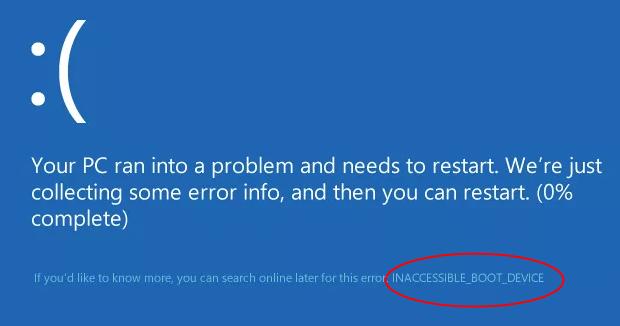
    My HP desktop computer took a dump when I try to start it I get a message inaccessible boot device" running windows 10 if that matters.

    Have no idea where to start? Any help greatly appreciated I use it for work primarily uploading inspection reports and lots of photos and this going to get me really behind. Really need to know if this is something that can be fixed or time for new computer?
  • #2
    LeadFarmer74
    Veteran Member
    • May 2015
    • 3105

    What did you change? Did you recently upgrade to windows 10?
    NRA Lifer
    Originally posted by Click Boom
    I know your ban hammer is cold hammer forged and chrome lined, im not messin with it!

    Comment

    • #3
      autopro
      Member
      • Jun 2013
      • 251

      I haven't changed anything that I know of. It auto updated to windows 10 about 6 months ago first issue I've had.

      Comment

      • #4
        LeadFarmer74
        Veteran Member
        • May 2015
        • 3105

        Originally posted by autopro
        I haven't changed anything that I know of. It auto updated to windows 10 about 6 months ago first issue I've had.
        Did you reset it instead of just shutting down the previous time?
        NRA Lifer
        Originally posted by Click Boom
        I know your ban hammer is cold hammer forged and chrome lined, im not messin with it!

        Comment

        • #5
          autopro
          Member
          • Jun 2013
          • 251

          Shut it off this morning like I have always done, normal shut down. When I got home turned it on and it looked like it was going to start tats when I got the message "your PC did not start correctly" and gives me a restart tab when I click on the tab it says "inaccessible boot device" and a tab that says advanced options when I click that tab it gives me several more options but I have no clue what they mean

          Comment

          • #6
            osis32
            Calguns Addict
            • Jul 2009
            • 5912

            where are you located? Just from your first ***** it sounds like your hard drive is not being registered by the mother board. there are 3 possibilities a can think if it that's the case. I will list them in terms of likelihood from greatest to least:

            1)bricked hd. happens all the time usually when it happens you need to install a new hard drive and Windows, programs and everything else.

            2) motherboard interface to hard drive died. if this is the case you probably have another spot you can plug the hard drive into the motherboard. depends if you have ide or sata. sata being easier and having more back up interfaces.

            3) power supply cable to hard drive went bad. this is the last likely but it has happened to me before. it also depends on sata vs ide but there is usually extra plugs you can try out. they go from the power supply to the hard drive.

            disclaimer I'm just guessing from what you initially posted and I may have forgotten something. if I did I hope others come along to help.
            Just a libertarian guy in a Leftist Authoritarian state.

            Comment

            • #7
              meno377
              ?????
              CGN Contributor - Lifetime
              • Jul 2013
              • 4911

              Originally posted by autopro
              Shut it off this morning like I have always done, normal shut down. When I got home turned it on and it looked like it was going to start tats when I got the message "your PC did not start correctly" and gives me a restart tab when I click on the tab it says "inaccessible boot device" and a tab that says advanced options when I click that tab it gives me several more options but I have no clue what they mean
              Possibly driver issues. Try booting again, click on advanced options and boot into "safe mode with networking". If you can get into your desktop, then its probably a driver. Start by updating your video driver.

              How do I turn Safe Mode on? How to start Windows 10 in Safe Mode, including when your PC doesn't boot correctly, or when you can't log in.


              To fix INACCESSIBLE BOOT DEVICE BSoD error in Windows 10, just follow solutions here. Some simple solutions may work like a charm for you.
              Last edited by meno377; 01-17-2017, 6:59 PM.
              Originally posted by Fjold
              I've been married so long that I don't even look both ways when I cross the street.
              Nothing is so permanent as a temporary government program.
              -Milton Friedman


              sigpic

              Comment

              • #8
                lazyworm
                Senior Member
                • Jan 2006
                • 1638

                do you hear the drive spins up when you power on?
                I'd open up the chassis and make sure there is no lose cable/connectors
                worst case you have a dead/dying drive. I hope you have regular backups of your important data.

                If this is over your head, you might want to post your location and offer up some ammo/drinks for some professional help.

                Comment

                • #9
                  ryang85
                  Junior Member
                  • Dec 2016
                  • 17

                  I had the same issue with my computer for my CNC table last week, your hard drive commited suicide most likey and your computer cant comunicate with it. Hopefully your not like me and back evetyything important up. [emoji23] if yph hear it spin go to best buy and get a sata to usb cable and see if you can get some files back from it before it compleatly dies.

                  Comment

                  • #10
                    autopro
                    Member
                    • Jun 2013
                    • 251

                    Thanks for the help everyone. I Googled it and have been watching videos on the issue. It will not boot in safe mode it just goes right back to the blue screen with the same error message. I can hear the drive spinning inside the case but my options are very limited I have no choice but go buy a new one tonight.

                    I can upload my work from my laptop but it will take several hours vs my desktop about an hour and a half and I must upload them before midnight or I don't get paid for them and it would seriously piss me off to lose an entire days pay. So off to Fry's I go. Thanks again to everyone!!!!!!!

                    Comment

                    • #11
                      osis32
                      Calguns Addict
                      • Jul 2009
                      • 5912

                      if you hear the hard drive spinning scratch out #3 reason I listed. get an external hd enclosure and see if you can salvage anything off the drive. good luck to you sir v
                      Just a libertarian guy in a Leftist Authoritarian state.

                      Comment

                      • #12
                        sealocan
                        Calguns Addict
                        • Mar 2012
                        • 9949

                        You know it's funny,
                        that electric typewriter and 10 key adding machine, that you used so many years ago in college, would still be working 100% correctly,

                        if we could just find them in the city dump.


                        (Though they can't bring you pron.)

                        Comment

                        • #13
                          yellowsulphur
                          Senior Member
                          • May 2007
                          • 1627

                          Possibly could be a corrupted master boot record (MBR).

                          Comment

                          • #14
                            the86d
                            Calguns Addict
                            • Jul 2011
                            • 9587

                            Have you unplugged iPhones and other USB devices that store data, remove CD?

                            1st time I saw this on a prior booting system it was an iPhone plugged in. We told her to unplug it... and charge it in her charger that came with the phone.

                            IF the MBR, or equiv. on UEFI got hosed, an OG windows disk for the same type (has to match x86, or x64, AND Home, Home Premium, Pro, Ult... etc.) could fix, IF you weren't running 10, but if you have a 10 disk...
                            You MIGHT be able to rewrite that with a fix off the DVD, if you can acquire one that matches what you are running.

                            Doesn't 10 have a boot partition that will allow MBR, or UEFI equiv. fixes for the Win partition? F8 your self to death after going into BIOS or UEFI, and disabling Fast/Quick boot?
                            Last edited by the86d; 01-17-2017, 11:38 PM.

                            Comment

                            • #15
                              Subotai
                              I need a LIFE!!
                              • Jun 2010
                              • 11289

                              Originally posted by osis32
                              if you hear the hard drive spinning scratch out #3 reason I listed. get an external hd enclosure and see if you can salvage anything off the drive. good luck to you sir v
                              This. You can buy one at Fry's cheap.
                              RKBA Clock: soap box, ballot box, jury box, cartridge box (Say When!)
                              Free Vespuchia!

                              Comment

                              Working...
                              UA-8071174-1