Unconfigured Ad Widget

Collapse

Creating sums in Excel... How to

Collapse
X
 
  • Time
  • Show
Clear All
new posts
  • mofugly13
    Senior Member
    • Mar 2009
    • 885

    Creating sums in Excel... How to

    I am trying to create a spreadsheet for pole light bases that I am installing on my current project. I am an Electrician, not a tech guy, and have a very basic knowledge of using Excel. I have a spreadsheet where in column B I input an elevation (a numerical value), then in column D I input an adjustment to that elevation, and in column E, I want to it to display the sum of the value in column B and Column D. I have figured out how to do this on a row by row basis. But with 30+ lines, this will eat up quite a bit of my time. How do I create a function that will add the value for each row in column B to the value in column D and create the sum in column E? Next I will want to take the sum in column E and add 2.5 to it, and have that display in column F.

    Not sure if this matters, but Row 1 across the columns is used to name each column.
    No government deprives its citizens of rights without asserting that its actions are "reasonable" and "necessary" for high-sounding reasons such as "public safety."
    A right that can be regulated is no right at all, only a temporary privilege dependent upon the good will of the very government
    officials that such right is designed to constrain.
  • #2
    cowtown
    Member
    • Feb 2013
    • 242

    So for example you have cell B2="15" and D2="15" and in E2 you have "=B2+D2" to get the sum, right?

    To get the same thing to happen down the column, click on E2 once to select the cell, then click on the little circle part of the selection rectangle and pull it down column E, for example all the way down to E20. That will duplicate the addition formula from E1 to E20...so you will have "=B3+D3" in E3 for example, and so on down the line. Is that what you want to do?

    To Add 2.5 to E3, put "=E3+2.5" in F3 or wherever. You can then drag F3's selector down the same way to duplicate that formula.

    Comment

    • #3
      MotoFahren
      Senior Member
      • Mar 2015
      • 643

      "=SUM(BXX)" where X is the row number and you write that equation in column E cells.
      "Simplify, then add lightness." - Colin Chapman

      Comment

      • #4
        MotoFahren
        Senior Member
        • Mar 2015
        • 643

        Have you tried google or youtube?
        "Simplify, then add lightness." - Colin Chapman

        Comment

        • #5
          mofugly13
          Senior Member
          • Mar 2009
          • 885

          Cowtown

          That did it! That was too damn easy. I spent almost an hour on the excel support site trying to make sense of this. Thanks!
          No government deprives its citizens of rights without asserting that its actions are "reasonable" and "necessary" for high-sounding reasons such as "public safety."
          A right that can be regulated is no right at all, only a temporary privilege dependent upon the good will of the very government
          officials that such right is designed to constrain.

          Comment

          • #6
            mofugly13
            Senior Member
            • Mar 2009
            • 885

            Originally posted by MotoFahren
            Have you tried google or youtube?
            I did google. And I figured how to do it per row, but inputting for every row was going to take forever. Cowtown got me squared away.
            No government deprives its citizens of rights without asserting that its actions are "reasonable" and "necessary" for high-sounding reasons such as "public safety."
            A right that can be regulated is no right at all, only a temporary privilege dependent upon the good will of the very government
            officials that such right is designed to constrain.

            Comment

            • #7
              MotoFahren
              Senior Member
              • Mar 2015
              • 643

              Originally posted by mofugly13
              I did google. And I figured how to do it per row, but inputting for every row was going to take forever. Cowtown got me squared away.
              Ah, I see the issue now. glad you got it squared away.
              "Simplify, then add lightness." - Colin Chapman

              Comment

              • #8
                brassburnz
                Veteran Member
                • Nov 2006
                • 3553

                I don't have access to my Excel files at home, but IIRC, this may help.

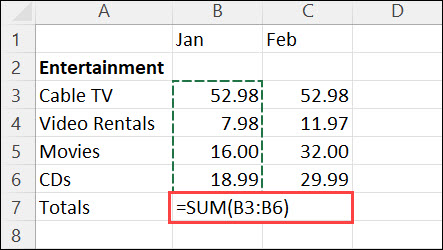
                =sum(B2: B20) This will add up all of the values in column B. You can do the same thing for column D.

                In cell E21, type =sum(B2020) and it will add the sums from those two cells. Just make sure there is nothing in C20.

                In cell F21, type =sum(E21+2.5)

                I think this is correct. I haven't actually set up an Excel file to check it.
                NRA Life Member
                CRPA Life Member

                Comment

                • #9
                  brassburnz
                  Veteran Member
                  • Nov 2006
                  • 3553

                  Originally posted by MotoFahren
                  "=SUM(BXX)" where X is the row number and you write that equation in column E cells.

                  You guys are fast. By the time I got around to posting, the answer is already here!
                  NRA Life Member
                  CRPA Life Member

                  Comment

                  Working...
                  UA-8071174-1